IPTV Application Development: How to Plan and Build the App

Table of contents
There are two kinds of video that reach viewers’ screens: the kind that rides the open roads of the internet (over-the-top, OTT) and the kind that travels a private highway (Internet Protocol Television, IPTV). And though the boundaries between the two are shifting and operators embrace hybrid models, behind the scenes they live on very different maps. That single difference shapes your delivery model, your device strategy, and a large share of your budget.
IPTV app development covers the client apps and integrations that deliver operator-managed television over a private IP network. In practice, that means a set-top box (STB) or Smart TV app connected to your video platform, subscriber billing, and content protection systems. Most projects succeed or stall on those integrations, not on the interface.
This guide walks through the decisions a video product owner actually makes. Platform type, budget, TV user experience, tech stack, content security, monetization, legal exposure, and other insights that can be valuable for early planning.
Key takeaways:
- IPTV apps are integration projects first. Your video platform, billing system, conditional access, and STB firmware set the real timeline.
- Three routes to market exist: white-label, hybrid, and fully custom. Cost and control move in opposite directions.
- Google’s Android TV Operator Tier cuts certification effort, while a custom AOSP build buys deeper control over the launcher and onboarding.
- Content licensing and takedown obligations belong in the plan from week one, not after launch.
- Define networks, devices, content rights, and existing systems before choosing the app architecture. Treat middleware, playback, entitlement, EPG, security, analytics, and billing as connected workstreams.
IPTV basics: Quick answers
Before we venture deep into IPTV, here are answers the most common questions our video team gets asked most often.
What is IPTV?
By definition of IPTV, it’s television delivered over IP, but not over the open internet. It runs on closed, operator-managed networks, which gives the operator control over quality and capacity.
Where did IPTV come from?
In the early 2000s, several telecom providers started using their private networks to deliver television, at a time when public internet video was still unreliable. These operators bundled internet, phone, and TV into “triple-play” packages sold on the strength of broadcast-grade quality.
Multicast made the economics work by avoiding the bandwidth limits of the public internet. Early IPTV set-top boxes ran Linux or custom firmware and brought live TV and first-generation video on demand into homes. A well-known deployment of this model, AT&T’s U-verse TV, launched in 2006 and ran as an IPTV service alongside broadband and IP telephony1.
How does IPTV work?
Operators deliver IPTV through their own infrastructure, usually over a broadband connection they also provide. Viewers typically need dedicated hardware, such as a set-top box, to reach the content.
How’s is IPTV different from OTT?
OTT services travel the public internet and reach viewers through any ISP, app, or Smart TV. That gives broad reach. IPTV stays inside an operator’s private, controlled network, which gives predictable delivery quality. In a way, OTT is like a bustling public highway, open to all, while IPTV is a dedicated toll road, optimized for speed and control within a closed ecosystem.
Cost structure is the second difference. OTT platforms depend on content delivery networks (CDNs) and cloud capacity, billed by bandwidth, storage, and scaling demand, so spend grows with your audience. IPTV keeps most traffic inside closed infrastructure, which reduces CDN dependency and makes variable costs easier to forecast.
Why do telecom providers still run IPTV?
Even in the age of Netflix and YouTube, IPTV didn’t disappear, as operators saw a cost-saving opportunity in multicast technology. One video stream can reach thousands or millions of viewers at once, without duplicating bandwidth. That suits live TV, where everyone watches the same match or newscast.
OTT can’t copy that. Public internet infrastructure is fragmented across countless routers and ISPs, and most of them either don’t support multicast or block it. OTT therefore falls back to unicast, where each viewer receives an individual stream from an origin server or a nearby CDN node.
Can you mix IPTV and OTT?
Yes, and many operators do run IPTV and OTT side by side. Hybrid platforms usually split the workload two ways:
- Live TV over IPTV multicast, delivered efficiently inside the operator’s network with minimal bandwidth waste
- On-demand and catch-up over OTT, giving viewers flexible access through the public internet
Modern set-top boxes and apps, backed by operator middleware, switch between multicast IPTV streams and OTT delivery based on network availability and content type.
Who does IPTV serve best?
IPTV works hardest for a few specific audiences:
- Households subscribed to a particular broadband provider
- Apartment buildings and multi-dwelling units with centralized networks
- Hotels, hospitals, universities, and corporate campuses that need central control over what plays on every screen
- Regions with limited internet bandwidth, where OTT performance is inconsistent and IPTV holds broadcast-grade quality
Technical decisions that shape an IPTV app
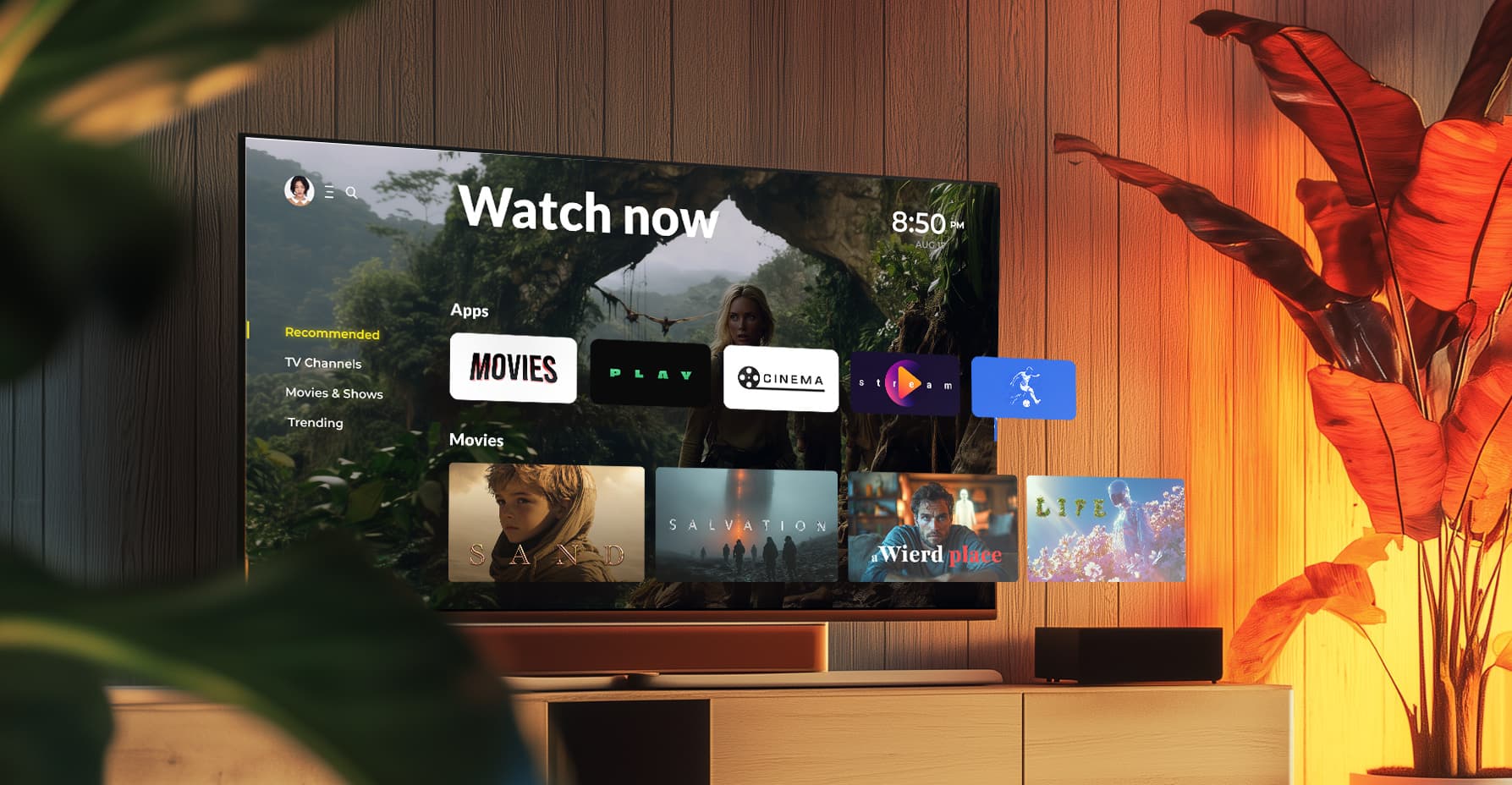
Some parts of an IPTV build carry more risk than the rest. These four areas come up in almost every project we take on with telcos and broadcasters. They usually decide how smooth the launch will be. Our work with IPTV and OTT providers points to the same short list every time.
Android TV Operator Tier: What it means for your app
The Android TV Operator Tier is a Google certification program that gives operators control over branding, interface design, and launch behavior on Android-powered STBs2. You have two routes: Google’s pre-built implementation, or a custom version built on the Android Open Source Project (AOSP).
A custom AOSP build gives you deeper personalization, including your own TV app launcher and features outside standard Operator Tier guidelines. Operators pick this route when the product has to carry their brand end to end, from the first boot screen onward.
With a custom AOSP build, you can:
- Customize first-time usage flows and ROM parameters, using dedicated APIs for provisioning and activation without viewer interaction
- Add self-install flows such as remote pairing, Wi-Fi setup, and user onboarding, which cuts pressure on support channels
- Create user profiles for personalization and access management across services
- Define what viewers see after booting the device, exiting an app, or returning to the main menu
The trade-off is real. A custom build puts certification and integration work on your side. The Google-certified Operator Tier is faster and more standardized, and the certification process runs smoothly when the team knows Google’s compliance, UI, and functional guidelines. Teams new to those guidelines tend to lose weeks on rework.
Set-top box integration with your video and billing stack
Custom or certified, an IPTV app has to sit inside a wider operator infrastructure. Integration work usually covers:
- Online video platforms for content delivery
- Business support systems (BSS) for subscriber and billing management
- Conditional access systems (CAS) and digital rights management (DRM) for content protection
- Third-party services for search, analytics, recommendations, or advertising
Underestimating this layer is the most common planning mistake we see. The app UI can be finished while billing and entitlement flows still need six more weeks of testing.
Working with OEMs and set-top box manufacturers
If you’re deploying on specific hardware, bring the original equipment manufacturer (OEM) into the conversation early. Early alignment on hardware and software requirements keeps the device and the app moving on the same schedule.
That coordination matters most when you’re defining the correct STB specifications for your application and confirming that the selected devices ship with the middleware your app needs and the required AOSP version. Likewise, it matters when planning joint testing and deployment so the app runs correctly on target devices.
Skip it, and you get misalignment, delays, and performance problems that surface after launch, when they’re most expensive to fix.

Not an Android TV Operator Tier expert?
Partner with a team that is. We handle direct communication with your OEMs, negotiate technical and commercial details, and keep the work aligned with your product goals.
Cross-platform support
Viewers move between devices, and your app has to follow: Android STBs, Smart TVs, phones, and browsers. Cross-platform development helps in three ways.
One IPTV app can ship across Android, iOS, Linux-based set-top boxes, and web browsers with limited rework. Shared business logic for authentication, streaming, and payments cuts development time and keeps behavior consistent between screens for quality multi-device viewing.
It also covers the hardware mix operators actually deal with, including Android-based boxes such as Formuler Z11 Pro Max, Linux-based systems such as MAG544w3, and Smart TV platforms including Samsung Tizen and LG webOS. Integration with OTT services inside the same IPTV app, which widens the content offer without a second product is another case.
It keeps the door open for what’s next as well. Support for standards like Hybrid Broadcast Broadband TV (HbbTV) or new streaming protocols keeps you compatible with hybrid IPTV and OTT delivery. Low-code tooling helps you add features such as AI-driven recommendations without rebuilding the app.
Multicast support in hybrid IPTV apps
Adding OTT to a managed IPTV service raises the hardest question in IPTV application development. How does one player handle multicast and unicast?
IPTV uses multicast protocols to deliver live TV efficiently across managed networks, while OTT relies on unicast HTTP streaming. Supporting both means your app and its devices need:
- Multicast-enabled network configuration and support for protocols such as IGMP (Internet Group Management Protocol)
- Custom media players that handle MPEG-TS streams or integrate with native STB decoders
- Low-level socket handling for stable playback, especially on Linux-based STBs and custom Android builds
Multicast also sidesteps standard OTT CDN setups, so the app integrates directly with the operator’s headend or video gateways. In practice, the app adapts to local network conditions and QoS parameters. It falls back to unicast gracefully outside the managed network. It also decrypts secure channels through CAS tied closely to the playback layer.
Types of IPTV services your app needs to support
Most IPTV apps combine three service types: live TV, video on demand, and time-shifted viewing such as catch-up and cloud DVR. Each of the IPTV types has different backend and player requirements, and most operators end up supporting all three instead of picking just one.
Which mix you build first depends on your content and audience.
IPTV app development: Six steps to build and launch
Plans to develop an IPTV app pass through the same six decisions, no matter which IPTV trends or innovations shape the market that year. Work through them in order and the scope stops moving mid-project.
Step 1: Define your platform type
Your first fork is build versus buy.
A white-label solution is fast, cheaper, and close to ready. It fits quick market entry, low upfront cost, and basic branding over standard features. Good for MVPs or testing a new market, limited once you need something the vendor doesn’t offer.
A fully custom IPTV platform is built from the ground up. Choose it when you need unique features, deep OEM integration such as pre-flashing and SDK access, and a product you’ll grow for years. It costs more and takes longer, and it’s the only route to genuine differentiation.
A hybrid approach pairs a proven backend with a custom frontend. You get a faster launch, a branded viewer experience, and selective customization where it matters. Most operators we work with land here.
Step 2: Set your project budget
Four cost drivers shape almost every IPTV budget:
- STB licensing fees tied to using and integrating with set-top boxes
- Development and certification work, which varies with app complexity and platform requirements such as Android TV or Apple TV
- OEM collaboration charges for SDK access, device certification, and pre-installation
- Backend and maintenance spend for servers, updates, and user support
There’s no published price list for this market, and any vendor quoting one before scoping is guessing. The ranges below are illustrative planning figures based on typical project scope, not quotes or verified market data. Device count, certification requirements, and the state of your backend move them significantly.
| Approach | Estimate build cost | Typical time to first | Best fit |
|---|---|---|---|
| White-label | About $20,000-$60,000 | 1-3 months | MVPs, market tests, small operators |
| Hybrid (proven backend, custom apps) | About $60,000-$150,000 | 3-6 months | Operators needing brand control on a deadline |
| Fully custom | About $150,000-$500,000+ | 6-12 months | Multi-device products with unique features |
Certification adds cost that teams routinely miss. Android TV Operator Tier approval, DRM licensing, and OEM device testing each carry their own fees and lead times.
As for timeline expectations, a single-platform build, such as one Android STB app on an existing backend, typically runs about 3-5 months from discovery to launch. A cross-platform product covering STBs, Smart TVs, mobile, and web usually needs 8-12 months. Each platform brings its own SDK, certification queue, and QA cycle.
Treat both as illustrative planning ranges. OEM lead times and content licensing negotiations sit outside your engineering schedule, and they often set the real date.
Step 3: Design UX for TV
TV viewing is lean-back, remote-driven, and low-input. Design for that, and keep four principles in view:
- Simplicity, with clear focus states, minimal clicks, and few choices per screen
- Quick access, so viewers reach playback within a few steps and never hit deep menus
- Smart discovery through voice search, companion device sync, and personalized suggestions
- Respect for viewing habits, including resume points, favorites, and a fast route back to live TV
The electronic program guide deserves particular attention. It’s the screen your live TV audience uses most, and it’s where a weak IPTV app becomes obvious. Our team’s take on EPG design covers the trade-offs in detail.
Step 4: Choose the right tech stack
Match the stack to the device, not the other way around.

Android set-top boxes
React Native, Kotlin, or native Android development
Smart TVs
HTML5 or the SDKs published by Samsung for Tizen and LG for webOS
Legacy devices
Embedded Linux, where broad compatibility matters more than modern tooling
OEM collaboration runs through all of it. Working with manufacturers usually means integrating their SDKs, meeting specific hardware constraints, and tuning the app for the exact devices they produce.
Step 5: Manage and secure your content
Content protection is a risk decision before it’s a tooling decision. Three risks drive most IPTV security work.
Unauthorized redistribution comes first. Widevine and PlayReady DRM bind playback to approved devices and encrypted sessions, which makes stream ripping and rebroadcasting far harder.
Account-sharing abuse comes second, and it costs subscription revenue quietly. Device limits, concurrent stream rules, and session policies enforced through DRM and your entitlement service keep credential sharing inside sensible limits.
Channel piracy on the live side comes third. CAS protects broadcast channels on managed networks, and pairs with multicast delivery for live streams and DASH or HLS for on-demand. Choose the combination that matches your content deals, since rights holders often specify the security level themselves.
Step 6: Select a business model
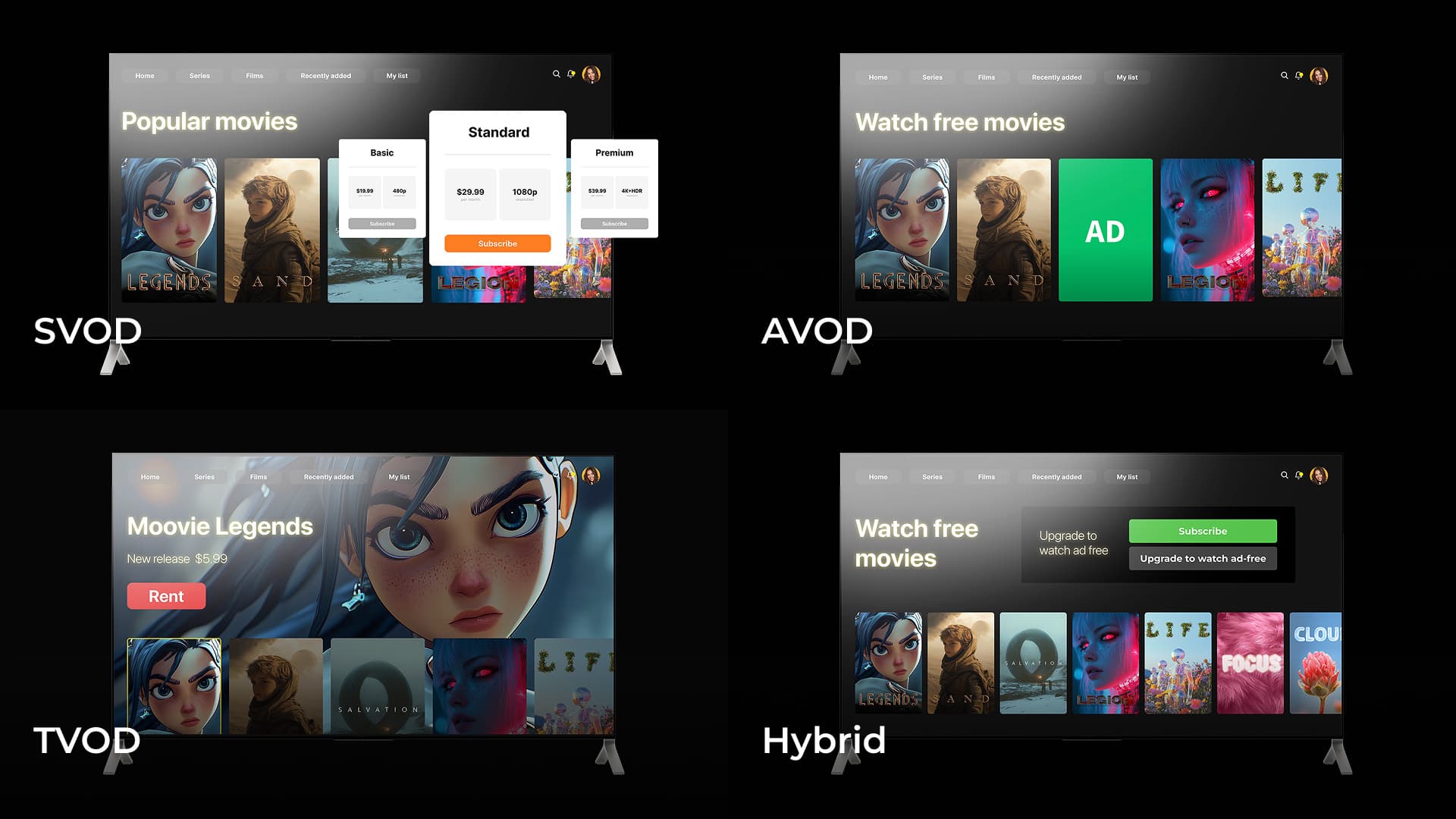
Pick a monetization model that fits both your content and how people actually watch it. SVOD and TVOD are the two common choices, and many operators run them together.
SVOD, or subscription video on demand
It is the default for IPTV providers with live channels and a VOD library. Viewers pay monthly or yearly for unlimited access. It suits channel bundles, produces predictable recurring revenue, and rewards content variety with longer retention. Subscribers in this model watch habitually, in shorter and more frequent sessions, so churn tracks perceived catalog freshness.
TVOD, or transactional video on demand
It charges per title: a new film release or a pay-per-view sports event. It works for premium content people will pay extra for, monetizes viewers who refuse subscriptions, and produces sharp revenue spikes around big events. Demand here is event-driven, which puts unusual pressure on peak concurrency and payment flows.
A hybrid of both is where most mature IPTV services end up. Subscriptions cover everyday viewing while one-time purchases capture premium releases, which raises average revenue per user and serves regular and occasional viewers with one product.
Legal and compliance considerations
Content rights sit under every IPTV product. Licensing agreements define which channels and titles you may carry, in which territories, on which devices, and for how long. Your app has to enforce those terms technically, through geoblocking, device limits, and DRM policy.
Operators also face takedown and notice obligations. Depending on the market, DMCA-style regimes or local equivalents require a process for handling rights-holder complaints, particularly for user-generated or third-party playlist content.
Regional rules add another layer, covering data protection, accessibility, advertising, and local content quotas. Treat this section as general orientation, not legal advice, and review your specific obligations with qualified counsel in each market you enter.
The final stop on IPTV application development
A strong IPTV app plan starts with the parts that can block delivery: device access, playback, middleware contracts, entitlement, content protection, and external approvals. Validate them before the UI and release scope harden.
IPTV work spans chipset-level firmware, Android TV certification, multicast infrastructure, and backend orchestration. On top of that sits a UI that must behave the same on a five-year-old STB and a new Smart TV. Few teams cover that full range.
When evaluating an IPTV development partner, pay attention to proven Android TV Operator Tier delivery, including familiarity with Google’s certification requirements, as well as direct OEM collaboration experience, so device and software timelines stay aligned. Cross-platform depth across STB, Smart TV, and mobile, along with carrier-grade engineering, built for peak concurrency, security, and long-term support mater too.
Ask for specifics. A credible partner can describe how they handled a failed certification, a multicast fallback bug, or an OEM firmware delay, because they’ve done it before. Oxagile has spent nearly two decades on video delivery, working with global telcos, broadcasters, and platform providers on exactly these problems.
Need a hand with IPTV app development?
Bring us your device list, backend constraints, and launch date. We’ll tell you what’s realistic, where the risks sit, and what the build takes.
Sources:
1. U-verse TV — Wikipedia
2. Android TV, Operator Tier certification — Wikipedia
FAQ
What steps are involved in IPTV app development?
If you want to develop IPTV app solutions that will conquer the market, then:
- Think of the platform type: fully custom, based on white-label software, or hybrid.
- Plan your project budget and account for possible additional costs, such as resources for integration with STBs.
- Create a UX strategy that focuses on users’ convenience when they search for content.
- Select the tech stack for multi-device support.
- Protect your content from unauthorized access with Digital Rights Management and Conditional Access Systems.
- Choose an efficient monetization approach: based on subscriptions (SVOD), selling individual content titles (TVOD), or a hybrid.
What devices should an IPTV app support?
Nowadays, users consume content while seamlessly switching between devices. When developing an IPTV solution, focus on set-top boxes, Smart TVs, and mobile devices to ensure your platform covers the versatile needs of the target audience.
How long does it take to develop an IPTV app?
One platform on an existing backend usually takes about 3-5 months. Covering STBs, Smart TVs, mobile, and web together typically takes 8-12 months, since each platform adds an SDK, certification queue, and QA cycle. Treat these as planning ranges. OEM hardware lead times and content licensing talks run in parallel, and they frequently decide the actual launch date.
What monetization models work for a custom IPTV app?
The monetization options for IPTV apps include offering:
- Monthly or yearly subscriptions (SVOD), allowing consistent revenue
- Per-title purchases (TVOD), enabling a boost in profits
- A hybrid option combining both SVOD and TVOD approaches, helping maximize revenue per user.
Does every IPTV app need certification?
Certification depends on the target platform, device program, app store, operator, OEM, DRM provider, and content rights. There is no universal checklist.
Confirm current requirements with each responsible party before development locks the architecture. Track test evidence, firmware versions, release artifacts, and approval owners in one plan. Custom AOSP devices can still carry security, DRM, OEM, and acceptance duties.
How should an IPTV app support multicast fallback?
Define fallback as a product and architecture flow. Specify when the app leaves multicast, which unicast source it requests, and how entitlement is checked.
Document what happens to playback position. Test unsupported devices, managed-network loss, gateway changes, stream failure, and recovery. Add telemetry for the selected path, trigger, outcome, device, firmware, and relevant error codes.