Computer Vision in Retail: Use Cases, Business Value, and Implementation

Table of contents
- How does computer vision in retail work?
- Computer vision retail use cases
- What each retail computer vision use case needs
- What is the computer vision retail business value?
- What does a retail computer vision system need to work?
- What can go wrong when deploying computer vision in retail?
- Taking computer vision in retail from pilot to rollout
Empty shelves mean lost sales, missed checkout scans erode margins, and long queues can drive shoppers away. Computer vision in retail helps teams detect these problems and respond sooner. For retailers considering an investment, the challenge is choosing an application whose measurable benefits justify the cost of deployment and ongoing operation.
At Oxagile, we develop computer vision systems for detecting and tracking people and objects. Our experience includes a workplace safety solution that processes video locally on NVIDIA Jetson devices, giving firsthand insight into the camera, processing, and model performance constraints behind a working deployment.
Drawing on that experience, we explore six computer vision retail applications, the infrastructure and integrations they require, and the conditions that typically undermine performance in stores. You’ll learn which business metrics to track and how to assess whether a pilot makes financial sense to scale.
Key takeaways
- Computer vision may improve shelf availability, reduce checkout losses, and shorten queues when detections lead to timely action.
- ROI depends on measurable gains relative to deployment, maintenance, and staff review costs.
- Existing CCTV can support traffic and queue analytics. Shelf and checkout monitoring often need dedicated camera views.
- Lighting, occlusion, and packaging changes affect accuracy, making performance across stores a condition for scaling.
- Privacy requirements vary by application, with additional obligations for biometric identification.
How does computer vision in retail work?
Picture a familiar scene at a supermarket: a checkout queue keeps growing, and shoppers glance toward the empty lane next to them, hoping someone will open it. Computer vision solutions are capable of changing that.
The system detects people in the camera feed and tracks their movement through the waiting area. Following them across successive frames lets the software estimate how long they wait. Once that time exceeds the store’s threshold, an alert reaches the shift lead, who can assign someone to another lane. Camera images have become information that supports store decisions.
The same footage lets managers review recurring bottlenecks and plan staffing. Live processing supports an immediate response, while recorded video reveals patterns over time. Existing CCTV may capture enough detail for queue monitoring, whereas reading shelf labels or verifying checkout scans often requires dedicated cameras with a closer, clearer view.
Case in point
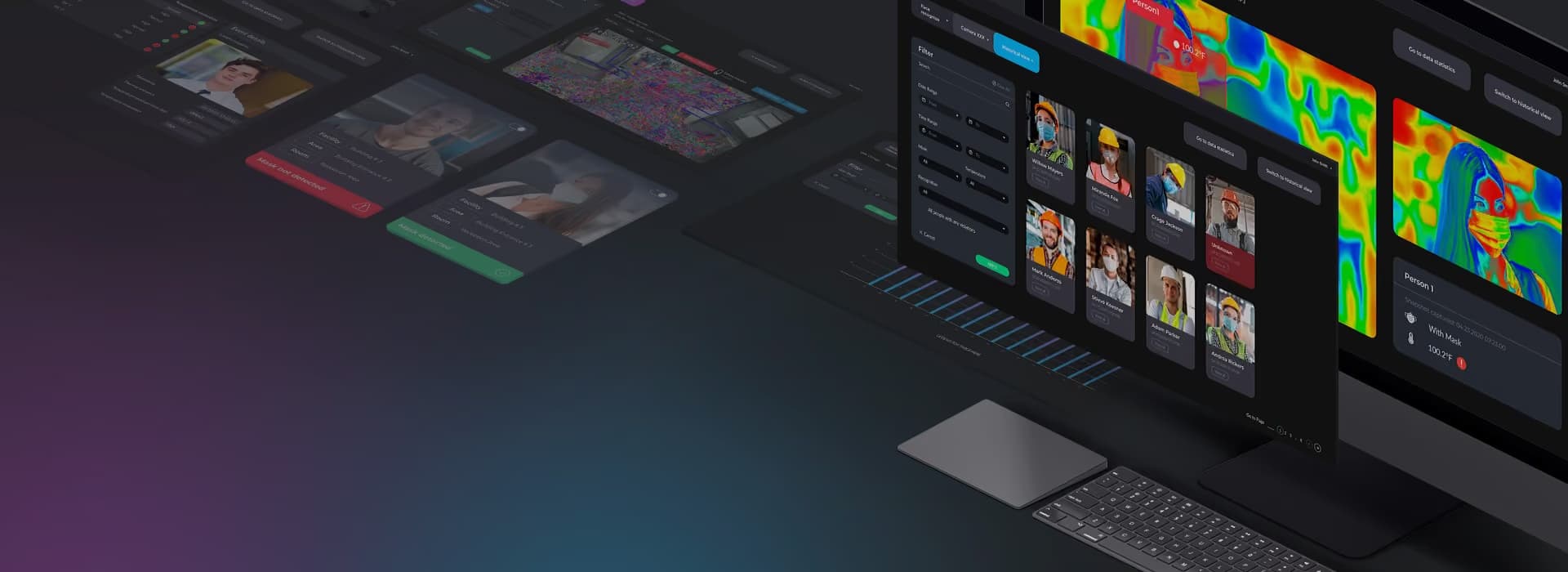
Processing multiple camera feeds at the edge
A workplace safety system wanted to count people entering and leaving a building, monitor occupancy, and alert staff when safety rules were breached. Several camera feeds had to be processed simultaneously, including footage with occluded faces and moving people.
For this workplace safety project, Oxagile used C++ to scale video processing on NVIDIA Jetson edge devices. Depending on the modules enabled, each device supported up to seven cameras. The deployment illustrates engineering challenges that also arise in stores, where detection tasks must share processing capacity and remain reliable under real operating conditions.
Computer vision retail use cases
The same store can use computer vision to keep products available, manage queues, and investigate checkout discrepancies. Each application relies on different visual evidence and connects to a specific operational workflow. But where does it deliver value?
Shelf monitoring and planogram compliance
A product might be available in the stockroom while its shelf position remains empty. With shelf monitoring, the system checks images for gaps and compares product placement with the planogram, the store’s guide to where each item belongs. It then flags a missing or misplaced product and sends its shelf location to an associate’s task app.
Computer vision retail automation connects these detections to replenishment tasks, giving staff a shelf location to check and restock. Follow-up images verify that the issue has been resolved.
Loss prevention and self-checkout monitoring
At self-checkout, an item may reach the bagging area without a corresponding scan in the transaction. A trained solution compares item movements captured by the lane camera with timestamped point-of-sale (POS) records. A possible mismatch triggers a rescan prompt or notifies an attendant, giving the store a chance to resolve the issue before payment.
Elsewhere in the store, security video analytics are able to flag predefined activity and attach relevant footage for review. Staff then examine the surrounding events and decide how to respond, with the clip and transaction details providing context for the investigation.
Foot traffic and queue analytics
Two stores with similar daily visitor counts might need very different staffing schedules. One receives a steady flow of shoppers, while the other fills up during a short lunchtime rush. Retail video analytics counts entries and tracks movement through defined areas, bringing to light when arrivals peak, where shoppers spend time, and how queues develop.
Managers make use of these patterns to align shifts and breaks with demand. During trading hours, queue length and estimated waiting times help shift leads decide about additional staff. Comparing those patterns across days also highlights whether congestion recurs at particular service points.
Cashierless checkout
A shopper picks up a sandwich, then puts it back. In a cashierless store, the system has to register both actions and remove the sandwich from the right basket. Cameras follow item movements and associate them with a shopping session. Some setups combine video with shelf sensors to help resolve uncertain interactions.
When the shopper leaves, the completed basket passes to the payment system for charging. Reliable operation depends on keeping products and sessions correctly matched, including when people shop close together or return items. Customers can complete purchases without scanning each product, while staff handle exceptions and disputed charges.
Customer experience analytics
A merchandising team using computer vision retail customer experience improvement gets the chance to compare how shoppers respond before and after a promotional display moves. Aggregated movement paths and dwell times let teams test layout and signage decisions, making products easier to find and browse.
Patterns across visits also emphasize displays that receive little attention or routes that shoppers rarely use, aiding decisions on what to change next. Moreover, technologies like online virtual try-on provide customers with the means to preview how products might look on them and compare styles or colors before buying.
Facial recognition
At a store entrance, facial recognition compares captured facial features with a defined security watchlist. A potential match brings the relevant images to a staff member for review and human assessment, such as whether the person has been correctly identified and what response is appropriate1.
The workflow also includes decisions about how people enter the watchlist, when records expire, and who is allowed to view or change them. Because the system processes biometric data to identify individuals, deployment depends on meeting the applicable legal conditions for that specific purpose. Those requirements must be assessed for each jurisdiction.
What each retail computer vision use case needs
An entrance camera may already provide the view needed to count visitors. Checking a missed scan takes a clear view of the checkout lane and access to POS records. Each application therefore places its own demands on the store’s setup.
Use case | Typical camera setup | Connects to | Biometric considerations |
|---|---|---|---|
Shelf and out-of-stock monitoring | Shelf-facing cameras or mobile capture | Inventory, replenishment tasks | Product analysis |
Planogram compliance | Shelf cameras or robots | Planograms, product catalog | Product analysis |
Footfall, dwell time, and heat maps | Entrance or overhead cameras | Analytics, POS | Counts and movement paths |
Queue alerts | Overhead view of waiting areas | Staff alerts, workforce management | Counts and waiting times |
Self-checkout mis-scan detection | Dedicated view of scanner and bagging area | POS events, attendant app | Item and transaction matching |
Shoplifting behavior alerts | CCTV covering relevant areas | Loss prevention case management | Video review, with biometric matching assessed separately |
Cashierless checkout | Multiple overhead cameras, sometimes shelf sensors | Shopping sessions, POS, payments | Shopper tracking requires implementation assessment |
Facial recognition watchlist | Cameras with a clear view of faces | Watchlist, staff review workflow | Biometric identification |
Shopper emotion analysis | Cameras suited to the model’s visual inputs | Marketing analytics | Biometric emotion inference requires additional legal assessment |
Privacy questions change with the way a system uses the footage. A queue counter can follow people’s positions without establishing their identities. Matching faces against a watchlist involves biometric identification, bringing additional requirements under laws such as GDPR and Illinois BIPA2. In either setup, footage that makes people identifiable still entails appropriate privacy safeguards.
Emotion analysis raises another question about whose emotions the system evaluates. The EU AI Act places biometric emotion recognition within its high-risk framework3. Using AI to infer employees’ emotions at work is generally prohibited, with exceptions for medical or safety purposes. A camera capturing both shoppers and staff makes that distinction relevant to the system’s design.
What is the computer vision retail business value?
When a shelf is replenished sooner, the retailer measures how much longer products remain available to shoppers. On-shelf availability and stockout duration unveil that change, whereas discrepancies between shelf observations and inventory records indicate stock that customers cannot find. At Morrisons, supplier Focal Systems reported an availability improvement of more than two percentage points following the camera rollout4.
At checkout, the financial effect appears in the value of unpaid items recovered and changes in losses per transaction. Wider trends also matter, surveyed retailers reported a 12.4% decrease in shoplifting incidents between 2024 and 2025, according to NRF5. Comparing pilot stores or lanes with similar locations over the same period signals changes in theft patterns, staffing, and security procedures.
For staffing and customer experience, shorter waiting times demonstrate whether coverage matches demand. Visitor-to-purchase conversion assesses merchandising changes, with promotions and seasonal traffic taken into account. Together, these measures connect operational decisions with what customers experience and buy.
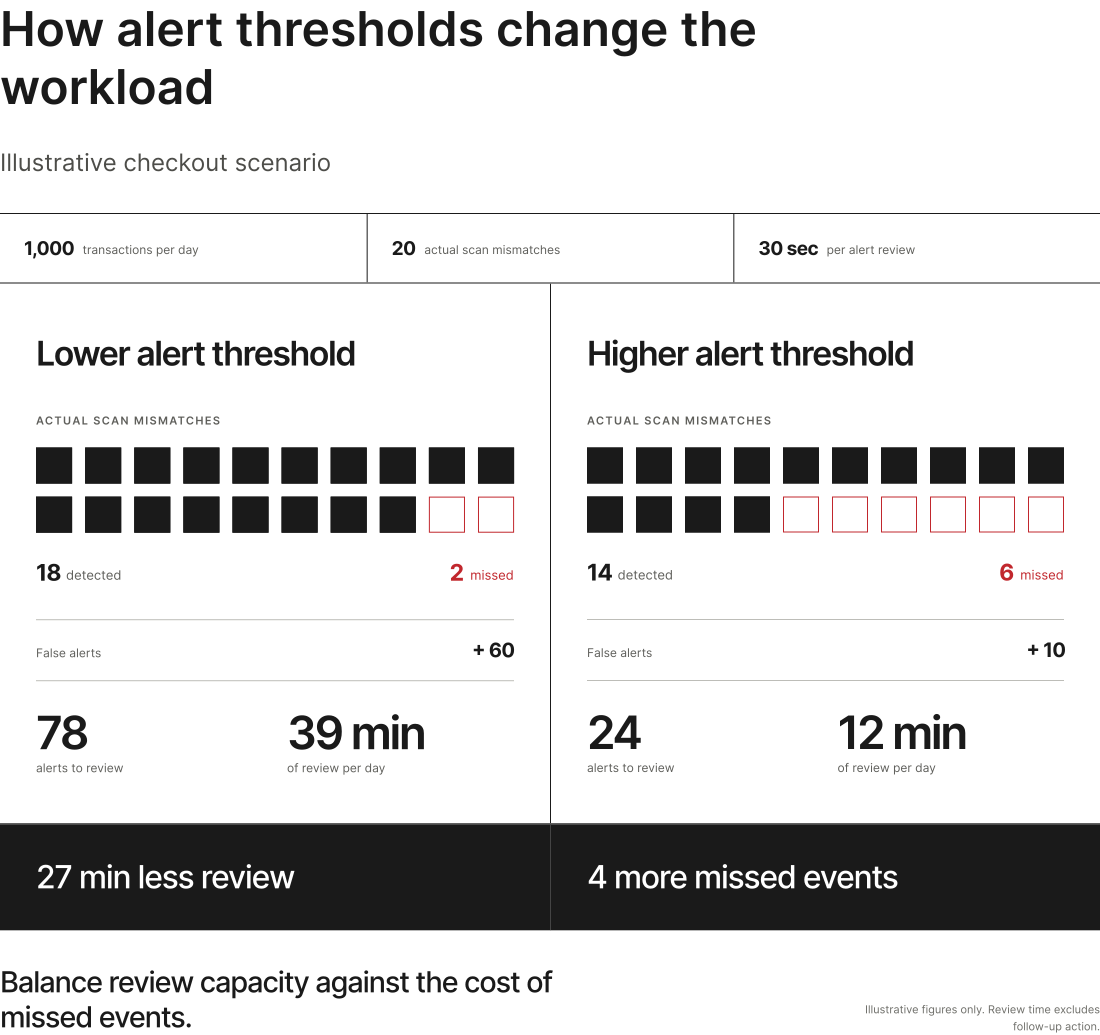
Computer vision retail metrics should capture detection quality and its effect on operating costs. Precision uncovers how many alerts are correct, and the miss rate serves as evidence regarding how often relevant events go undetected. False alerts add review work, so staff time belongs in the evaluation alongside improvements in availability or losses.
Calculating computer vision retail ROI means comparing verified benefits with the full cost of operating the system. Common benefits include gross profit from additional sales, verified reductions in losses, and labor savings actually realized. The calculation also includes cameras, processing hardware, software, integration, maintenance, and alert review over the same period. A pilot provides the evidence for deciding whether that return justifies a wider rollout.
Can your cameras spot a problem in time to act?
Oxagile develops object detection and tracking systems around your products, camera views, and store conditions.
What does a retail computer vision system need to work?
A camera may show an entire aisle clearly on a security monitor but capture too little detail to distinguish neighboring products. Existing CCTV provides suitable views for entrances and queues, yet shelf analysis and checkout verification often call for dedicated positioning. The useful detail at the point of interest determines whether a feed will support the task.
The video then reaches a trained model for inference, the process of applying what it has learned to new images. An edge device runs that process inside the store, keeping time-sensitive alerts close to the cameras. Cloud processing supports centralized analysis and reporting, but a hybrid architecture can combine local detection with a shared view across stores.
In a retail AI system, computer vision retail management integration requires enough event context to reach the right workflow. A lane identifier and timestamps aligned with POS records are necessary for checkout alerts. Inventory events should have product and location identifiers that match the retailer’s enterprise resource planning (ERP) or warehouse management system (WMS), and queue events feed workforce management tools. Handling delayed or duplicate messages helps keep those systems consistent.
Reliable detection depends on the quality of computer vision retail data that reflects the packaging, layouts, and viewing conditions the model will encounter. Synthetic computer vision retail/FMCG (fast-moving consumer goods) data supplements real examples with generated images of seasonal packaging or partly obscured products. Real store footage is still a must-have to establish how well the trained model performs in practice.
The alert threshold is another design choice with operational consequences: the same store activity can produce very different review workloads and missed-event counts.
What can go wrong when deploying computer vision in retail?
Changing store conditions
A computer vision model might struggle with different camera angles, afternoon glare, new packaging, or products hidden by shoppers and trolleys. False checkout alerts interrupt purchases and add work for attendants and missed shelf gaps leave availability problems unresolved.
Testing before rollout
Footage from stores outside the training set establishes whether the model handles different layouts, lighting, and busy periods. Before live alerts reach employees, the system runs in the background while reviewers check flagged events and ordinary footage. Reviewing both exposes false alarms and missed events, giving the retailer a realistic estimate of the workload.
Monitoring after launch
Performance needs to remain visible at the store level. A rise in false alerts after a display reset may point to a changed camera view. More missed detections after a packaging update often call for new training examples. Monitoring and employee feedback lets teams identify which adjustments to make.
Data retention and biometric requirements
The data retained has to fit the task. Queue reporting uses aggregate counts, incident review requires a short clip with controlled access and a defined deletion schedule. Biometric identification has its own assessment of the purpose and applicable legal conditions before deployment.
Taking computer vision in retail from pilot to rollout
Computer vision retail optimization gives teams a closer view of what happens on the shop floor and the opportunity to respond when it still makes a difference. Its business value becomes tangible when that visibility translates into better availability, fewer losses, and a smoother shopping experience.
Achieving those results consistently takes reliable data, careful engineering, and a place for the technology in everyday store workflows. A pilot that proves the operational benefit and the economics gives retailers a solid foundation for making computer vision a lasting part of their operations.

Where should computer vision start in your stores?
Bring Oxagile the operational problem you want to solve, and our team will shape a pilot with clear performance targets and an integration plan.
Sources
- — Information Commissioner’s Office (ICO)
Facial Recognition Technology (FRT) and surveillance
- — Illinois General Assembly
Biometric Information Privacy Act, 740 ILCS 14/15
- — Regulation (EU)
Artificial Intelligence Act, Regulation (EU) 2024/1689, Article 5 and Annex III
- — The Grocer
Asda trialling AI cameras to monitor availability
- — National Retail Federation (NRF)
Retailers see fraud schemes evolve as shoplifting declines
FAQ
Can computer vision use existing CCTV cameras?
Often, yes. Entrance counting and queue monitoring use existing cameras if their position, resolution, and accessible video stream suit the task. Shelf analysis and checkout verification often demand a more targeted view. A camera audit establishes which feeds to reuse and equipment gaps.
How much does computer vision cost for a retail store?
Cost depends on the number of locations and camera feeds, processing hardware, training data, and integrations with retail systems. Ongoing expenses include maintenance, model updates, and alert review. Oxagile can assess the available infrastructure and project requirements to define the scope and estimate deployment costs.
Is facial recognition in stores legal?
It depends on the jurisdiction and intended use. In the EU, biometric identification requires a lawful basis and an applicable condition under GDPR Article 9. Remote biometric identification also falls within the EU AI Act’s high-risk framework. In Illinois, BIPA generally requires written notice and a written release before collecting covered biometric identifiers.
Why do retail computer vision pilots fail?
It’s possible for a pilot to overlook conditions that appear during rollout, including different camera angles, crowded aisles, packaging changes, and lighting variation. It may also generate more alerts than staff have the capacity to handle. Testing in additional stores and measuring missed events, false alerts, and response workload exposes those weaknesses before expansion.
Is computer vision better than RFID for inventory?
The choice depends on what the retailer wants to observe. RFID tracks tagged items, including stock outside the camera’s view. Computer vision checks visible shelf conditions, such as gaps and misplaced products. The two sometimes work together to investigate why recorded inventory and the shelf shoppers see do not match.
What retail problems can computer vision solve?
It identifies empty shelves, misplaced products, missed checkout scans, and growing queues. Movement analysis also helps teams assess layouts and displays. Results depend on the camera’s view and the workflow receiving the information, such as a replenishment task or an attendant’s review request.
Which use cases give the fastest ROI: shelf monitoring, loss prevention, foot traffic analytics, or self-checkout?
The strongest candidate depends on the store’s recurring costs and ability to act. Shelf monitoring has a clearer business case where stockouts are frequent and replenishment is prompt. Checkout and loss prevention applications need measurable losses and an effective response process. Foot traffic analytics produces a financial return through staffing or merchandising changes. Verified benefits and total operating costs determine payback.
Does computer vision work for warehouses and supply chains, or only stores?
It also supports warehouses and distribution centers. Cameras read carton labels, check visible pallet contents, and flag packaging damage at receiving or packing stations. Connecting those observations to a warehouse management system lets staff investigate exceptions against the relevant shipment, item, or order.
Can you integrate computer vision with our existing POS, ERP, WMS, or inventory systems?
Yes. Oxagile builds integrations around the interfaces and data those systems provide. Checkout monitoring needs POS events aligned with video timestamps. Inventory and warehouse workflows need shared product and location identifiers. An initial review establishes the available connections and how delayed or duplicate events should be handledю