What Shelf Monitoring Computer Vision Sees and Misses

Table of contents
Drawing on Oxagile’s expertise in object detection and image analysis, we explain how shelf monitoring turns camera images into restock decisions. The article follows five steps, from capturing the shelf to alerting staff, and examines the central challenge: telling a genuinely empty position from a product the system cannot see or identify.
Imagine a shopper walking down a supermarket aisle for something they buy every week. They know where to find it, but today the spot is empty. The store’s inventory system may still show units in stock.
Shelf monitoring gives store teams a view of what’s on display. To turn that view into a restock task, the software needs to work out what the image is telling it. Poor lighting, a hidden pack, or unfamiliar packaging can leave the system uncertain about a position that is actually occupied.
So how does a computer vision system for shelf monitoring tell whether a product is missing? We’ll follow the stages from image capture to the restock task and look at what can make each result less certain.
Key takeaways:
- AI computer vision retail shelf monitoring works in five stages, each with its own weak spot that can affect the final restock alert.
- The hardest part is confirming that a product is missing when a blocked view or failed recognition could suggest the same gap.
- Cameras check the shelf itself, helping store teams find availability gaps that a positive stock balance can hide.
- Finding a product and identifying it are separate tasks. An unidentified pack should not automatically count as an empty space.
- Before rollout, retailers need to understand how uncertain results are checked in shelf analytics and how confirmed gaps become useful tasks for staff.
Why empty shelves are still a problem
An empty shelf can cost a sale even when the store has the item in stock. IHL Group puts the yearly cost of out-of-stocks and overstocks at 1.7 trillion USD, 6.2% of global retail sales. That total covers shortages and excess stock. Out-of-stocks make up 65.6% of it, with empty shelves accounting for 690.9 billion USD, the largest single cause1.
For store teams, the practical difficulty is that a positive stock balance does not guarantee a product is ready to buy. Units may be waiting in the backroom, or the recorded stock may prove impossible to locate. Retail shelf monitoring checks the display directly, making it easier for staff to spot gaps that stock records miss.
How computer vision for shelf monitoring works
When a store associate spots a gap, they can take a closer look and check what belongs there. A shelf monitoring system works toward the same decision in the following stages.
Stage | Question | What happens | What can go wrong |
|---|---|---|---|
1. Capture | What’s in view? | The system gets an image of the shelf from a fixed camera, a robot, or a staff member’s phone. | Poor lighting, blocked views, or parts of the shelf outside the frame. |
2. Detect | Where are the products? | The software draws a box around each product it finds in the image. | Closely packed products overlap or blend together, leaving some undetected. |
3. Recognize | Which products are they? | The software uses the details visible inside each box to identify the product. | Similar packaging, backward-facing products, or unfamiliar labels prevent identification. |
4. Compare | Does the shelf match the plan? | The system checks what’s on the shelf against what should be there, flagging possible gaps and misplaced products. | An outdated planogram flags a gap where the layout has changed. |
5. Alert | What needs restocking? | Once a gap is confirmed, staff receive a task that tells them what to replenish and where. | Duplicate alerts or unresolved tasks send staff to a shelf that's already being refilled. |
Shelf monitoring step by step
Imagine a shelf with room for six cans of the same product. Let’s follow that row through all five stages to see how the system checks the shelf and decides whether to send a restock task. Along the way, we’ll look at what can complicate each step in a real store.
1. Capture the shelf image
The camera needs a view of all six positions. If the photo cuts off the end of the row, the system has no view of the last spot. Getting the whole row in frame helps, though other parts of the display can still get in the way. Researchers building a grocery dataset from eight stores name dense shelves, occlusion, changing viewpoints, and visual ambiguity as the core problems2. Occlusion means something blocks part of the camera’s view.
2. Find the product facings
With the whole row in frame, the object detection model finds five cans. Each can takes up one facing, or one position at the front of the shelf. Cans farther back share those same facings. Five detections give the system five locations to work with. On a crowded shelf, though, two cans can blend together in the image, so the system still has to check that sixth spot.
3. Identify each product
The five cans could all be the same variety or include another one from the same brand. AI image recognition uses details on the packaging to tell them apart. A planogram system built for more than 7,000 7-Eleven stores in Taiwan had to tell 471 product categories apart3. In our example, the system identifies all five cans as the variety that belongs on that shelf.
4. Compare the shelf with the plan
The planogram calls for six facings of that variety. Image analysis gives the system five matches, so it flags the sixth position as a possible gap while the other five cans are still there for shoppers. Checking how closely the display follows the plan is called planogram compliance. If staff have moved the display and the plan still shows the old layout, the same comparison could flag a gap in a spot that no longer belongs to that product.
5. Turn a confirmed gap into a task
Once the system confirms that the sixth spot is empty, it sends a restock task to store staff, identifying the product and its shelf location. When AI-powered computer vision monitors retail shelves, the software also needs to track open tasks. If someone is already on their way to refill that spot, another alert could send a second employee there.
How stores confirm a shelf gap
When the sixth spot in our row is hard to see, the system may leave it open for review. The aforementioned 7-Eleven study notes product occlusion is common on retail shelves3. Its model was not trained for severe occlusion, backward-facing products, or overlapping items. When a shelf looked substantially different from the images the model had learned from, the system could return “Unknown”.
While that check is open, a store associate might look up the product to see whether there are more cans on hand. The record gives staff a starting point, but sometimes lists stock they cannot locate. Retailers call that discrepancy phantom inventory. ECR Retail Loss found phantom inventory affects 8% to 24% of items at any audit4.
Even if the associate finds more cans in the backroom, the sixth spot still needs checking. A clearer photo or a look in the aisle might settle whether it’s empty before anyone gets a task to refill it.
Cameras, robots, and phones for shelf monitoring
AI computer vision retail for shelf monitoring follows the same stages across the four setups below. Fixed shelf-edge and ceiling cameras monitor the display from set positions. Mobile robots capture fresh images as they pass through the aisles, while staff use phones to photograph shelves during routine checks or whenever needed.
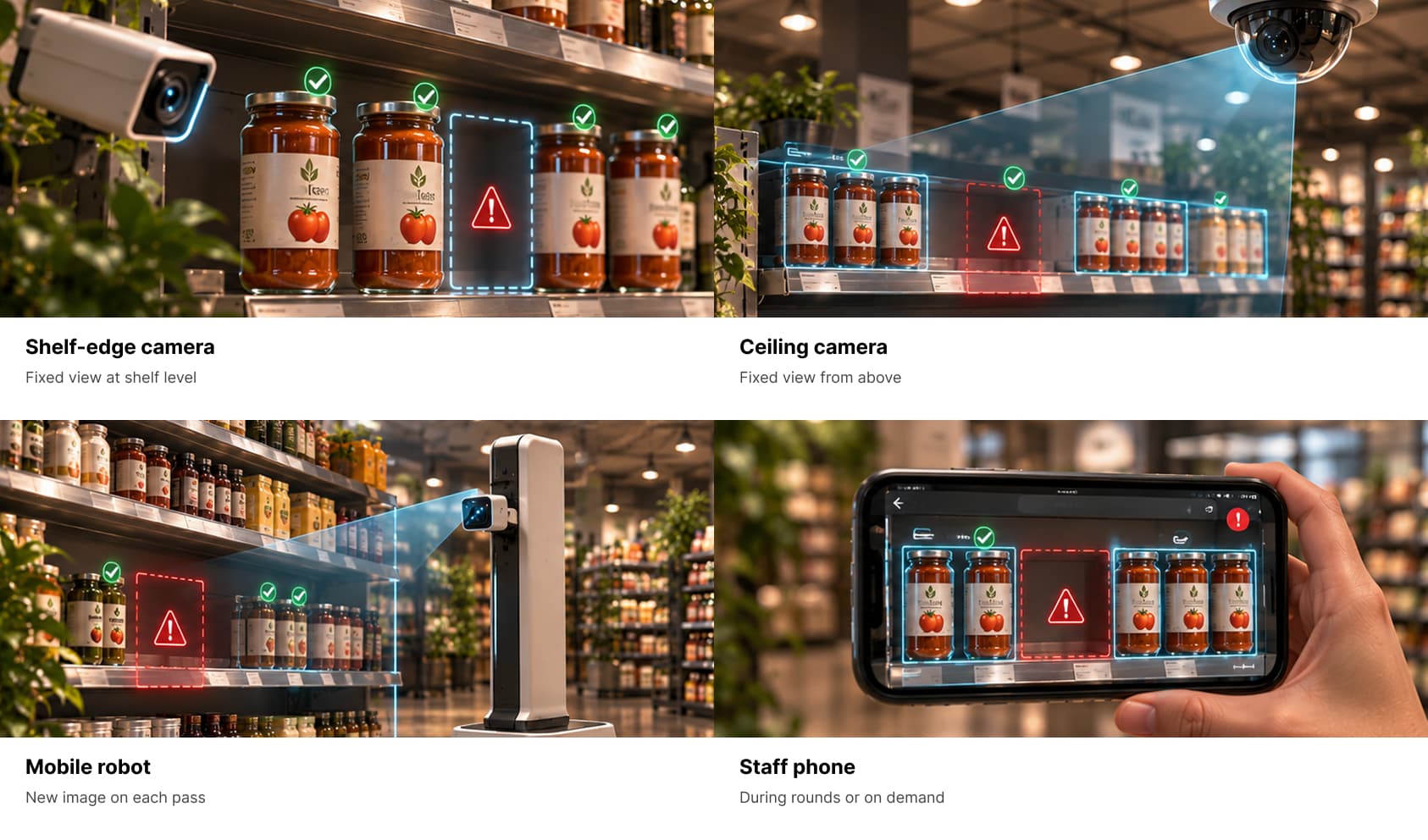
The setup determines how much of the shelf the system is able to see and when it gets a fresh image. If a camera supplies a live feed, real-time video analysis can check the shelf when the footage is delivered.
Morrisons uses the shelf-edge setup shown above to alert staff about gaps in real time. The retailer installed more than 200,000 shelf-edge cameras across 498 stores in eight months5.
Case in point
How Oxagile’s software reads printed ads
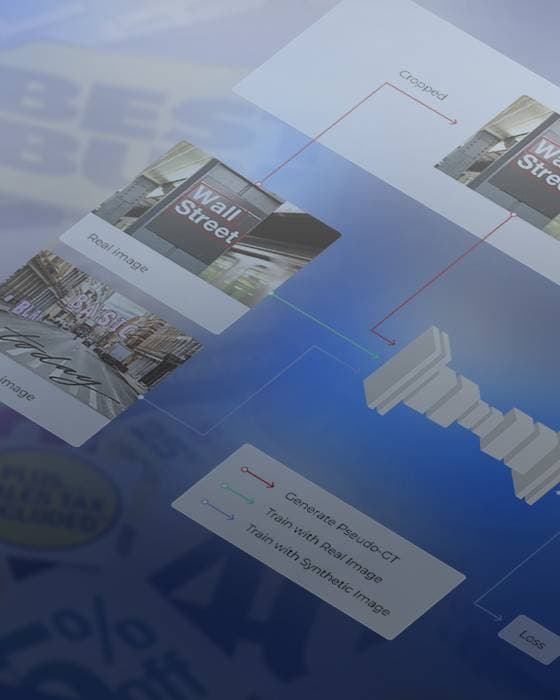
A single page of retail advertising can carry several offers, each with its own price and product details. Oxagile’s software first worked out where each ad began and ended. It cropped the ads into separate images so text recognition could read the brand, price, volume, and product type for each offer. The software then classified the offers and saved their details as records.
Although this wasn't a shelf monitoring project, it involved similar image processing tasks and sequence that applies to a crowded shelf. Once the software has picked out an individual pack, it can look for details that distinguish it from the one next to it, such as the size printed on the label.
Questions to ask before you build or buy
If you’re considering computer vision for retail shelf monitoring, start with a display your team knows well, such as a shelf you use for weekend promotions. Walk through a shift with your vendor or development team, including actions like setting up the display and the first restock task.
Does the system need a planogram?
When staff set up the display, the software needs to know which products go where. Ask whether it uses a planogram or another record of the layout. The setup gives you a chance to see who makes the change in the system and when it takes effect.
What happens when a product or its packaging changes?
The new layout might include a familiar product in a pack that the system has never seen. Have the team show how they’d add it. You’ll find out what the store needs to provide and what staff see if the new pack appears on the shelf before the update is ready.
How soon will the system notice an empty spot?
Once the promotion is running, imagine the last pack sells just after a scan. When the system gets its next image tells you how long the gap could go unnoticed. Ask who or what takes that photo and whether someone on the floor can request a fresh one sooner.
What if the next image is hard to read?
The next picture might show the gap clearly, or that something is in the way. Bring a photo of each situation to see how the software handles them. Ask which result would create a task and how the system handles a position that still needs checking.
What happens after staff get an alert?
When a gap is confirmed, follow the task into the tools your store team uses. Check who receives it and how they close it once the shelf is refilled. If an alert turns out to be wrong, ask how staff record what they found and whether those reports show up in shelf analytics, where the team can spot recurring problems.
The bottom line on retail computer vision shelf monitoring
An empty spot and an unclear image call for different actions. One can send a store associate to replenish the shelf, the other signals that a better look is required. Keeping those outcomes separate also matters when retailers compare availability across stores. If one location logs an unclear image as a gap and another waits for confirmation, their reports are hard to compare.
A custom system gives stores a common way to record shelf availability, accommodating differences in how they check shelves and assign restock work. A store that scans aisles on a schedule may handle a second check differently from one where staff take photos on demand, and both can report the outcome in the same way.
Oxagile’s retail software development team builds those rules into a shelf monitoring system and connects it to the tools your stores already use.

Planning a shelf monitoring project?
Share your shelf images with Oxagile to assess product detection, scope a pilot, and plan integration with your restocking workflows.
Sources
- — IHL Group
IHL Group Research Findings & Key Statistics
- — Scientific Reports
A real-world framework for automated product recognition and catalog generation: dataset, model, and analysis
- — Scientific Reports
Real-time retail planogram compliance application using computer vision and virtual shelves
- — ECR Retail Loss
Smart Inventory Record Inaccuracy (IRI) Prediction and Management
- — The Grocer
The Grocer Gold Awards 2025: Shelf-edge AI at Morrisons wins Technology Initiative of the Year
FAQ
How does shelf monitoring with computer vision work?
Out-of-stock detection starts with a shelf image. The software locates visible products, identifies them, and checks their positions against the shelf plan. When the comparison reveals a possible gap, the system needs to confirm it before sending staff a task to replenish the product.
What is on-shelf availability?
On-shelf availability describes how often shoppers can find a product where they expect to find it. A store may have units in the backroom while the shelf is empty. Checking the display gives staff a way to see what’s available to the shopper standing in the aisle.
What is planogram compliance?
Planogram compliance describes how closely a shelf matches the store’s intended layout. The planogram specifies where each product belongs and how many positions it should occupy at the front of the shelf. Comparing the display with that plan can reveal empty positions and products placed in the wrong spot.
How does a camera know a shelf is empty?
A camera gives the software an image to assess. The software checks whether it has a clear view of the position where the product belongs and whether anything occupies it. If the image leaves that position unclear, another photo or a check in the aisle can help settle it.
Why is a shelf empty when the system says the item is in stock?
The units may be in the backroom, waiting for someone to replenish the display. Sometimes staff can’t find the units listed in the stock system at all. That’s called phantom inventory. The shelf check tells staff what’s available to shoppers, and the stock record gives them a place to start looking for more.
Do you need robots for shelf monitoring?
Shelf monitoring can use images from fixed cameras, staff phones, or cameras mounted on robots. The choice affects when the system gets a fresh view of the shelf and what it can see from that angle. At Morrisons, for example, shelf-edge cameras alert staff to gaps in real time.
Why is product recognition hard on store shelves?
Two packs can look almost identical, especially if the detail that distinguishes them is small or partly hidden. Text on the packaging can help identify the product. Oxagile used a related technique for printed retail ads, isolating individual offers and reading details such as brand, price, and volume from each one.