How Much Does It Cost to Build an LMS?

Table of contents
- What an LMS development quote includes
- Deciding whether to build custom LMS software, subscribe to SaaS, or use open source
- Key factors that affect learning management system costs
- LMS feature costs: What should you budget for?
- LMS budgets by project scope
- Ongoing operational costs
- Comparing LMS development quotes
- Concluding thoughts on LMS pricing
An initial planning budget for a custom learning platform can range from $50,000-150,000 for core functionality and even more for a complex enterprise system. The gap is largely explained by what happens behind the interface. A corporate training portal with standard course assignments and a commercial learning platform serving multiple organizations may share a feature list but require very different engineering efforts.
So, how much does it cost to build an LMS? Below, we break down the development budget, examine where costs accumulate, and identify expenses that may fall outside the initial quote.
Key takeaways
- Similar feature lists conceal different budgets. For instance, tracking course completion is simpler than preserving an auditable learning history.
- SaaS subscriptions and open-source customization may be more economical when existing platforms support the required learning workflows.
- Permission models, learning standards, integration logic, and live video requirements can substantially increase development effort.
- Data migration, content production, infrastructure, and ongoing maintenance require separate consideration when calculating the total LMS cost.
What an LMS development quote includes
To assess learning management system costs, consider the work at each stage of educational app development:
- Discovery establishes workflows, data ownership, and technical constraints
- UX design maps learner and administrator journeys
- Engineering implements the interface, business logic, and integrations
- QA verifies the agreed features across devices, roles, and operating conditions
Oxagile tip: Ask which assumptions still need validation
A promised integration may not be ready to price until the team has API documentation and a usable test environment. Ask whether the quote assumes both are available.
Course production, learner support, hosting, third-party licenses, and next year's enhancements are normally outside the build budget unless explicitly included. Deployment, migration, and administrator training also deserve named line items, as their inclusion varies between LMS proposals.
Deciding whether to build custom LMS software, subscribe to SaaS, or use open source
Commissioning a new LMS is difficult to justify when a commercial product fits the learning process, nobody will maintain the codebase, or the immediate deadline is simply to publish courses. It becomes more compelling when unusual roles, compliance evidence, HR or video integrations, or a learning service sold to customers make standard offerings impractical. However, each approach divides ownership and maintenance differently.
SaaS subscription
In this scenario, the vendor operates a product with established capabilities and controls platform releases. LMS pricing may follow registered users, active learners, or a flat subscription fee. Charging rules, integration allowances, and paid add-ons affect the overall contract cost1.
Open source
Open-source customization gives your organization more responsibility for maintaining its chosen setup. For example, Moodle LMS has no software license charge1, but implementation still involves hosting, configuration, support, and upgrades. Custom extensions must stay compatible with new core releases. Before changing versions, rehearse the process on a copy of the production site and check plugin compatibility.
Custom build
In this case, you fund a workflow, data model, and integrations tailored to your requirements. Ownership and handover depend on the contract. A custom application avoids a subscription to the platform it replaces once that agreement ends. Other licensed components and managed services remain payable under their own terms.
Consider a hypothetical SaaS contract priced at $5 per active learner per month. At 2,000 active learners, the annual subscription would be $120,000, or $360,000 over three years, assuming consistent usage and pricing. Use the same three-year period when evaluating a custom LMS, including the initial build, infrastructure, licenses, and continuing engineering support.
Oxagile tip: Check the limits before committing to custom development
Test your hardest workflow in an existing platform. Can a manager assign training across departments without seeing restricted learner records? Does the report export preserve those restrictions? Compare the cost of closing those specific gaps with a new build.
Estimate your LMS cost
Our edTech team can help scope your LMS functionality and development budget.
Key factors that affect learning management system costs
The development team follows each learning workflow across screens, records, and connected services. Effort grows where one decision changes several parts of the system.
Custom workflows and roles
An instructor, department manager, external assessor, and tenant administrator may each have various levels of access to the same course. Approval chains, delegated administration, and exceptions expand implementation and testing. For enterprise learning management, clarify assignment, override, and viewing rights across organizational boundaries.
Integrations and data ownership
Single sign-on verifies identity, yet it does not automatically settle account provisioning, department changes, or access removal. HR, CRM, payment, video, and proctoring integrations depend on defined data flows and recovery rules. Therefore, identify which system owns each record and how disagreements will be resolved.
Compliance, audit evidence, and accessibility
A compliance workflow may require evidence of completed training and subsequent changes to results. Retention periods and export permissions shape the underlying records. Accessibility also calls for explicit acceptance criteria, such as the agreed WCAG version and conformance level, with checks across course navigation and assessments2.
Live learning and video
Embedding an external meeting differs from building an interactive classroom. Attendance reconciliation, participant controls, and collaborative tools all broaden implementation. Peak simultaneous sessions and viewers influence media architecture and load testing. Playback introduces further decisions about recording access and retention.
AI functionality
An AI tutor that answers questions using approved course materials has different requirements from one that assesses learner performance and adjusts learning paths. Content preparation, access restrictions, response evaluation, and model usage should be accounted for alongside feature development.
Tenants, languages, and concurrency
A multi-tenant platform serves separate customer organizations. Isolation must extend to reports, search, files, and background jobs. Additional languages affect interface layouts, course versions, notifications, and testing. Load targets should distinguish total accounts from simultaneous activity, including assessments and live classes.
Who builds and maintains it
Compare the proposed mix of analysts, designers, engineers, QA, and infrastructure specialists. Relevant edTech experience helps expose implementation pitfalls before they lead to rework. A cheaper development line may leave migration, security testing, or release operations to your internal team, changing the overall LMS cost.
Oxagile tip: Look beyond the feature name
Ask what happens when a course changes after learners have started it. Must existing attempts continue on the old version? Should certificates carry a revision identifier? Answers affect content storage, assessment logic, reporting, and migration together.
Case in point
A white-label webinar module for an enterprise LMS
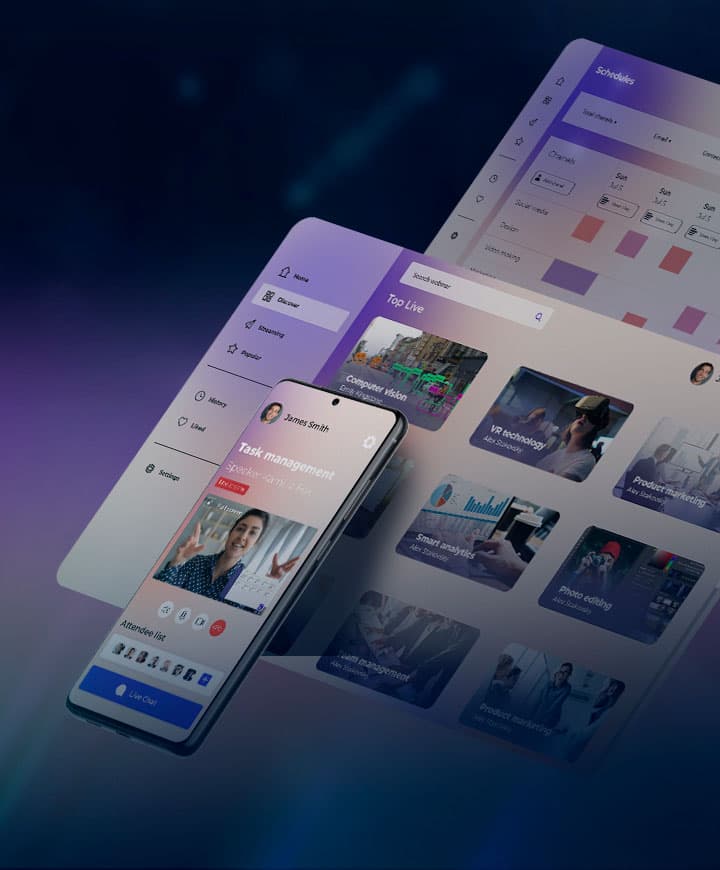
An enterprise LMS provider wanted webinar capabilities it could offer under its own brand and monetize within a wider organization management product. We built an independent WebRTC module that plugged into the existing platform and delivered it ahead of schedule while accommodating changing requirements. The scope covered:
- Two interaction models with different session rules: presenter-led broadcasts with audience questions and many-to-many discussions.
- Integration with LMS video libraries, including shared playback, recording, and MP4-to-HLS conversion to support stable media delivery.
- Simultaneous connections supported by horizontal media-server scaling, continuous performance, and load testing across infrastructure, server versions, and the module itself.
LMS feature costs: What should you budget for?
What belongs in an MVP depends on the learning process. Regulated training may need audit evidence from launch, while a commercial course platform may require paid access. Use the initial scope below as a starting point for a release that supports your intended use.
Relative effort compares baseline implementations within a single application. The labels describe complexity, not quoted engineering hours. Shared components mean the rows cannot be priced or added independently.
Feature | Initial scope | Relative effort | What increases the cost? |
|---|---|---|---|
Registration and authentication | MVP: accounts and basic roles | Moderate | SSO, provisioning, delegated permissions, tenant isolation |
Course creation and content management | MVP: upload and organize lessons | Moderate-high | SCORM playback, content versioning, approvals, video concurrency |
Assessments and quizzes | MVP: fixed questions and scoring | Moderate | Adaptive questions, manual grading, proctoring, accommodation |
Progress tracking and reporting | MVP: completion and basic exports | Moderate | xAPI/LRS integration, historical records, reporting permissions |
Certificates | MVP if completion evidence is essential | Lower-moderate | Expiry, renewal, revocation, verification, versioned templates |
Notifications | MVP: enrollment and completion messages | Lower-moderate | Time zones, escalation rules, preferences, delivery recovery |
Payments and subscriptions | MVP for paid learning, otherwise optional | Moderate-high | Refunds, failed renewals, taxes, access changes, reconciliation |
Gamification | Usually a later release | Moderate | Cross-course rules, reward reversals, tenant-specific rankings |
AI recommendations or assistance | Later unless central to the product | High | Restricted content, evaluation datasets, safeguards, monitoring |
Mobile access and dedicated apps | Responsive web for the MVP, apps if essential | Moderate for web, high for offline apps | Offline synchronization, download protection, device testing |
Course delivery and reporting share work that the table lists under separate features. SCORM packages need compatible launch, playback, and progress tracking. xAPI support involves exchanging learning records with a Learning Record Store (LRS), which can be outside the LMS3. Specify the required standards and versions before deciding what to implement, license, and test.
Paid access creates a similar link between billing, enrollment, and permissions. The system must process duplicate or out-of-order payment events without enrolling a learner twice or leaving access active after cancellation. Scoping the full sequence gives a more realistic picture of the effort than pricing the checkout screen alone.
Oxagile tip: Budget for integration behavior
For an HR integration, trace a new hire, department transfer, departure, and failed synchronization. Specify what happens to course assignments and historical records in each case. Include monitoring and a way to retry updates safely.
LMS budgets by project scope
A custom LMS can be a relatively modest internal training tool or a commercial learning platform with its own billing, video infrastructure, and administration tools. The following budget ranges are development estimates that illustrate the difference in investment.
LMS type | Example functionality | Estimated budget | Development timeline |
|---|---|---|---|
Basic LMS / MVP | Web-based course delivery, quizzes, progress tracking, learner and administrator accounts | $50,000–$150,000 | 3-6 months |
Advanced LMS | Custom learning workflows, certification, video learning, detailed reporting, third-party integrations | $150,000–$500,000 | Depends on integration and rollout scope |
Complex LMS | Multi-tenant architecture, interactive classrooms, advanced analytics, proctoring, AI functionality | May exceed $500,000 | 9-18 months for a full-featured portal |
These ranges are intended for initial budgeting. A single requirement, such as offline mobile learning or integration with a legacy HR system, can significantly change the estimate even if the rest of the LMS remains relatively simple. Mind that the figures refer to development, additional expenses for content production, infrastructure, licensing, and ongoing support should be factored into the overall investment.
Practical ways to reduce LMS development costs
The following approaches target different parts of the initial budget, with a tradeoff to check in each case:
Limit bespoke workflows to the exceptions
If standard enrollment or course assignment meets the business need, keep it. Reserve custom rules for the cases that affect access, compliance, or the service you sell.
Reuse standard capabilities selectively
Authentication, video delivery, and payments often have established components. Compare their license and usage charges with the engineering they replace, and check customization limits before adopting them.
Postpone features, preserve their foundations
Gamification and advanced AI may wait for a later release. If customer records will need isolation, preserve that boundary from the outset to avoid a later data-model redesign.
Validate risky integrations early
Test representative records, permission changes, and failed synchronization before building dependent screens. A small technical investigation adds upfront work but helps prevent broader rework.
Match infrastructure to credible peak demand
A simpler deployment reduces setup and maintenance effort. Use redundancy from launch where availability requirements justify it and avoid paying for unneeded capacity on a speculative growth forecast.
Ongoing operational costs
Beyond the initial development budget, LMS owners face recurring expenses for hosting, backups, monitoring, video delivery, software licenses, and AI services. Technical maintenance also requires ongoing investment in security patches, software upgrades, and integration support.
On the operational side, factor in course production, assessment updates, learner support, and localization. If the new LMS replaces an existing platform, set aside a separate budget for data migration, particularly when historical assessment results and certification records need to be preserved.
Oxagile tip: Watch the cost of live learning
Forecast peak attendance and simultaneous sessions, then calculate recording volume from retained hours and encoded file sizes. Include delivery traffic, transcoding, and backup copies where applicable. Retention sets the duration of those storage charges.
Comparing LMS development quotes
Two vendors may interpret the same LMS requirements differently. One may budget for SCORM-compatible course playback, historical learning records, and automated enrollment through an HR system, whereas another may estimate basic content delivery and manual enrollment. The proposals may look similar at first glance despite substantial differences in engineering scope.
Pay particular attention to what each vendor considers ready for launch. Does the estimate include migrating existing courses and learner records, testing accessibility, and preparing administrators to work with the new platform? Check which third-party components the development team plans to use and what recurring charges they introduce.
A lower development quote may leave more implementation and maintenance work to the internal team. Comparing these responsibilities alongside the proposed functionality gives a more accurate picture of the total investment.
Concluding thoughts on LMS pricing
A custom LMS is worth the investment when existing products fall short of specific business requirements. Before committing to development, establish which capabilities justify custom engineering, which can be covered by existing components, and what the platform will cost to operate after launch.

Get an LMS estimate grounded in your workflows
Know what your LMS budget covers before you commit to a build. Share your workflows, integrations, and launch priorities, and we’ll outline a practical first release.
Sources
- — World Bank
Learning management systems for education: Knowledge pack
- — W3C Web Accessibility Initiative
WCAG 2 overview
- — Advanced Distributed Learning (ADL) Initiative
Experience API specification, Part One: About the Experience API
FAQ
How much does it cost to develop a custom LMS?
For initial budgeting, expect $50,000-150,000 for a basic learning platform and $150,000-500,000 for an advanced LMS. Complex platforms may exceed $500,000. These indicative ranges are based on eLearning portal development estimates, with final pricing determined by project requirements.
What factors affect LMS development costs?
Feature depth, permission rules, integrations, course standards, accessibility, tenant isolation, video concurrency, and mobile requirements all affect effort. Data migration and the proposed team's responsibilities also change the scope behind the price. At Oxagile, we assess these requirements during project scoping to identify costly dependencies early and recommend a development approach that fits the client's budget.
Is customizing an open-source LMS cheaper than building one from scratch?
Customization can be cheaper when the existing data model and plugin architecture fit the learning process. If essential behavior requires changes to the core product, upgrade testing and long-term support may erase that initial saving. Oxagile can help assess the limitations of an open-source platform and determine which development option makes better financial sense in the long run.
Which LMS features are the most expensive to develop?
Complex reporting, adaptive assessments, offline synchronization, interactive video, and AI assistance are often among the more demanding areas. Their relative cost depends on shared infrastructure and acceptance criteria. A simple implementation of any one feature may be much smaller.
How much does it cost to integrate an LMS with other business tools?
Price each connection against documented data flows and responsibilities. Read-only data retrieval differs from two-way synchronization with identity matching, assignment rules, retries, monitoring, and reconciliation. API restrictions and access to test environments also affect the work.
How long does LMS development take, and does faster delivery cost more?
A basic learning platform may take 3–6 months to develop, with complex solutions requiring 9–18 months or more. Accelerated delivery may increase costs if additional engineers and parallel testing are needed. Some tasks, particularly integration testing and data migration, have dependencies that limit how much the schedule can be shortened.