Computer Vision Applications by Industry

Table of contents
Computer vision applications turn camera or image data into a decision that a system can act on. This could be a defect flagged, a face verified, a person tracked, a document read. Across eight Oxagile projects, time savings outweighed accuracy gains. Police video processing fell 98.67% and soccer highlight production fell 72%.
Most lists of computer vision applications tell you the same thing. Retail, healthcare, manufacturing, agriculture, security. Every industry is on every list, and none of them says what the system actually delivered.
This one is built the other way round. Eight industries where computer vision proves its value, one delivered outcome each, from a named Oxagile project, with the conditions behind it.
Key takeaways:
- A computer vision application is a model plus a camera, a decision rule, and something that acts on the result. The model is usually the smallest part.
- Eight Oxagile projects showed bigger measured gains in time than in accuracy: 98.67% off police video processing, 72% off soccer highlight production.
- Accuracy depends heavily on the input, with model choice further down the list. A few of our projects showed 99.3% recorded for cropping ads off scanned pages and 80.7% for identifying people moving through live feeds.
Delivered outcomes by industry
What does computer vision actually deliver once it leaves the demo and gets put to work? It gets a lot less abstract when you put numbers next to it. Here’s what we measured on eight Oxagile projects.
| Industry | What the system does | Delivered outcome | Conditions |
|---|---|---|---|
| Public safety, law enforcement | Extracts faces, objects, and vehicles from footage and redacts them frame by frame | Processing time cut 98.67%; over 95% object detection; 80.7% person identification | Body-worn and in-vehicle cameras, shaky footage |
| Education, assessment | Verifies test-taker identity and flags irregularities during remote exams | 5,000+ exams monitored daily | Consumer webcams, unsupervised rooms |
| Sports, media | Detects goals, fouls, cards, and crowd reactions to build highlight packages | Highlight processing time cut 72%; 90% accuracy on scoring moments and fouls | Live and VoD soccer broadcast |
| Retail, advertising | Reads printed ad pages, crops each offer, extracts brand, price, and offer type | 99.3% cropping accuracy; about 93% offer type recognition | Scanned print layouts, mixed fonts |
| Workplace safety, manufacturing | Detects people, masks, distance, and body temperature at entrances and on the floor | 15 ms per face image; temperature to +/- 0.3 C | Compressed surveillance video, moving subjects |
| Smart cities, parking | Recognizes parking lots from satellite imagery | 85% recognition accuracy | Satellite images, no ground cameras |
| Venues, access control | Verifies a visitor’s age at the door before entry | Age confirmed at entry without a manual ID check | Edge devices, cloud or on-premises |
| Healthcare, diagnostics | Identifies immunofluorescence labeled tumor cells in microscope images | Exact cell locations returned, cutting identification time | Laboratory microscopy |
What counts as a computer vision application
A computer vision application starts with a model, but there is usually much more engineering around it. A camera or another image source feeds it data, application logic decides what to do with the output, and the result has to reach whatever system or person acts on it. In many projects, the model itself ends up being a relatively small part of the build.
The underlying vision tasks are fairly familiar.

Classification
Tells you what something is, such as a normal scan or an incorrectly worn mask.
Detection
What is here and where? Finds objects and their location in an image, which works for counting people or locating license plates.
Segmentation
Goes down to individual pixels when the exact boundary matters, as it does in surgical planning or defect detection.
Recognition and tracking
Answer who, and where did they go, such as identity verification or following a player across cameras.
A real application rarely stops at one of these tasks. Our police video platform, for example, uses detection, recognition, tracking, and redaction as parts of the same pipeline.
Applications of computer vision by industry
The camera is often the only obvious thing these applications have in common. A camera might be looking for a tumor cell, an empty parking space, a foul on the field, or a face in hours of police footage. What happens to the image after that depends on the industry and the decision the system needs to make.
Public safety and law enforcement
Police video piles up faster than anyone can review it. Body-worn and in-vehicle cameras produce hours of shaky, fish-eye, low-light footage, and every piece of evidence used in court needs faces and plates blurred by hand.
Computer vision can do much of the initial review for public safety, picking out people, faces, vehicles, and license plates in the footage. It can follow them from frame to frame and handle repetitive work such as redaction, so officers spend less time going through video manually.
Case in point: Police video analysis at up to 60x the speed
Oxagile built a computer vision video analysis platform for a Fortune 500 client that pulls every unique face, object and vehicle out of footage, blurs any of them across every frame, and produces a report with metadata per frame. Object detection runs above 95% on unstable footage, person identification reaches 80.7% during real-time tracking, and video processing time dropped by an average of 98.67%. Four months, 16 man-months.
The part that matters operationally: the report marks which entities the system misidentified or could not detect, so an officer knows where to look by hand.
Education and assessment
Remote exams moved online and stayed there. Here, computer vision can keep identity checks running beyond the initial login, and it also aids in automating teacher efficiency assessment, student engagement evaluation, and homework grading. Face detection and recognition can flag when the test taker leaves the frame, another person appears, behavior on camera warrants review, and even tracks eyes and posture.
Oxagile built this into a WebRTC proctoring platform that monitors more than 5,000 exams a day, on a customized OpenCV build for multiple face detection and recognition. It red-flags light level changes, head movement, window resize events and audio changes, then scores the session and hands the report back through LTI to the LMS.
Sports and media
A highlight package is worth the most in the first hour after the final whistle. Cutting it by hand takes longer than that.
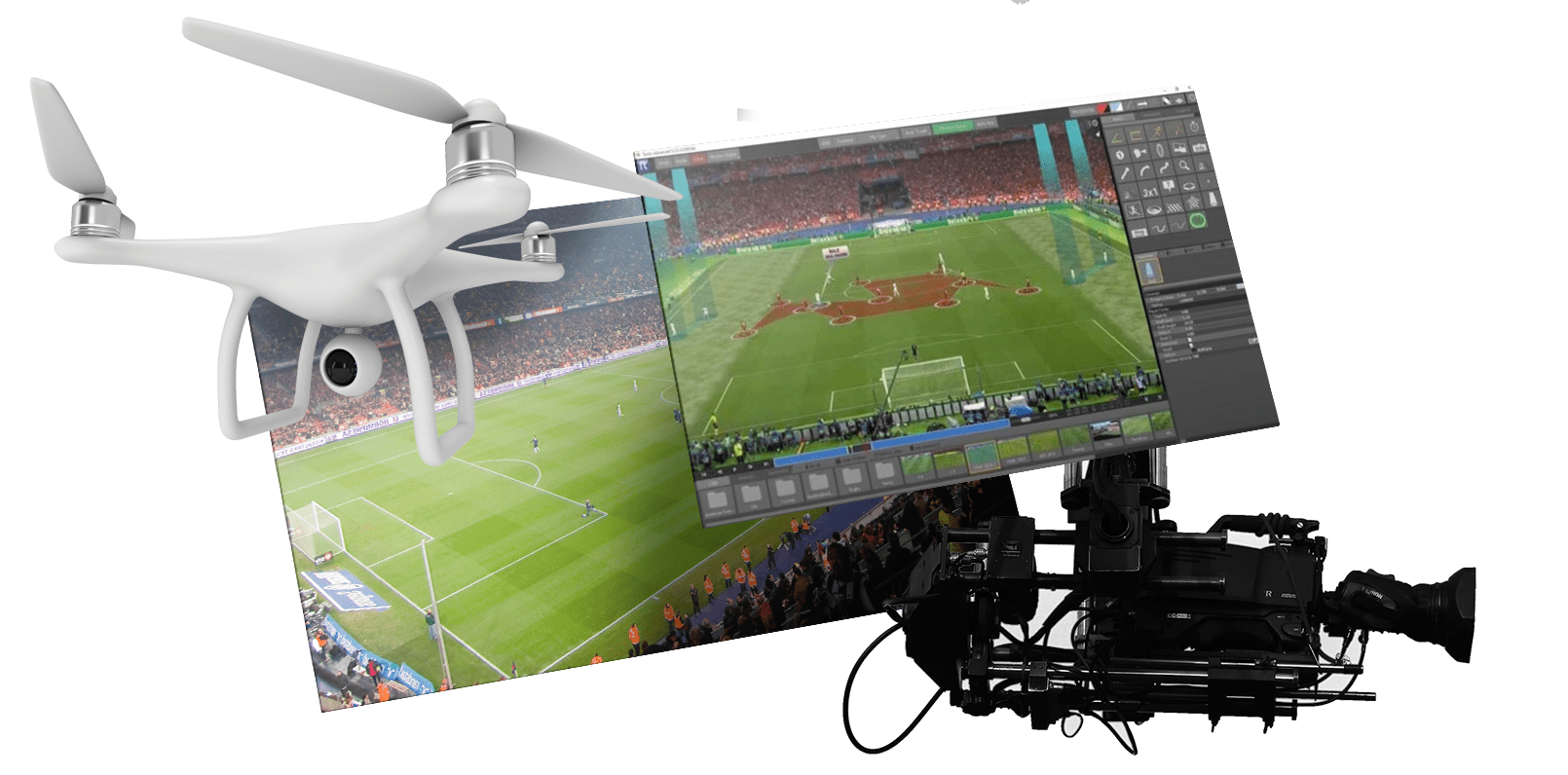
Oxagile built a machine learning highlight generator that decomposes soccer matches live and on demand, recognizes over 15 activity types including every foul type, red cards, scoreboards, and crowd reactions, and identifies players by face and gear. It reached 90% accuracy on scoring moments and fouls, cut video processing time by 72%, and runs on live streams with a delay as low as 10 seconds. Two months to a deployable build.
Live action stats
A new app for basketball fans harnesses computer vision and statistical analysis technology to create the ultimate mobile engagement tool. All the fan has to do is point their smartphone camera at the court and tap any player to view performance stats. Under the hood, the solution uses real-time data from ball- and player-tracking sensors to recognize athletes and monitor their movements.
Retail and advertising
Retail pricing intelligence starts with a printed page nobody wants to type up. A single printed ad page can contain dozens of offers, each with a brand, product, price, volume, and promotion type buried in a different layout. Turning that text and figures into structured pricing data manually gets painful at 20,000 ad blocks a day.
Computer vision does the page-level work first, separating individual offers before OCR extracts the details into a table. In one of our projects, YOLO v4 and v5 reached 99.3% cropping accuracy, while offer type recognition came close to 93%. The target was to process at least 80% of the daily volume without human input.
Workplace safety and manufacturing
On a factory floor, computer vision can watch the places people cannot watch continuously. A worker getting too close to machinery or entering a hazardous zone can trigger a warning or an automatic shutdown. The same camera network can count people by area, check masks and distancing, and pair optical and thermal feeds for temperature screening at entrances.
One such system processes a face image in 15 ms and measures temperature to ±0.3°C. Its mask detector was trained on the MAFA dataset of 30,811 images and 35,806 masked faces, including the occlusions and difficult angles common in surveillance video.
The hardware economics mattered too. Commercial optical and thermal units ran into tens of thousands of dollars each. OEM cameras brought that down to hundreds, with one Nvidia Jetson handling up to seven cameras at the edge.
Smart cities and parking
Smart-city video analytics does not always start with a live camera feed. Satellite and aerial imagery can be analyzed for roads, buildings, parking areas, and other infrastructure that would otherwise have to be mapped manually.
For one parking management project, satellite images were enough to recognize parking lots with 85% accuracy and map available capacity without surveying each location on the ground.
Venues and access control
Face analysis at the door goes beyond identity checks. Age estimation supports entry rules for restricted venues, while emotion recognition reads facial cues for entertainment and customer-facing applications.
In one entertainment project, the system checks a visitor’s age from their face before entry to an R-rated screening. Edge processing keeps facial data on site, with both cloud and on-premises deployment available for bars, clubs, and other age-restricted venues.
Healthcare and diagnostics
Computer vision applications for medical imaging can be found in almost every hospital these days. Chances are that your CT scan, X-ray, or MRI has been processed by AI to help the doctor make an accurate assessment. Computer vision solutions assist clinicians in cancer screening, surgical manipulations, blood testing, dentistry, physical rehabilitation, and many other treatments.
In pathology and molecular diagnostics, much of the work still comes down to a specialist examining microscope images and locating cells of interest. Such image analysis turns that visual search into a detection task, marking the exact coordinates for the specialist to review.
In one clinical imaging project, the system identifies immunofluorescence-labeled tumor cells and returns their exact locations in the image. It also learns from newly processed samples, reducing the time spent searching for pathogenic cells as more data passes through it.
Also standard, where Oxagile has no published figure
Four more applications are worth naming because buyers ask about them, even though there is no delivered number to attach yet.
Insurance claims
A photo replaces the adjuster visit. Damage is assessed, repair cost estimated, consistency with accident physics checked, and fraud flagged.
Fintech onboarding
Document OCR plus identity verification, cutting onboarding from minutes to seconds.
Liveness detection
Motion, depth, and facial dynamics confirm a real person is present, which defeats photo, video, mask, and deepfake attacks.
Patient monitoring
Video detects falls, abnormal movement, and posture in patient rooms without wearables.
Why computer vision accuracy varies
A clean scanned page and shaky bodycam footage give a computer vision model very different problems to solve. The accuracy figures make more sense once you look at what each system had to process.
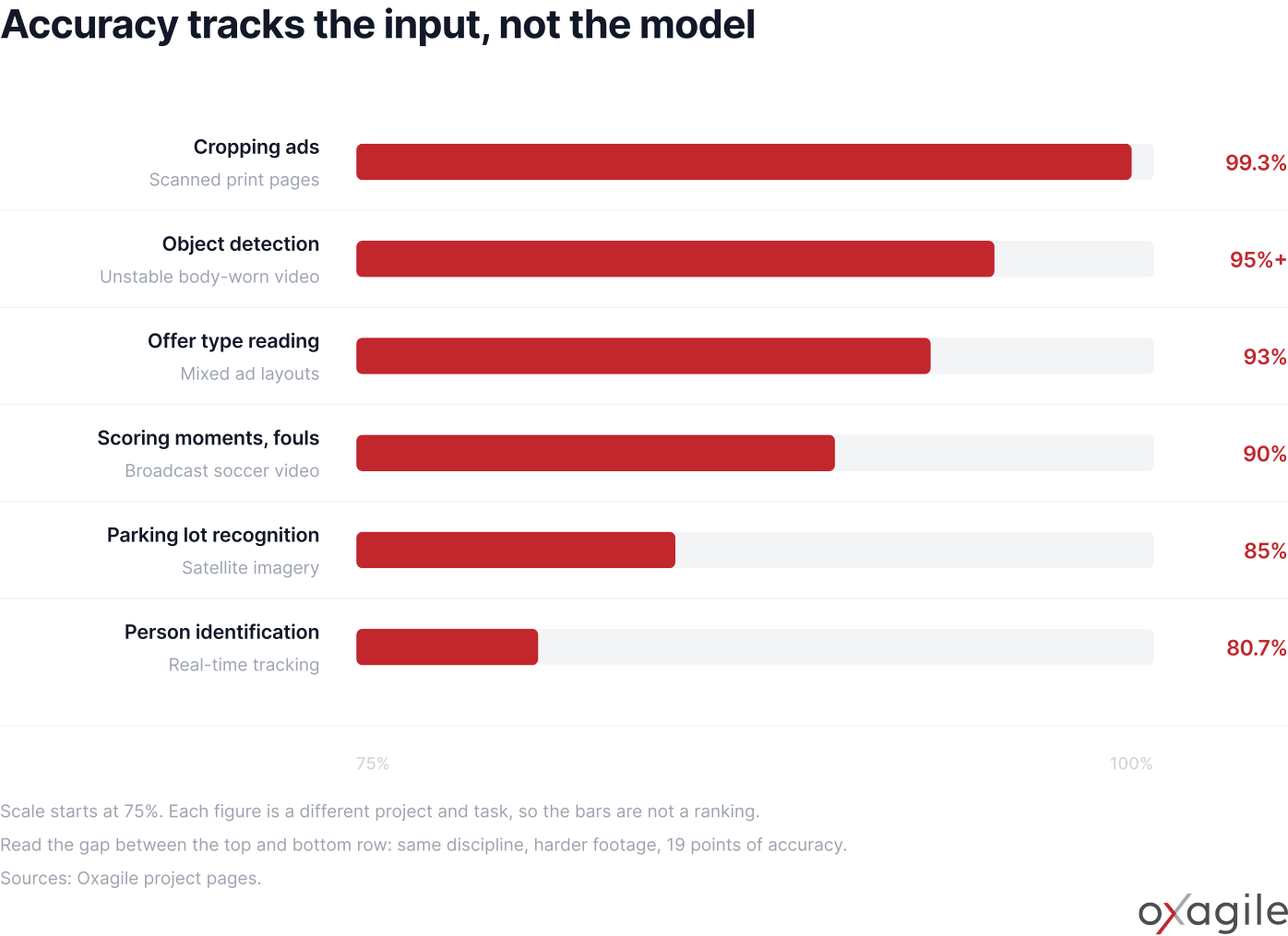
Delivered accuracy across six Oxagile projects, hardest input at the bottom. Attached as SVG and PNG.
That 19-point spread matters because accuracy does not travel neatly from one use case to another. A benchmark belongs to the footage and conditions it was measured on, and those may look very different from your production environment.
How to pick your first computer vision application
The easiest place to justify computer vision is usually a process that already consumes human attention. Someone watches footage, checks images, counts objects, reads labels, or looks for the same visual signal hundreds of times. There is already a job to automate and, just as importantly, a human result to compare against.
Operating conditions shape the build from the beginning. A production-line camera stays at a known angle under fairly predictable lighting, whereas body-worn footage moves through changing light, distance, and viewpoints. The time available to process an image varies just as much, from hours for a batch of scanned documents to milliseconds when a factory system has to react to a safety risk. Identity verification raises the stakes further because a wrong result affects a person and the underlying biometric data requires tighter controls around storage, access, and review.
Those differences have architectural consequences long before model selection becomes interesting. They determine how much training data is needed, where inference runs, what hardware goes on site, how errors are handled, and how much human review stays in the process. For a first deployment, detection and search over footage that already exists often give you more room to learn than an application expected to identify a person and act on that identification immediately.
What computer vision applications cost you
What makes computer vision expensive? Model development may take less work than getting the system to perform on real footage. Training data has to cover the bad cases too: poor light, compression, blocked views, odd angles, new objects, and differences between cameras. Those cases need to be found, labeled, tested, and often revisited as more production data comes in. An off-the-shelf API does not remove that work.
Deployment adds another chunk of the budget. Running inference at the edge means hardware, device management, and camera maintenance. Biometrics and medical imaging come with stricter requirements for data handling and access. And once the system is live, changes in lighting, camera position, or the scene itself can shift its performance enough to require new data and another training cycle.
Where computer vision apps earn their place
The strongest applications tend to have a very ordinary problem underneath the AI: there is simply too much visual information for people to process manually. The engineering question is how much of that work can be trusted to software under the conditions it will actually face.
That is also why the camera, footage, response time, and consequences of a wrong answer matter so much. They shape the system you end up building long before a model benchmark becomes useful.

Take your computer vision project further
Bring us the problem, the footage, and the result you need the system to produce. We’ll help figure out what will work under the conditions you actually have.
FAQ
What are the main applications of computer vision?
Oxagile builds computer vision applications across public safety, education and assessment, sports and media, workplace safety, retail and advertising, smart cities, access control and diagnostics. In each case the system turns camera or image data into a decision: a face verified, an object counted, a document read, an event flagged for review.
What is an example of a computer vision application?
A police video analysis platform Oxagile built extracts every face, object and vehicle from body-worn camera footage, blurs any of them across every frame for court use, and reports metadata per frame. Object detection runs above 95% on unstable footage and processing time fell by an average of 98.67%.
Which industries use computer vision the most?
Any industry where people make repeated visual judgments at scale. The heaviest use is in public safety, education, sports and media, and manufacturing, because all four combine footage that already exists with a review task nobody has enough people for.
How accurate are computer vision applications?
In terms of accuracy, the model counts less than footage. On Oxagile projects, ad cropping from scanned pages reaches 99.3%, object detection on unstable police footage runs above 95%, and person identification during real-time tracking reaches 80.7%. Oxagile measures on the client’s own data before quoting a number.
Can computer vision run on existing cameras?
Usually. Deployment can run on edge devices, on-premises or in the cloud (we had up to seven cameras per Nvidia Jetson unit in one build). What matters more than the camera model is whether it was placed for analytics or for general viewing.
What does a computer vision project cost?
It depends on the environment and the data you already have. On one Oxagile build, boxed optical and thermal units costing tens of thousands per unit were replaced by OEM cameras and an in-house pipeline, putting hardware in the hundreds.