








This website uses cookies to help improve your user experience




Roughly one-third of our brain’s cortex is devoted to decoding the visual world, way more than it spares for hearing or touch combined. But even so, that does not mean it records reality in full. It compresses, filters, prioritizes, ranks, and ignores. What you perceive is a negotiated version of what is happening.
In daily life, that works. In business, it gets expensive.
Operations proceed without halting for scrutiny. Signals overlap. Concentration wanders. The result is predictable: patterns are noticed too late, reactions are delayed, and decisions are made with partial context.
Computer vision (CV), obviously, helps to cover those voids.
Yet our client discussions reveal unequivocally: many businesses, as they begin to explore technologies to address their challenges, yearn for a beacon amid the swirl of existing tools and options and can hardly give an unequivocal answer to the question, “What is computer vision technology?”
Moreover, for many teams, the main types of computer vision tasks continue to signify image processing, feature extraction, or camera calibration, much as it did several years ago. While corresponding core tools can handle certain tasks, the field has blossomed far beyond its classical roots. Yet the key questions linger: when does classic CV suffice, and when do you chase its advanced versions? Should one pick a tailored journey or a ready-made trail? How can you sidestep stumbles through every step of CV implementation?

This article, guided by Dmitry Pozdnyakov, AI Engineer at Oxagile and Associate Professor, PhD, answers these questions and builds a clear foundation for where computer vision can create real leverage in a specific context. We will walk through the complete CV “food pyramid” so you can choose the right ingredients to make adoption faster, safer, and far less painful than expected.
Key takeaways:
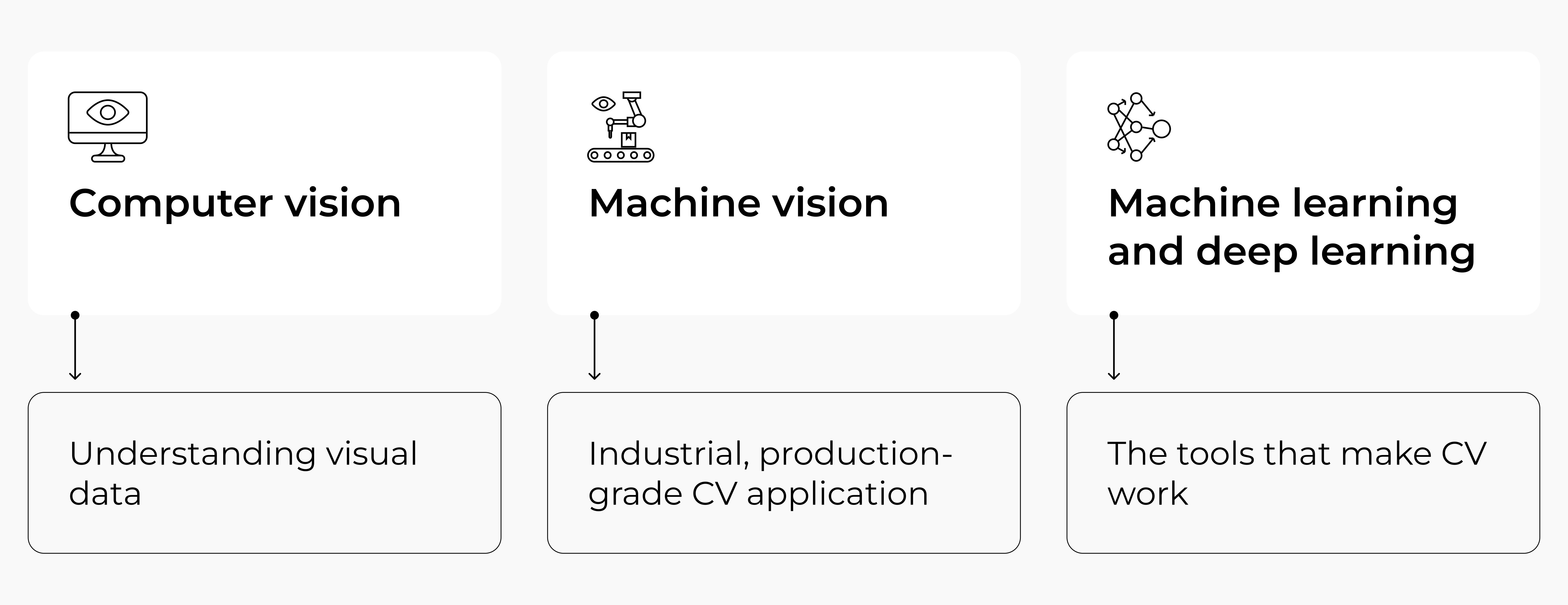
To explore genuine business scenarios without tangling ideas or hopes, let’s set some clear boundaries around frequently interwoven terms. Our CV project experience signals that many businesses could use a life ring in a pool of AI, CV, ML, DL acronyms. Oh, and did we mention machine vision?
When we discuss a computer vision definition, we essentially mean giving machines the ability to work with visual information the way humans do. To put it simply, computer vision is the automation of human sight, that allows them to “see and explore” the world.
Anything a human can accomplish by glancing at an image or a scene falls within its domain. Examples include spotting specific features, identifying and locating objects in a photo or video, calculating distances, or tracking movement.
Here’s the important nuance, though: unlike humans, who arrive pre-loaded with a lifetime of embodied experience, computer vision on its own is essentially just looking. "Understanding" isn’t really in its job description. It processes, detects and measures. But it doesn’t grasp.
That said, thanks to complex algorithms, sophisticated mathematical models CV has evolved from a blunt instrument into something that can read between the lines.
Inside this broad field sits machine vision. It is not a separate technology, but a very specific way computer vision is used in industrial environments. Machine vision is what ensures that products coming off a conveyor belt meet quality standards. It checks whether packaging is damaged, whether labels and QR codes are readable, and whether the right number of items is in a box.
Dmitry explains:
“Unlike classic computer vision, machine vision does not need to present results in a human-friendly visual form. There may be no screen at all. It simply triggers an action: stop the line, reject the product, send a signal downstream. That is why machine vision feels more abstract.”
At this point, it is important to step sideways and talk about computer vision in artificial intelligence. In its essence, artificial intelligence is a different concept and comes from a different layer, so it’s not right to combine them like computer vision AI.
At its core, AI is about building systems that can perform tasks associated with human cognition, such as reasoning, decision-making, learning, and language understanding. Visual perception is only one of these capabilities, alongside many others that have nothing to do with images or videos themselves.
The terms computer vision, AI, and machine learning travel together so often that their differences get lost, so the same kind of clarification is needed for machine learning and deep learning. These are not subfields of computer vision technology. They are methodological domains that computer vision happens to use. The relationship is pragmatic: computer vision poses problems, and machine learning provides ways to solve them.
Expert view:
“Historically, early computer vision systems relied on classic machine learning. Engineers manually designed visual features and combined them by means of algorithms.
Everything changed with deep learning. In modern computer vision, deep learning as a rule means convolutional neural networks. These networks are mathematical models inspired by biological vision. They reflect how visual signals travel from the retina through layers of processing in the brain. A landmark example is AlexNet, whose architecture drew directly on studies of animal visual systems. So instead of relying on handcrafted rules, these models learn visual representations on their own.”
Deep learning systems learn to see in a way that loosely resembles how humans do. Through repeated exposure, they form stable internal patterns. A square remains a square whether it is red or blue. A shape can be recognized regardless of lighting or minor distortions.
At a high level, it all can be summed to the idea that now camera replaces the eye, algorithms replace perception, and the system learns to detect, recognize, measure, and interpret what is visible.
But let’s look at the longer version of how this highly trained assembly line for interpretation unfolds from start to finish. First, a camera captures raw visual data (a frame, a feed, a photograph), and that data immediately enters a preprocessing stage where noise is reduced, lighting is normalized, and the image is made ready for analysis. Only then the real work begins.
What follows is feature extraction: the system scans the image for structural patterns like edges, corners, textures, gradients, and other elementary visual vocabulary from which meaning is eventually built. These features are then matched against what the model has learned during training, allowing it to recognize and classify objects within the scene. The final step is a decision: an action taken, a label assigned, an alert triggered.
The engine behind most of this is a Convolutional Neural Network, or CNN. When an image passes through one, its earliest layers detect the simplest things like a horizontal line, a sharp contrast boundary. Then each successive layer combines those primitives into something richer: shapes, then objects, then specific identifiable features. By the deepest layers, the network can distinguish a car tire from a hubcap. It outputs a probability score for each category it knows, and through thousands of training iterations, those scores grow more accurate.
And there is another architecture as well, the Vision Transformer. It takes a different approach:
This way, it captures relationships across the entire image rather than scanning it piece by piece. Both approaches are chasing the same goal: turning a grid of numbers into something a machine can understand and act on.
Computer vision is less a single skill than a whole repertoire, and which capability a system draws on depends entirely on what it needs to figure out.

Together these nine capabilities account for most real-world computer vision examples you’ll come across, and in practice they’re rarely deployed in isolation. A well-designed system will layer several of them, with each one feeding into the next, to arrive at something that starts to resemble genuine situational awareness.
At first glance, the idea of a “ready-made computer vision API” sounds attractive. Plug it in, send images, and get results. But the moment you look closer, the concept of a truly standard business task starts to fall apart. There are very few problems in computer vision that can be called universal. A handful, at best.
Dmitry notes:
“Object detection in the general case is one of the rare examples that made it into mainstream APIs. And that scarcity already tells the story. Most off-the-shelf APIs are built around highly generic demos. They work ideally only in isolation, “in a vacuum”, detached from real production constraints. The moment a task touches an actual business process, an actual environment, or an actual risk profile, the API stops being sufficient.
Even seemingly “basic” use cases, such as OCR for document processing, require adaptation: to document layouts, lighting conditions, language specifics, error tolerance, integration logic. Without customization, they simply do not solve the problem end to end.”
This is why the classic framing of using an API for simple tasks and building custom solutions for complex ones does not really hold. In practice, even simple business tasks are not solvable with a generic API out of the box.
As Dmitry puts it:
“The widespread perception that “APIs can do everything” largely comes from one major exception: large language models. But ChatGPT is not the rule, but rather the phenomenon.”
Therefore, the essential question to ponder from the very start is not whether to select an API or a custom-built option, but the exact framing of the issue you genuinely seek to resolve. Because in computer vision, solutions are rarely interchangeable modules. They must be designed around specific workflows, constraints, and environments.

We can step in at any stage of computer vision adoption, from defining the right features and collecting meaningful data to model training, testing, and benchmarking. All to make sure every hour, dollar, and effort is spent deliberately, not burned on trial-and-error.
Alright, the very first question you should ask when looking to make life easier for yourself and your business is: what is computer vision application in the context of your existing business processes?
Step back a little, and the broader picture becomes clear: computer vision delivers value in a very specific way. It replaces slow, costly, and inconsistent human visual judgment with systems that operate continuously and without fatigue. That core pattern repeats across industries, even if the surface use cases look entirely different.
If we briefly step back in time, the first large wave of computer vision adoption did not start as a planned technological breakthrough. In the United States, large hospitals had accumulated vast amounts of X-ray and CT scans long before anyone seriously considered using AI in medicine. Researchers decided to experiment.
They trained neural networks on these images using only diagnostic labels, without telling the models what visual features to look for. When the results were compared in blind tests against leading radiologists, the models flagged early-stage pathologies that human experts had missed. Follow-up histological tests confirmed the predictions.
Expert view:
“The key insight was not speed, but perception. Computer vision systems and models learned to rely on visual signals that were real and predictive yet outside established diagnostic conventions. This moment triggered rapid adoption. Within a few years, computer vision became a standard first-pass tool in medical X-ray imaging. Today, doctors still sign off on diagnoses, but neural networks handle initial screening, prioritization, and attention guidance, significantly reducing time and error rates.”
The same value logic now appears across many industries these days.
A fast-growing area is vision-based monitoring that replaces or supplements wearable devices. In hospitals, CV systems analyze live video feeds to detect falls, abnormal movement patterns, or safety risks in patient rooms around the clock.
In elderly care and autism support, camera-based systems track posture, movement, and behavior without forcing patients to wear sensors that are often rejected or forgotten. Even vital signs like heart rate and breathing can now be estimated remotely through video analysis.
In insurance, computer vision has fundamentally changed claims handling. A smartphone photo now replaces the physical visit of an adjuster. Automated damage assessment systems analyze images, estimate repair costs, verify consistency with accident physics, and flag potential fraud using both visual patterns and metadata. Claims that once took days or weeks are processed in minutes.
In fintech, similar CV pipelines power rapid onboarding through document OCR (optical character recognition), identity verification, cutting onboarding time from minutes to seconds while improving security.
Apart from simply verifying a static image or document, vision systems analyze subtle motion, depth cues, facial dynamics, and interaction patterns to confirm that a real person is present in front of the camera. This makes such common attack vectors’ photos, videos, masks, or deepfakes ineffective.
In fintech and digital onboarding, liveness detection significantly reduces account takeovers and synthetic identity fraud, while allowing verification to happen in seconds without human review.
In manufacturing, microscopy, and pathology labs, computer vision reduces human error where visual fatigue is a real risk. CV systems analyze large volumes of biological and medical images to identify drug targets, observe cellular responses to compounds, and evaluate delivery mechanisms. Automated inspection systems verify samples, detect defects, monitor equipment states, and ensure procedural compliance.
These systems do not get tired, distracted, or inconsistent, which directly translates into fewer mistakes and higher throughput.
Across all these examples, the source of ROI is the same: computer vision removes the human bottleneck wherever visual judgment limits speed, scale, or reliability. Wherever a business depends on someone looking at something and making a decision, CV transforms that instant into an expansive, repeatable framework.

As we’ve already said, some CV challenges are highly standardized, like facial recognition for access control, where proven neural networks and off-the-shelf tools make deployment straightforward: all you need is to install a camera, connect it to a computer and electronic lock, upload employee photos, and you’re done. These "plug-and-play" scenarios often follow a well-trodden path, delivering quick results with minimal customization.
However, not all problems fit this mold. In our team’s experience with real projects, we’ve tackled non-trivial cases where no ready-made solution exists, requiring creative problem-solving from scratch.
Let’s walk through a practical checklist for deploying computer vision, using one of our real cases: measuring human body temperature at an entrance using optical and thermal cameras.
Every CV project begins with a question, but not every question is well-formed.
Some tasks are standardized. Face-based access control is a good example. It has been solved many times, there are pretrained models, known hardware setups, and predictable integration steps. You mount a camera, deploy the model, upload employee photos, connect a lock, and you’re done.
But sometimes the task itself is new. In this case we’re going to talk about, the request sounded straightforward: measure a person’s temperature as they enter the building. In reality, the client did not yet know:
At this stage, the goal is not a solution. The goal is to turn an idea into a solvable problem.
Before designing anything, the team looked outward. Are there ready-made solutions on the market?
There were. Commercial “box” systems combining optical and thermal cameras already existed. They worked, but they were expensive and rigid. Buying them would have solved the problem quickly, but at a price point and form factor the client did not want.
This step is critical. Even when the final decision is custom development, knowing what already exists sets a reference for functionality, accuracy, and cost.
The client’s real requirement emerged here: “We want the same result as the boxed solution, but cheaper, modular, and under our control.”
That meant:
This decision immediately pushed the project from “integration” into “engineering”.
Before writing a single line of model code, the team had to deal with physics.
Thermal cameras do not output temperature images the way humans expect them. They output signals. Turning those signals into a usable thermal map required reconstructing the temperature field from raw data, essentially recreating what vendor software normally hides.
This is an often-overlooked step in CV projects: cameras are not neutral observers. Understanding what they actually measure matters.
The optical and thermal cameras were separate devices. Mechanical calibration would have required precise mounting and manufacturing constraints.
Instead, the team designed a virtual calibration algorithm. As a person moved in front of both cameras, separate neural networks detected the face in optical and thermal images. Individually, these detections were noisy. Across many frames, the average alignment error converged to zero.
The result: software alignment rather than mechanical precision.
Classic approaches suggested measuring temperature in specific facial regions, usually near the eyes. But this breaks down with glasses, masks, or occlusions.
The team flipped the logic. By treating the face as a whole, the algorithm built a temperature histogram, removed outliers, and focused on the upper percentile of readings, regardless of where the hottest pixels came from.
The algorithm turned out to be simpler, more robust, and less fragile than the textbook approach.
This is a recurring CV lesson: robustness often comes precisely from data processing at a different level of abstraction than efforts to stabilize the conventional algorithms.
Once the pipeline worked, it was not delivered as a demo or a script. It was packaged as an SDK that could run on arbitrary pairs of optical and thermal cameras.
This step turns a project into a product:
8. Validate against business constraints
The final system matched the functional quality of commercial solutions but at a radically different cost structure. Instead of tens of thousands of dollars per unit, the hardware cost dropped to hundreds, with room for margin and customization.

The challenge:
Measure employees’ body temperature in real time while reliably detecting faces, masks, and occlusions, using cost-effective hardware.
The solution:
A custom computer vision system combining optical and thermal cameras, robust face detection, and a temperature analysis algorithm that works under real-world conditions, packaged as a deployable SDK.
Computer vision is a practical lever that, based on our experience, helps a wide range of businesses see, measure, and act more accurately and efficiently. CV replaces slow, inconsistent human judgment with continuous, scalable insight. The ROI shows up in fewer errors, faster workflows, safer environments, and entirely new business models.
Chances are, a few processes where this could apply in your case have already come to your mind before opening this article.
But real magic isn’t just in the algorithms themselves, but in framing the problem correctly. True success comes from starting with the task, understanding the physical and operational realities, and only then turning raw visual data into actionable intelligence.
Even a task as “simple” as measuring body temperature can unfold into a journey through sensor physics, algorithm design, and deployment engineering. This is where experience makes the difference: knowing which questions to ask early, which shortcuts are dangerous, and which complexities are worth embracing.
Or struggling where to start?
Our experts will help you map the requirements, identify key metrics, and anticipate hidden risk, so you can deploy CV where it creates measurable impact, avoiding wasted effort.

They’re related but they occupy different roles. The relationship is pragmatic: computer vision defines the problem, machine learning provides ways to solve it.
Any industry where people are currently making repetitive visual judgments at scale can benefit from computer vision. The common thread across all of them is the same: a process that depends on someone looking at something and making a call.
In practice, the biggest traction so far has been in healthcare, where CV systems screen X-rays and CT scans and have flagged early-stage pathologies that human radiologists missed. Manufacturing relies on CV for automated quality inspection and defect detection on production lines that never sleep.
Insurance has used it to cut claims processing from days to minutes through automated damage assessment from photos. Fintech applies it to identity verification and fraud detection. Retail, agriculture, construction, and public safety are all active areas.
Edge deployment is a standard part of Oxagile’s CV work, particularly for clients where latency, connectivity, or data privacy make cloud processing impractical. The team covers the full pipeline from model development to deployment, including packaging solutions such as SDKs that can run on arbitrary hardware configurations and scale without being tied to a specific vendor’s infrastructure.
MLOps is the practice of treating machine learning models the way software engineers treat code: with version control, automated testing, continuous integration, monitoring in production, and structured retraining cycles.
For computer vision specifically, it matters because a model trained on one dataset in one environment will drift with real-world changes: lighting conditions shift, camera angles vary, new object types appear. Without MLOps practices in place, that drift goes undetected until something breaks visibly.
It depends heavily on the task and where inference is running. In the cloud or on-premise servers, GPUs are the standard choice. They’re well-suited to the parallel matrix operations that neural networks rely on.
For edge deployment, the picture is more varied: dedicated AI accelerator chips like NVIDIA Jetson, Intel Neural Compute Stick, or the NPUs built into modern mobile processors handle inference efficiently at low power. The right answer is always determined by the latency requirements, the model size, the volume of frames being processed, and the acceptable cost per inference.
The first conversation is always about the problem itself, the client’s goals, and their broader vision for the outcome. Before any architecture decisions or tool selection, Oxagile’s team works to turn a business challenge into a well-formed technical problem.
For CV projects specifically, the early stages typically include checking what already exists on the market before committing to custom development, auditing the physical environment and hardware constraints, and validating that the data available is sufficient for the approach being considered.

