How Does AI Proctoring Work? What the Camera Actually Checks

Table of contents
AI proctoring checks webcam footage for face presence, identity, head movement, visible objects, lighting, and distance. Some systems also estimate gaze. Oxagile’s experience developing proctoring platforms shows how these observations fit into a review process: software logs time-stamped events, and a human proctor examines the footage to establish what happened.
“AI is watching” is often where an explanation of automated exam monitoring begins. It leaves the more useful part untold, like what the camera is looking for, why an ordinary movement might attract attention, and what happens to that observation afterward.
We’ll answer “how does AI proctoring work?” by following an exam from the initial identity check to the final report. Drawing on Oxagile’s experience developing EdTech solutions and proctoring systems, we’ll look at how camera observations become recorded events and what a proctor needs to interpret them. Research and examples from other products help explain each check’s limitations.
Key takeaways
- AI proctoring runs a short list of specific camera checks.
- Face detection establishes presence, whereas face recognition checks identity.
- Lighting, framing, and movement can affect the checks’ reliability.
- Audio, screen activity, and typing are monitored through separate inputs.
- An online proctoring AI solution’s flag marks a moment for a person to review, not a verdict.
Before the exam starts: Identity and room checks
Before the first question appears, the system confirms who is sitting down and what is visible in the room. The identity check needs a reference to compare with the face on camera. That reference is the enrolled profile, which is typically a photo or biometric record captured at registration or sign-in.
At sign-in, face recognition can be supported by another identity check, as in a WebRTC proctoring platform our team modernized for a U.S. provider.
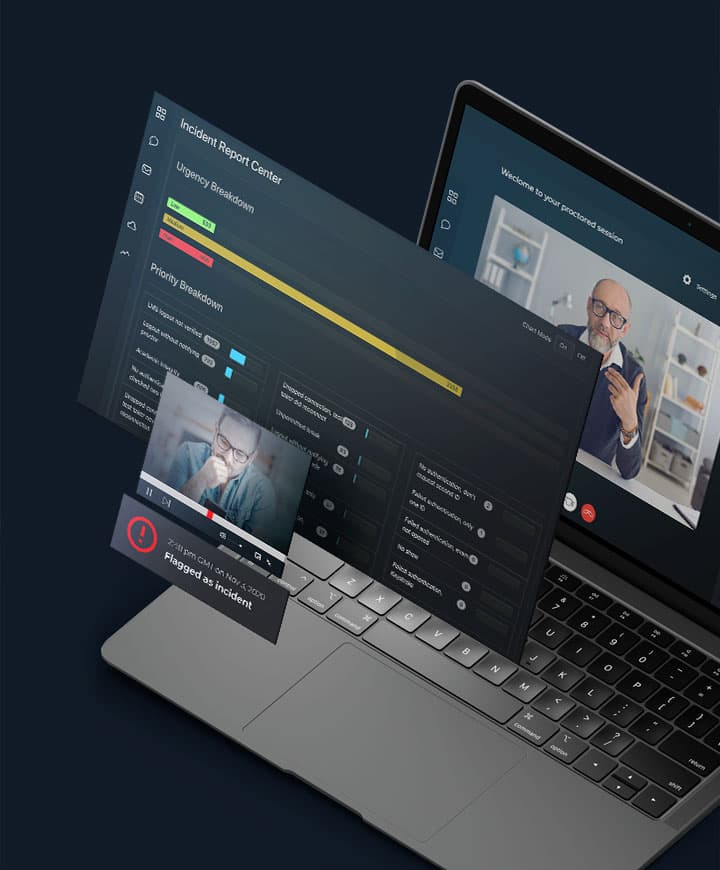
Case in point
Scaling a WebRTC proctoring platform to 5,000+ daily exams
Oxagile modernized a platform for a U.S. proctoring provider serving students from 129 countries. The project connected biometric identity checks, automated monitoring, recordings, and reporting within a system designed to support more simultaneous exams.
- The platform supports 1,000+ simultaneous connections and 5,000+ daily exams
- A 93% increase in platform capacity
- WebRTC recording of the test taker’s face and desktop activity
- Biometric identity validation supported by challenge questions
- Automated incident alerts and reporting with penalty-point scoring
The setup also extends to the workspace. Object recognition checks the room for books, phones, smart watches, and notes. The exam rules determine what those observations mean, for instance, a textbook may be allowed in an open-book assessment and prohibited in another test. Once the initial checks are complete, monitoring follows the session as it unfolds.
How does AI proctoring work during the exam?
Monitoring can bring several inputs into a single event log. For example, Oxagile’s platform flags light and audio changes, head movements and window resizes.
What the camera checks during an AI-proctored exam
CHECK | WHAT THE CAMERA LOOKS FOR | KNOWN WEAK SPOT |
Face in frame | Is one face visible throughout the exam? | A room that is too dark or too bright; slouching that crops the face |
Same person | Does the face match the enrolled profile? | Glasses, hairstyles, and head coverings may affect results |
Extra people | Is a second face in view? | No public data yet |
Head and eyes | Where do the head and gaze point? Gaze estimation varies by product. | Movement and poor light; some neurodivergent behaviors trigger more alerts |
Objects | Phones, books, notes, and smart watches. | No public data yet |
Light level | A sudden change in room lighting. | No public data yet |
Distance | How far is the face from the camera? | Pushing the laptop screen back can crop the face |
Not the camera: audio level, window resize, browser and tab events, typing patterns. | ||
A flag marks a moment for a person to review. It is not a verdict. | ||
Face in frame
The most basic check establishes whether a human face remains visible. Losing sight of it may generate an absence alert even when the test taker is still at the desk. Respondus Monitor’s documentation describes how poor lighting, slouching, or tilting a laptop screen can make the face difficult to assess or crop it out of view1.
Same person
Presence leaves the identity question open. Recognition compares the visible face with the enrolled profile, a task that depends on a usable image. Respondus tests its models using images of people with different glasses, hairstyles, and head coverings to account for variations in appearance2. An identity alert needs to be considered alongside the conditions in which the image was captured.
Extra people
Face detection is also able to identify more than one face in the image. The recording gives the proctor a sequence to examine: when the additional face appeared, how long it remained, and what happened during that interval. Those details establish how the observation relates to the exam rules.
Head and eyes
The recording also shows changes in head position, including ordinary posture adjustments. Some products supplement this with an estimate of gaze direction. A recent review of 80 studies found webcam gaze tracking struggles with movement and poor light3. An apparent look away can therefore reflect an unreliable estimate. Gaze availability and alert settings vary by product.
Objects
The other part of the camera’s view is the workspace. Object detection looks for visible items such as phones, books, notes, and smart watches. A proctor examines the item against the permitted materials and uses the recording to establish how it appeared and was used during the exam.
Light level
Every visual check depends on the image it receives, so recording conditions also enter the analysis. The system checks light level, distance from camera, head movement, and headgear. Lighting changes may be logged, while dim light or glare can obscure facial details. Respondus describes prompts to correct poor lighting and improve the footage available for review1.
Distance
This check monitors how far the face appears to be from the webcam. Posture and laptop position also affect the framing: the same resource documents slouching and accidental screen adjustments among the reasons faces become cropped1. A distance alert consequently needs to be examined together with what remains visible in the image.
Together, these checks provide real-time video analysis of the session. Other parts of the platform add observations that originate outside the camera image.
Make every proctoring alert count
Oxagile connects AI-powered exam monitoring with efficient human review in custom proctoring platforms.
What the camera does not check
A microphone supplies the audio, while screen capture and browser monitoring record activity on the computer. A window-resize alert might therefore appear alongside a head-movement alert in the same exam record, although they come from different inputs.
For identity verification, a platform may draw on another source of evidence, specifically, the way a person types. Oxagile’s systems also learn typing patterns as a second check on identity. This form of behavioral biometrics uses keystroke data collected through the software.
The camera’s own output remains a visual observation. It’s not capable of establishing intent, and its face checks have distinct purposes: detection locates a face, while recognition compares that face with the enrolled profile. Poor visibility often disrupts detection before a meaningful identity comparison is possible.
Why some innocent students get flagged
That dependence on the recording explains how an uneventful exam sometimes still produces alerts:
Lighting
A dim room or glare obscures facial features.
Framing
Slouching or adjusting a screen pushes the face partly out of frame.
Movement
Changes in position disrupt gaze estimates or resemble looking away.
The 2026 review found darker skin tones are more likely to be misclassified. The same review warns neurodivergent behaviors are more likely to trigger alerts3.
Pre-exam setup checks help identify lighting and framing problems. Respondus reports cutting false positive flags by 80% in a year1. The 80% figure is Respondus’s own reported improvement in Respondus Monitor.
What happens after a flag
When a check triggers a flag, the system logs the event with a timestamp. For the proctor, the next requirement is a way to open the relevant footage. Oxagile’s systems produce video reels with time-stamped events for review.
The proctor then follows what happened before and after the event. For a missing-face alert, that may reveal how a change in camera angle cropped the face. For an object alert, the reviewer examines the item and the permitted materials. The reviewer now has the opportunity to assess the initial observation against what the recording shows and the exam allows.
The review then returns to the full session. The platform scores sessions with penalty points and reports incidents in real time. A post-exam report brings the event records together. Automated scores help prioritize sessions for review, but a person determines whether the evidence establishes a violation.
AI exam proctoring narrows hours of video to a few moments worth examining. Each flag needs to give the reviewer both a reason to look and enough footage to reach a decision.
Questions to ask before you build or buy
For a team selecting or developing an AI proctoring platform, the same sequence becomes a set of decisions about how the service will operate. The questions below follow those decisions from camera checks to the people and data behind them.
Which checks run, and which can we turn off?
Establish possible scenarios for check configuration for different exam formats, permitted materials, and student requirements. Ask which settings apply to an individual test.
Can sensitivity be adjusted?
Ask how event duration and repetition affect flagging, which settings may be changed, and how those changes affect the alerts sent for review.
Who reviews flags, and how quickly?
Confirm when review happens, who can intervene during an exam, and who makes the final decision. Examine the footage and information available to that person.
Does the system catch poor lighting and framing before the exam?
Look at the setup prompts and the route to support when a problem cannot be resolved before the test starts.
What is stored, who can access it, and for how long?
Get specific answers for recordings, identity profiles, event logs, and reports, including retention periods, access permissions, and deletion settings.
For a software development project on remote proctoring, a sample exam brings these requirements together. Following it through to the final report establishes what the student sees, what the software records, and what a human reviewer needs to make a decision.
Final thoughts on AI-based proctoring
Every camera check serves a purpose, but each one also introduces the risk of false alerts. For EdTech providers, the challenge is deciding which checks are worth running, how sensitive they need to be, and how much time proctors spend reviewing the results. Those choices matter even more as exam volumes grow and requirements change.
Where should your proctoring investment go next?
We can help you assess what to retain, what to develop, and what to validate before committing to a larger build.
Sources
- — Respondus
Enhanced flagging for Respondus Monitor
- — Respondus
Why we do our own machine learning
- — Springer Nature Link
Ensuring academic integrity through automated online exam proctoring a decade long systematic review
FAQ
How does AI proctoring work?
AI proctoring analyzes webcam footage alongside any enabled audio and screen monitoring. Camera checks cover face presence, identity, head position, visible objects, and gaze direction. Each triggered rule creates a time-stamped flag. In Oxagile’s systems, the flagged footage goes to a human proctor for review against the exam rules.
Can AI proctoring track eye movement?
Yes, systems with gaze estimation are capable of estimating viewing direction from webcam images. Their capabilities and alert settings vary. A recent review of 80 studies found webcam estimates less reliable than dedicated eye-tracking hardware and more vulnerable to movement and lighting variation. A proctor needs to interpret gaze alerts in context.
Does AI proctoring decide whether a student cheated?
No. AI proctoring identifies events that meet its flagging rules. A person examines the recording and decides how the event relates to the exam requirements. Oxagile’s proctoring systems provide alerts and recorded footage for that review, allowing proctors to focus on selected moments within a session.
Is AI proctoring face detection or face recognition?
AI proctoring may use both. Face detection locates a human face in the frame and can identify the presence of multiple faces. Face recognition compares the visible face with an enrolled profile. Oxagile’s systems support both capabilities, with identity confirmation available at sign-in and during the exam.
Why do innocent students get flagged by AI proctoring?
Innocent students can be flagged when poor light, cropped framing, or movement makes the video difficult to analyze. A 2026 review also identifies misclassification risks for darker skin tones and alerts associated with some neurodivergent behaviors. Setup checks can resolve recording problems, while human review helps interpret the events that remain.
How does remote proctoring using computer vision ensure exam integrity?
Computer vision exam proctoring helps reviewers locate events such as another face, an identity mismatch, or a phone in view. It connects those observations to recorded footage for review. Browser lockdown and separate identity procedures cover additional checks, while a person assesses the evidence against the exam rules.
What is the difference between AI proctoring and live proctoring?
Live proctoring has a person watch an exam as it happens. AI remote proctoring uses software to analyze sessions and mark events for review during or after the test. A platform can combine them, using alerts to direct a live proctor’s attention and recordings to support later examination.
Does AI proctoring work with Canvas, Blackboard, and Moodle?
Yes, AI proctoring software can connect with Canvas, Blackboard, and Moodle through supported integrations. Oxagile offers integration with these learning management systems and developed an LTI-compliant proctoring platform for a U.S. company serving students from 129 countries. The exam launch and reporting workflow depends on the integration implemented for the institution.