














This website uses cookies to help improve your user experience


Ask around a large video operation, and someone will own up to a file called FINAL. Next to it live FINAL_2, FINAL_APPROVED, FINAL_APPROVED_USE_THIS, and a 91 GB ProRes master whose filename ends in someone’s initials and the date of a meeting nobody remembers.
One of those five is the version going to air tonight. The other four keep getting backed up and paid for every month, because deleting anything with the word FINAL in the name is a decision no sane person makes at seven on a Friday evening. Video asset management software exists so nobody has to make that call in the first place.
The storage bill is the cheapest part of the problem. Harder to see are the twenty minutes spent establishing which file is current, the shoot commissioned for footage that already exists three folders away, and the music cue nobody checked before a clip went into a package for a territory where the license lapsed. Rising asset volume and more delivery endpoints make these events harder to trace back to a cause.
According to Fortune Business Insights1, the media asset management market is expected to grow to 7.29 billion USD by 2034, with cloud deployment leading the way. However, other analysts include archive services and general digital asset management (DAM), resulting in estimates two to three times higher.
This tells us more about where the category boundary is drawn than about the market itself. Cloud-native systems designed to manage media operations are absorbing more of that spending each year, and this trend is more important than any specific total.
This article looks at video media asset management from an implementation perspective: what businesses need from such a system, which capabilities carry weight in video-heavy production, where off-the-shelf software fits well, and what to work through before committing to an architecture. Platforms get their own section, kept short, since product choice rarely decides whether the result works.
Key takeaways:
MAM in video manages video assets together with everything attached to them: metadata, versions, permissions, rights windows, and the processing jobs each asset passes through on its way from ingest to eventual deletion. The label varies, as some call it digital video asset management, others simply video media asset management, but the job underneath stays the same.
Framing a MAM as centralized storage undersells it by a wide margin, which is why a good share of implementations disappoint. Object storage already solves capacity cheaply. Storage cannot tell a distributed team which of four masters carries the approved audio layout, and it can’t stop a clip from reaching a market where the underlying rights lapsed. Video MAM systems become valuable in proportion to how much movement there is between the people and systems that touch an asset before it reaches distribution.
The difference from traditional DAM comes down to what the assets demand. DAM was built around images and marketing collateral, where files are small and a thumbnail describes the asset well enough. Video brings multi-terabyte camera originals, dozens of derivatives per title, frame-accurate references, timecode, subtitles, audio stems, and processing jobs that take hours of compute. A DAM asked to run broadcast operations tends to hold up until the first live event.
Size matters less here than symptoms. Video production asset management shows up first in operations working against fast turnarounds. So do streaming services with multi-format catalogs, post houses coordinating remote editorial, brands running in-house video teams, and software vendors building products on top of someone else’s content operations.
Centralization matters less as a place to put files and more as the point where naming and metadata become someone’s responsibility. When an operation has one authoritative index, the daily question changes from “who has the latest cut” to “which version is approved for this market”. And that second question has an answer the video asset management system can give without a phone call.
Search speed sounds like a convenience metric until you multiply it across a newsroom. In one MAM engagement where Oxagile’s video engineering team rebuilt cross-site search around a single umbrella engine, search became roughly 20 times quicker, and overall response times improved by a factor of several hundred, which in a breaking-news operation converts into segments that make their slot.
Territory windows, talent releases, music licenses, and embargo dates belong in the metadata model, with enforcement wired into publishing workflows. Where content leaves the building under license, protection needs to extend past access control into the delivery chain itself, which is where DRM sits. Distributing premium video usually means integrating the MAM with DRM systems, so entitlement decisions and license issuance draw on the same rights data.
Footage that cannot be found has the commercial value of footage that does not exist. Well-tagged archives support licensing revenue and automated reuse in highlights, and they cut the volume of shoots commissioned to recreate material already sitting on tape.

A media software provider serving content producers and distributors came to us with a MAM buckling under seasonal load and breaking-news spikes, plus a growing tangle of third-party integrations that destabilized each other.
Oxagile’s team ran an architecture audit, migrated to AWS, moved to Kubernetes and a microservices-oriented architecture, and built middleware to prevent integration collisions. The results included 1,000 times better index scalability, roughly 900 times faster response times, six times lower deployment costs, and around 500 developer-hours saved per year.
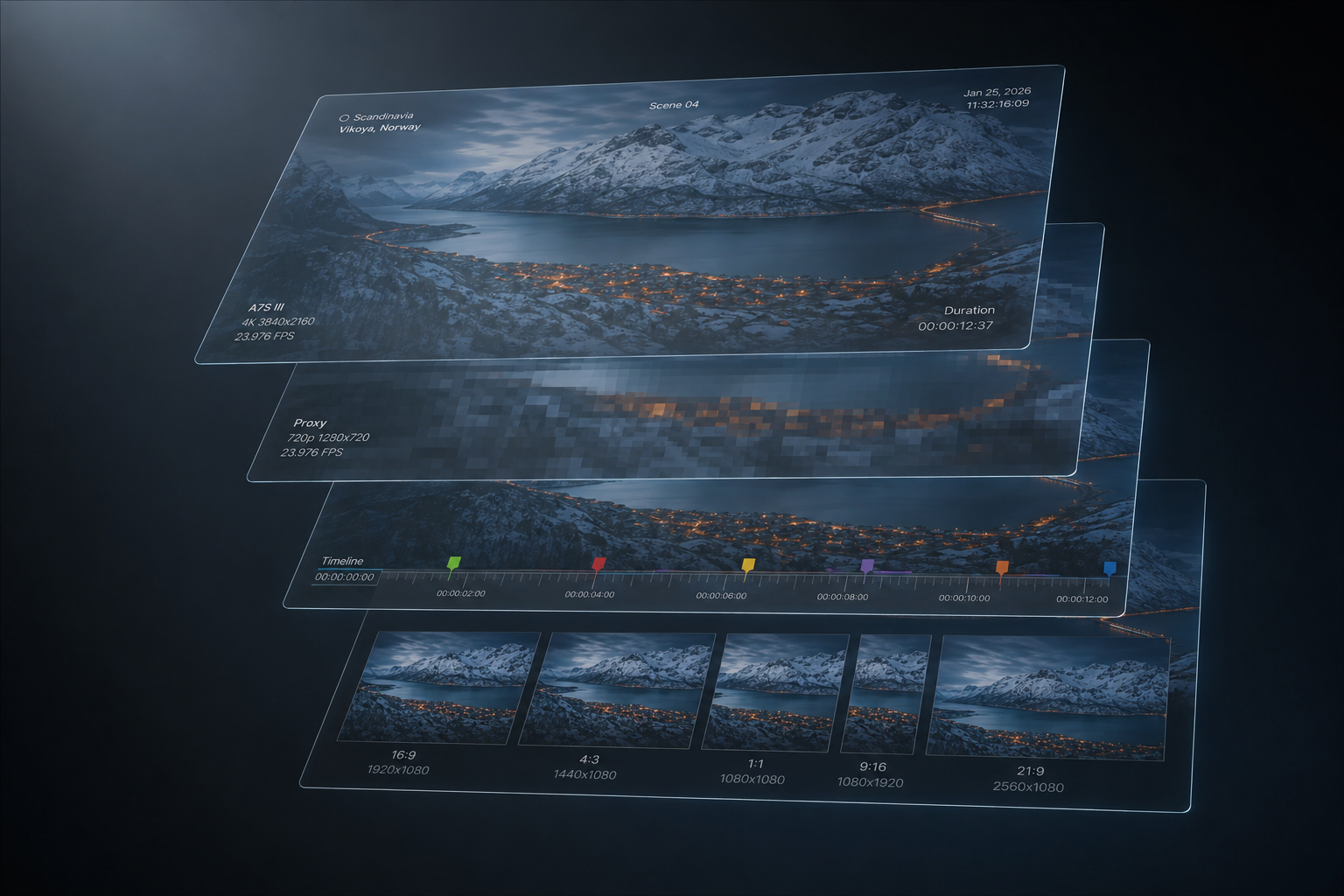
Video metadata splits into a few distinct layers. Technical fields such as codec and frame rate arrive free from ingest. The descriptive layer is where systems succeed or quietly rot, because it depends on humans filling fields against a deadline. AI-assisted tagging through speech-to-text, face and object recognition, and shot detection has moved from novelty to baseline expectation, and it works best as a first pass that a librarian or producer corrects.
An editor in another country cannot pull a 91 GB camera original over a domestic connection, and anyone who has tried knows the download bar has a way of turning an afternoon into an existential experience, quite apart from the egress fees you rack up for the privilege of watching it crawl.
Proxies are low-resolution, timecode-accurate stand-ins that let review and rough cuts happen anywhere, with the conform against the original file happening only at the end. Proxy strategy also carries a running cost, since resolution and codec choices determine bandwidth and how soon a proxy exists after ingest, and both are paid for daily.
Review cycles collapse when feedback attaches to a frame instead of arriving as an email saying the transition near the middle feels off. Frame-accurate comments and threaded approvals shorten the loop between the edit suite and the client, and they leave an audit trail of who approved what, which matters when a compliance question surfaces months later.
A single title can spawn dozens of deliverables across broadcast masters, streaming ladders, social crops, and territory-specific versions with different subtitle and audio configurations. The MAM should trigger and track those jobs, tie every output back to its parent, and report failures where someone will see them. The alternative, more common than vendors admit, is a transcode farm running jobs that no one owns until a delivery deadline is missed.
A filename field with a search box on top does not amount to retrieval, though it is how most catalogs get used once the tagging discipline slips. Useful retrieval means faceted filtering across technical and rights fields, plus transcript search and saved queries that behave like living collections.
Response time under concurrency matters as much as accuracy, since a search that takes eight seconds during peak hours will be abandoned in favor of somebody’s local drive.
Watch folders and conditional routing turn a catalog into an operational system. A watcher module that detects a new file and starts different workflows depending on the folder and format removes an entire class of manual handoffs. The API surface deserves the same scrutiny as the feature list, because everything you will want to connect over the next five years passes through it.
Oxagile’s tip:
Sit through enough MAM demos, and you will notice they all show the same two things, search and tagging, while the parts that eat a year of engineering time never make the slide deck. Start with partial API coverage, event webhooks that fire without enough context, and metadata schemas that resist extension.
Ask any vendor for the API documentation before the second demo, and check whether the operations you care about are reachable programmatically, not just through the interface.

Our team has built and rescued media systems for broadcasters, distributors, and MAM software vendors.
If you are scoping a build or trying to work out whether your current setup can carry another year of growth, our media asset management services start with an honest assessment.
Before looking at what is available on the market, a word about what is already installed, because a shocking amount of broadcast video still runs through systems that predate the smartphone.
Plenty of large operations still run legacy MAM platforms such as Sony Navigator X, a product nobody is buying new anymore and everybody is still quietly running, in the way people keep driving a car they know has a problem because the problem is, at least for now, theirs and not yet the road’s. For these operations, the decision was made years ago, and what is left now is working out how. Our team has handled such migrations, including reverse-engineering an undocumented legacy database to recover data mappings that were never written down by anyone still employed.
A few other names come up constantly around video MAM and are worth separating out before the list starts. An operation’s media environment usually contains EVS, DIVA, Vantage, Signiant, Avid, Adobe Premiere Pro, and AWS S3, among others. These are production and storage systems that sit around a MAM, and they matter enormously for interoperability, but putting them on the same shortlist as an actual MAM platform is comparing apples to loading docks.
The video asset management platforms below cover a reasonable spread of the market, and reviewing them feels closer to reviewing family estate cars than sports cars. Nobody is going to fall in love with any of them, and none is ranked here, because the one that suits a newsroom moving live feeds off satellite is not the one that suits a marketing team publishing product videos. And pretending otherwise is how procurement projects go wrong.
Sony’s cloud media platform, operated by Sony Media Cloud Services and on the market since the early 2010s, with Sony reporting more than 175,000 users and over 30 million GB of stored content.
Best for: production, post, and sports or news teams that want cloud review, transfer, logging, and archive without running infrastructure, and for organizations already working inside Sony’s production environment.
Its strength: media handling built specifically for video work, with NLE integrations into Premiere Pro, DaVinci Resolve Studio, and Avid, plus an enterprise tier that adds live stream support and bring-your-own AWS S3.
Where it thins out: enterprise metadata modeling. Worth flagging too: proxy resolution caps at 540p below the Business tier, which matters if remote review needs to happen at 1080p.
Pricing is public up to the Business tier. Free with 10 GB, Pro at $15 a month with 2 TB, Team at $49 a month with unlimited members and 3 TB, and Business at $249 a month with unlimited workspaces and 6 TB. The 1080p proxy resolution sits behind that same Business tier, which is a curious place to put it, the software equivalent of a car manufacturer locking heated seats behind the trim level that also happens to include the sunroof. Enterprise is quoted, starts at 12 TB, and carries no annual commitment requirement.
Adobe’s enterprise DAM, descended from Day Software’s CQ platform after the 2010 acquisition, now delivered as a cloud service.
Best for: large marketing organizations producing high volumes of video alongside other content, particularly where Creative Cloud is the production standard and governance requirements are heavy.
Its strength: Creative Cloud integration and governance maturity, backed by AI features like Smart Tags and visual search.
Its con: The cost is real, and so is the implementation weight, since the feature set leans toward marketing operations more than broadcast production.
Pricing works differently for video teams. Since December 2024, new customers license either AEM Assets Prime or Ultimate, with consumption metered in Operations. Delivering or downloading an image costs one Operation, delivering a video or a transformed variant costs 20, and each encode, each AI language caption, and each smart crop also costs 20. A video-heavy library therefore consumes an Operations allowance at a very different rate from an image library of the same size, which is the sort of thing that surfaces in year two of a contract. List pricing is not published, and third-party estimates put enterprise deployments in six figures annually.
A cloud-native DAM founded in 2010 in Vancouver and built on Microsoft Azure.
Best for: mid-market and enterprise marketing teams with substantial video libraries and users spread across regions and agencies.
Its main appeal: unlimited-user licensing instead of per-seat billing, paired with Azure-backed regional availability.
Its con: broadcast-grade workflows and live operations are not its strength.
Pricing is quote-based, structured around storage and feature tiers, and third-party 2026 guides place typical subscriptions in the mid-five figures annually, with implementation running around three months.
Widen began as a Wisconsin photoengraving business in 1948, moved into digital asset management in the 2000s, and was acquired by Acquia in 2021.
Best for: enterprises that need governance-heavy asset management across brand, product, and video content, especially product-led companies that benefit from DAM and PIM in one platform.
Its strengths: the configurable metadata schema is the draw here, along with product information management and over 50 prebuilt integrations.
Its cons: production video workflows are a secondary concern for the platform, which still shows in the depth on offer.
Pricing is quote-based, with tiers varying by user count and storage.
Oxagile’s tip:
The comparison that predicts success has nothing to do with feature coverage. Take three of your most awkward workflows, the live feed that ingests during a match, the version that has to be pulled from one territory only, the archive restore that has to complete inside an hour, and ask each vendor to walk through them end to end.
Products differ far less in what they store than in what they let you automate around, and the awkward workflows are where those differences surface.
Metadata models built retroactively get corrected one asset at a time, a repair job that never quite finishes, not unlike painting a bridge that keeps growing faster than the paint dries.
Start from the questions the business will ask of the archive in three years, work backwards to the fields that answer them, and keep the mandatory set small enough that a producer with fifteen minutes will complete it. Controlled vocabularies beat free text for anything you intend to filter on later, and every field needs an owner and a moment in the workflow where it gets filled.
A MAM that models your catalog accurately and your process badly will be worked around within weeks, usually through shared drives that reintroduce the original problem. Map the real path an asset takes, including the informal steps, before deciding what the system should enforce. Our breakdown of MAM workflows goes through this in more depth.
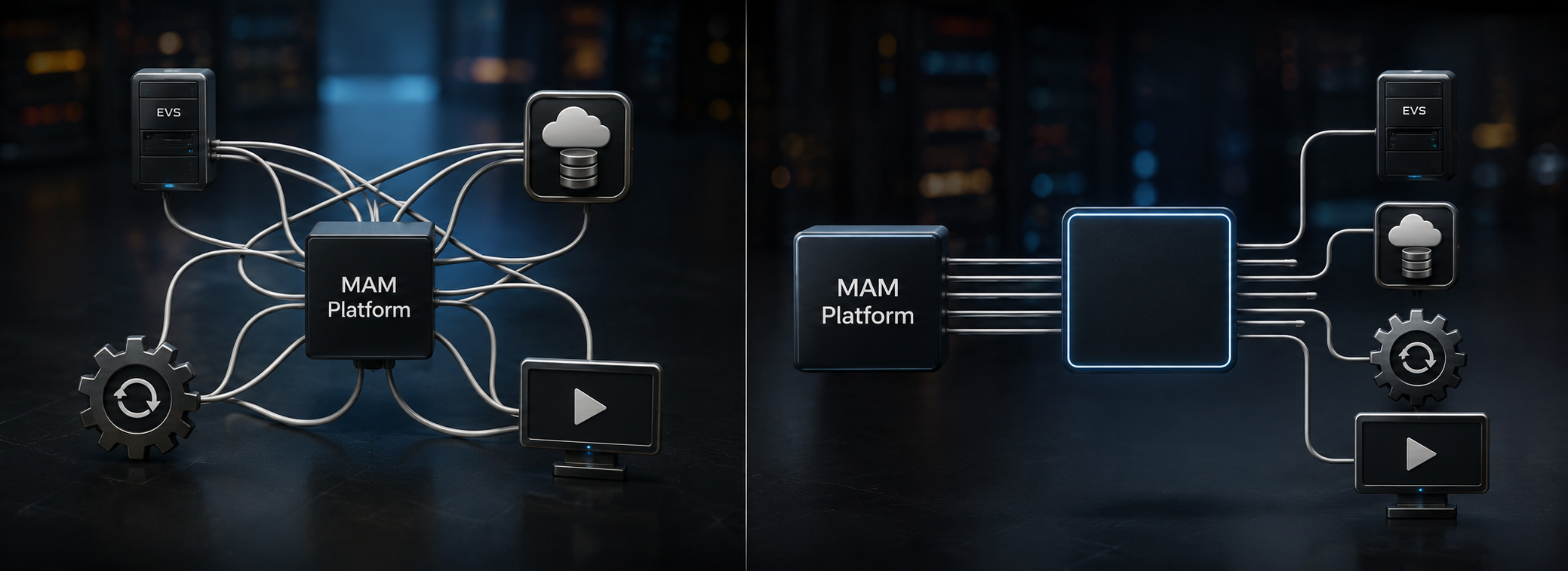
MAM almost never stands alone. It is one node among EVS, transcode farms, transfer acceleration, storage tiers, editorial suites, playout, and distribution platforms. Point-to-point connections between all of them produce a system where one vendor upgrade breaks three workflows.
A middleware or orchestration layer, with event-driven services communicating over a message bus, keeps integrations from destabilizing each other. It also gives you one place to put retry logic and the small transformations every pair of systems ends up needing.
Role-based permissions need to reach individual assets and specific operations, since the right to view a proxy, download a master, and publish to a territory are three different rights. Rights metadata maintained in a separate spreadsheet will be wrong within a quarter, and it will be wrong in the direction that produces a takedown notice.
Storage growth is linear and cheap to forecast. Concurrency breaks first, in the form of simultaneous transcode jobs during a seasonal peak or several live feeds arriving at once while a newsroom searches the archive.
Load-test against the operational peak you expect three years out. Queue depth and index performance are the numbers to watch, and disk consumption is the easy part.
Media operations rarely justify a pure model. Hot content and burst compute belong in the cloud, deep archive belongs on cheaper tiers, and production facilities with heavy local editorial often keep on-premises storage for good reasons.
Combining on-prem deployments with cloud bursting for peak workloads is a common outcome for exactly this reason. Data gravity and egress pricing should be in the model from day one, because moving petabytes twice is a decision you make once.
In legacy migrations, the reliable approach extracts metadata, editorial structure, markers, and storage references from the old system, transforms them into the new data model, and loads them through APIs, with media remaining in original storage until access is required. Both platforms then operate in parallel, and archived content can be restored on a controlled path without losing editorial context.
Budget discovery time for reverse engineering, since the systems that most need replacing are the ones whose documentation left with the person who built them.
Oxagile’s tip:
Among video asset management tips, this one gets skipped more than any other. Agree on the definition of “done” for an asset before migration starts.
Editorial calls a cut final at one point, compliance at another, and distribution at a third, and the mismatch usually surfaces mid-project, once the status field they are all migrating into already carries three incompatible meanings and no owner.

A MAM platform serving media organizations needed integration into a content distributor’s environment, alongside migration from a legacy Sony Navigator MAM with missing documentation and unknown data mappings.
Oxagile’s team reverse-engineered the legacy database, validated assumptions through proof-of-concept work, and designed an index-first migration covering a repository of 5 to 10 million assets.
Integrations spanned EVS, Sony Ci, AWS S3, DIVA, Vantage, and Signiant, with live ingest from multiple simultaneous broadcast feeds delivered via satellite. We also built an EVS connector and XML parser that monitor a watch folder, transform EVS metadata into the target schema, and hand it to the platform’s native ingestion service, plus support for the editorial move from Avid to Adobe Premiere Pro.
Video asset management systems get evaluated on features, then judged in production on coordination. The operations that get value from them did the unglamorous work first, giving the taxonomy an owner, mapping workflows as they run and not as the org chart imagines them, and keeping rights data where enforcement happens.
Video asset management for enterprises with live feeds, multi-territory distribution, and mixed on-prem and cloud infrastructure ends up as a systems integration project with a product at the center. Budgeting it as a software purchase is the most common reason the timeline slips.
The FINAL file problem never fully disappears, because people work fast under pressure and always will, and no piece of software has yet been invented that stops a tired producer from saving a file with a name that means nothing to anyone but him. What a designed system changes is how far the consequences travel. A duplicate stays a duplicate instead of turning into an on-air error, and the version history stays intact for whoever inherits the operation in three years, instead of landing on their desk as a problem to solve from scratch.
Oxagile’s experienced video engineers can help you pressure-test the plan before it becomes an architecture. We can give a hand if you’re integrating a platform into a complex media environment, migrating off a legacy system, designing video asset management services around your own product, or in other cases.
1. Media Asset Management Market Size, Share & Industry Analysis — Fortune Business Insights

Off-the-shelf platform subscriptions for mid-sized operations typically run from several thousand dollars a year into six figures for enterprise agreements, and that figure is often the smaller half of the total. Implementation cost concentrates in integration work, metadata modeling, migration, and change management.
A deployment into a clean environment with standard workflows can take a few months. Integration into an environment with live ingest, legacy systems, and multiple storage tiers is a multi-quarter engagement. Which of the two you get depends on what discovery turns up before the contract is signed, which is why Oxagile’s specialists always start with a detailed assessment.
The dependable gains sit in metadata generation. Speech-to-text makes dialogue searchable, recognition models cover faces and logos, shot detection breaks long recordings into usable units, and automatic subtitling and translation cut localization effort. Those capabilities attack the weakest point in most systems, the descriptive metadata humans never had time to enter.
AI output needs review workflows and confidence thresholds, since a catalog full of unverified tags creates a different retrieval problem. Automated highlight and clip generation is maturing quickly for sports and news, where the editorial patterns are consistent enough to model.
Buying is cheaper in most cases where your workflows fit the product. Building becomes defensible when the MAM is part of what you sell, when regulatory or contractual constraints rule out available platforms, or when integration requirements are so specific that customization approaches the cost of construction.
A third path that Oxagile’s team often encounters covers most enterprise cases, which is to buy the platform, build the integration and orchestration layer around it, and keep customization in code you control.
Yes, though the transition rarely needs to be total. The common pattern keeps deep archive on existing infrastructure, moves the index and active content to the cloud, and adds cloud bursting for peak processing.
The sequence matters more than the tooling. Metadata and references move first, media stays where it is until access requires movement, and the legacy platform stays available until the replacement has proven itself under real load.
Budget properly for discovery, since undocumented mappings and forgotten dependencies are the usual source of overruns that Oxagile frequently encounters when taking on legacy MAM environments.
Digital video asset management systems treat versions as related assets under a parent, with lineage recorded so every derivative traces back to its source. Proxies, masters, graded versions, territory cuts, and delivery formats each carry their own status and rights attributes.
Editorial applications connect through panel integrations so the version an editor opens is the one the system considers current, and check-in and check-out or lock semantics prevent parallel edits from diverging. Approval status belongs on the asset record and drives what publishing workflows are allowed to release, so an unapproved cut cannot reach a distribution endpoint.

