The Mega Guide to Tizen App Performance Optimization: Real-World Strategies for Samsung TV Apps

Table of contents
- Memory: Why it becomes a frequent source of Tizen TV performance issues
- Insights from the field: How memory issues are investigated and fixed
- App startup speed: The first performance signal users notice
- How teams optimize startup time in real projects
- How JavaScript workload shapes responsiveness on Tizen TVs
- Stabilizing interaction with throttling
- Re-rendering as a hidden source of JavaScript load
- UI rendering as the visible side of performance
- Animation strategy across device tiers
- Layers and compositing behavior
- CSS behavior, layout thrashing, and forced reflow
- Concluding thoughts on Tizen app optimization techniques
Building apps for Samsung TVs often starts with confidence: the stack looks familiar, the architecture feels close to web development, and everything runs smoothly during early testing. The reality of Tizen app performance optimization usually comes later, when the same application runs on real devices, with real users, and on hardware that behaves very differently from a desktop browser.
Drawing on Oxagile’s experience in Tizen TV app development, this discussion dives into performance challenges that repeatedly surface in production.

Alexander Skamarokha, Oxagile’s Performance Engineer, shares observations from projects where seemingly small technical decisions led to visible Tizen TV performance issues, such as gradual slowdowns, frustrating startup delays, and more.
We’ll begin with the layers users feel before they consciously notice them: how memory behavior influences long-session stability, why an application can gradually feel heavier even without obvious leaks, and what actually unfolds in the short but critical interval between launching the app and reaching a fully responsive screen. From there, we’ll shift the focus to the mechanics that define moment-to-moment fluidity in everyday use: JavaScript execution pressure and the rendering pipeline that turns interface logic into visible motion.
Key takeaways:
- Performance on Tizen is a broad topic, but memory issues are a primary source of poor performance, especially memory leaks that only become visible during long user sessions, not short QA tests.
- Even without leaks, excessive memory allocation can trigger frequent garbage collection, causing UI freezes, delayed remote input, and unstable playback.
- Asset management is critical, as large images and media (even if compressed) consume significant memory once decoded.
- Startup experience impacts perceived performance, with poorly structured loading flows and heavy dependencies leading to delays, blank screens, or non-interactive interfaces.
- JavaScript execution directly affects responsiveness, where excessive processing or poor timing can result in lagging during navigation and scrolling.
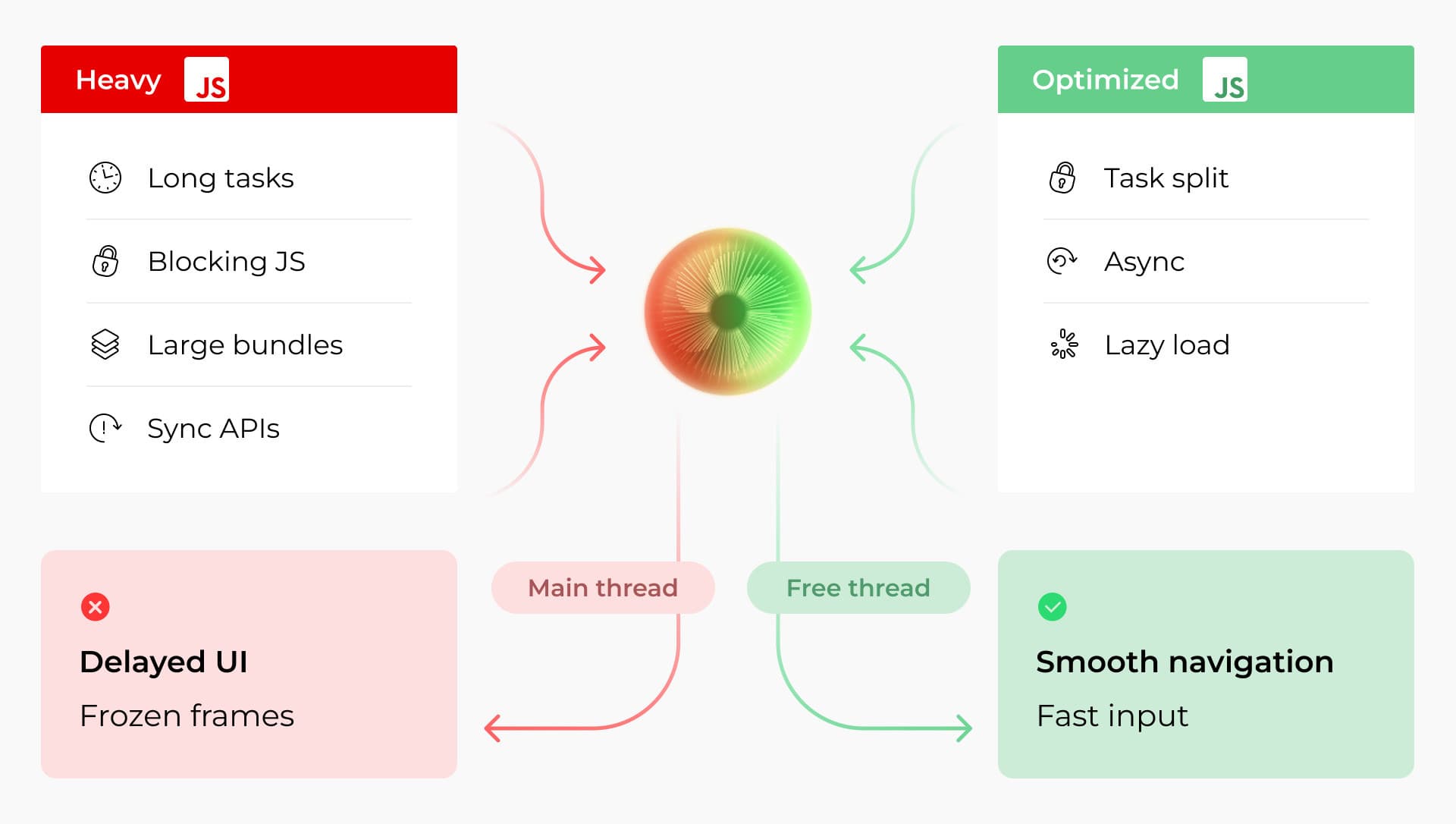
- Abnormal UI lag often comes from excessive JavaScript on the main thread, delaying input responses.
- Throttling frequent operations can stabilize responsiveness on constrained devices.
- Unnecessary re‑rendering increases execution load.
- Heavy UI layers and animations raise compositing cost, which can degrade perceived smoothness.
- CSS and layout choices matter: avoid properties that force frequent layout recalculations.
- Real‑device validation is key, as emulators don’t reflect hardware constraints and performance patterns.
Memory: Why it becomes a frequent source of Tizen TV performance issues
If startup speed is what users notice first, memory behavior is what quietly determines whether an app stays smooth an hour later. In many real projects, memory-related problems don’t show themselves during demos or short QA sessions, but they’re faced after longer playback, navigation loops, or extended browsing sessions.
Oxagile’s field experience shows that memory issues on Samsung TVs usually fall into two categories. The symptoms may look similar, yet the underlying causes differ. This makes understanding memory behavior a core part of Tizen app performance optimization.
1. Memory leaks
Memory leaks occur when objects remain in memory longer than intended. The source may be application logic, third-party libraries, or media player components.
Expert comment:
“Leaks rarely show up right away. You start playback and everything looks fine, but after an hour the frame rate drops or the UI begins to lag. Restart the app, and it feels new again. That pattern, playing itself as performance degrading over time and recovering after restart, is often the first real signal of a memory leak.”
Time plays a crucial role here. Short QA sessions may never expose the issue, while real viewers naturally trigger it through longer watch sessions. As a result, teams often encounter Tizen app slow performance only after release, when playback duration and navigation depth increase.
Another complication comes from dependencies. Open-source players or third-party libraries can introduce leaks that stay hidden until very specific usage patterns appear in production.
2. High memory allocation rate (memory pressure)
Not every slowdown means memory is leaking. In many cases, the system does release memory, but the application allocates new data faster than the platform can process it.
On Tizen devices, aggressive allocation rates push the system into frequent garbage collection cycles, causing UI pauses and delayed remote-control response. The effect becomes visually noticeable on older and low-end TVs, where hardware limits amplify performance issues that may stay invisible on newer models. Different generations of devices respond very differently to memory pressure, which explains why performance testing across the full Smart TV spectrum, including low-end Samsung Tizen Smart TV devices, often reveals issues late in production.
Expert comment:
“Sometimes the app doesn’t leak memory at all. It simply consumes too much too quickly. For example, loading many large images at once. The system starts aggressive garbage collection, and during those moments, the app can feel unresponsive to remote control input.”
A common example involves image-heavy home screens where Full HD assets are loaded for small UI cards. Network transfer size may look harmless, yet memory usage grows according to image resolution once decoding begins. Under load, even technically correct implementations can trigger noticeable performance issues.
A practical perspective
In production environments, memory problems usually follow one of two patterns:
- Memory usage grows over time due to retained objects
- Memory demand spikes faster than the platform can comfortably handle
Both scenarios affect responsiveness and playback quality, yet each requires a different approach to investigation and optimization. We’ll cover them next through practical field insights.
Insights from the field: How memory issues are investigated and fixed
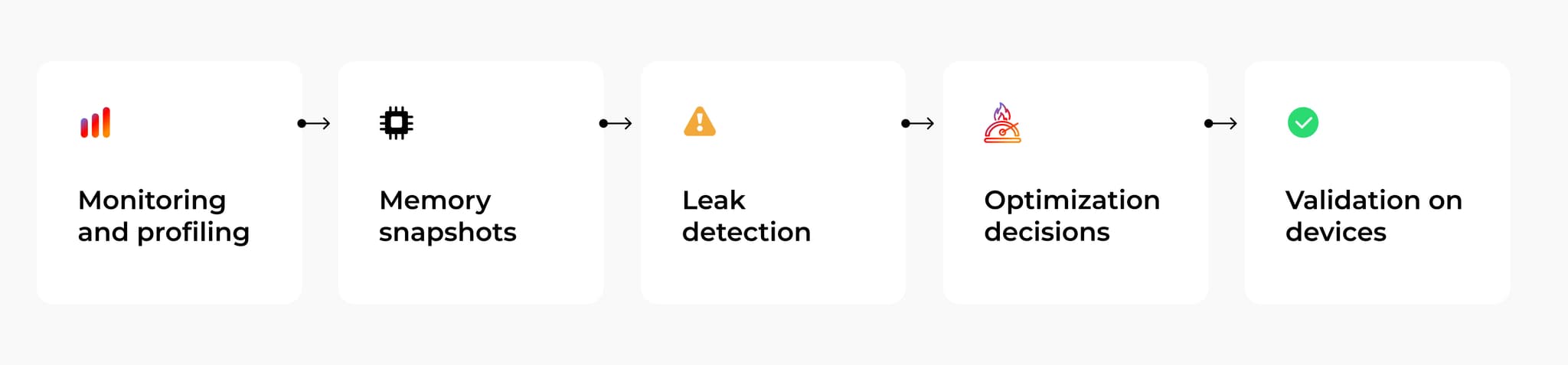
Memory optimization on Smart TVs usually doesn’t begin with fixing what’s wrong straightforwardly. The first challenge is understanding what exactly happens inside the application, and on Tizen, that step can be unexpectedly difficult.
Compared to other platforms, performance tooling on Samsung TVs is limited. Engineers often combine logs, profiling sessions, and repeated scenario testing to build a clear picture of memory behavior.
Expert comment:
“Working with memory on Tizen is harder because there aren’t many strong monitoring tools. With webOS, for example, you can use Beanviser to track resource usage. On Tizen, investigation often relies on logs and profiling through developer tools, which makes analysis more manual.”
Because of that, optimization usually starts by recreating the exact scenario that causes degradation — a task that can take longer than the fix itself.
Fixing memory leaks: Start with the scenario
Leaks often appear after specific user flows repeat over time instead of during isolated interactions.
Expert comment:
“The first step is always reproducing the scenario. Sometimes it’s endless navigation through recommendations or long playback sessions. You profile that flow, record logs, and then dig through the data to find what stays in memory longer than it should.”
A typical workflow includes:
- Identifying a repeatable user journey
- Running profiling during the session
- Comparing memory growth across iterations
- Tracing retained objects back to code or libraries
Finding the root cause often requires deep code exploration, particularly when the issue originates from dependencies or player integrations rather than application logic itself.
Fixing high allocation rate: Look at the content first
When memory pressure comes from allocation speed instead of leaks, the fastest improvements often sit outside core logic. One of the first checkpoints is visual content.
Expert comment:
“Teams often look at image size in kilobytes, but memory doesn’t care about compression. Once decoded, the size depends on the resolution. A small card using a Full HD image can consume far more memory than expected.”
Common improvements include:
- Matching image resolution to actual UI size
- Reducing the number of large assets loaded simultaneously
- Avoiding heavy image bursts during startup
Media player configuration also plays a major role. Default buffering parameters are usually designed for web playback and may consume excessive memory on Smart TVs, particularly older models.
Less obvious cases: Code-level triggers
Some issues originate at the application layer: not because code directly leaks memory, but because it keeps references to heavy assets longer than necessary.
Metadata and JSON responses typically consume little memory compared to images or video buffers. Optimization, therefore, focuses more on how visual assets are requested and retained than on API payload size.
Field reality
Memory optimization on Tizen is an iterative process. Engineers move between profiling, scenario reproduction, and validation until patterns become clear.
The biggest gains usually come from practical observations:
- Identifying workflows that degrade over time
- Reducing unnecessary asset pressure
- Tuning player behavior to match device limitations
These adjustments have a noticeable impact on Tizen app slow performance, especially on devices with tighter resource budgets.

Seeing performance issues, but not sure where they come from?
Many Tizen performance problems look similar on the surface, while their real causes sit deeper — in memory behavior, startup architecture, or interaction between platform and content. Oxagile’s engineers help teams identify bottlenecks, analyze real device behavior, and turn fragmented symptoms into a clear optimization strategy.
App startup speed: The first performance signal users notice
Startup speed shapes the very first impression of a Smart TV application. Even before navigation begins, users already form expectations about responsiveness based on how quickly the screen reacts after pressing the app button.
On Tizen, startup consists of several stages that unfold one after another. Understanding this sequence helps explain why applications that technically meet certification requirements may still feel slow in everyday use.
Expert comment:
“I usually divide startup into phases. The first one starts when you launch the app and wait for any visual reaction — a splash screen, animation, or label. The second phase ends when the UI becomes fully usable, with focus ready and navigation responsive.”
Samsung certification places clear limits on initial startup timing. The first visual response generally needs to appear within a narrow window, while full readiness can take longer depending on architecture and content load.
From a user perspective, delays become noticeable when a visually complete app homepage remains non-interactive for seconds afterwards. In real projects, this gap often becomes one of the first visible Tizen TV performance issues.
A common startup mistake inherited from web development
Many teams approach TV apps with web development habits. Pages load progressively, parts of the interface appear one after another, and elements become interactive gradually.
On TVs, that pattern frequently leads to frustration. Navigation depends on remote-control focus, so partially loaded screens create uncertainty and visual instability.
Expert comment:
“The most pleasant startup experience appears when heavy work happens behind a loading animation, and the interface becomes visible only when it’s ready. Users see a clean transition instead of watching components pop into place.”
A polished startup flow hides background work and reveals the UI only after critical tasks are complete. The result feels faster even when the total loading time remains similar.
What actually slows startup on Tizen
In many applications, startup delays come from JavaScript bundle evaluation. Before any code runs, the platform must process libraries and compile the code.
Expert comment:
“A lot of startup time goes into evaluating bundles. On older Tizen models, this phase alone can take several seconds. Until the evaluation finishes, no animation or interface appears; users just look at a blank screen.”
Challenges like bundle evaluation delays and startup bottlenecks become notably visible in large-scale OTT products, where applications must run consistently across many device generations — a situation that often reveals performance constraints long before launch.
Case in point: Performance challenges in a modular OTT platform
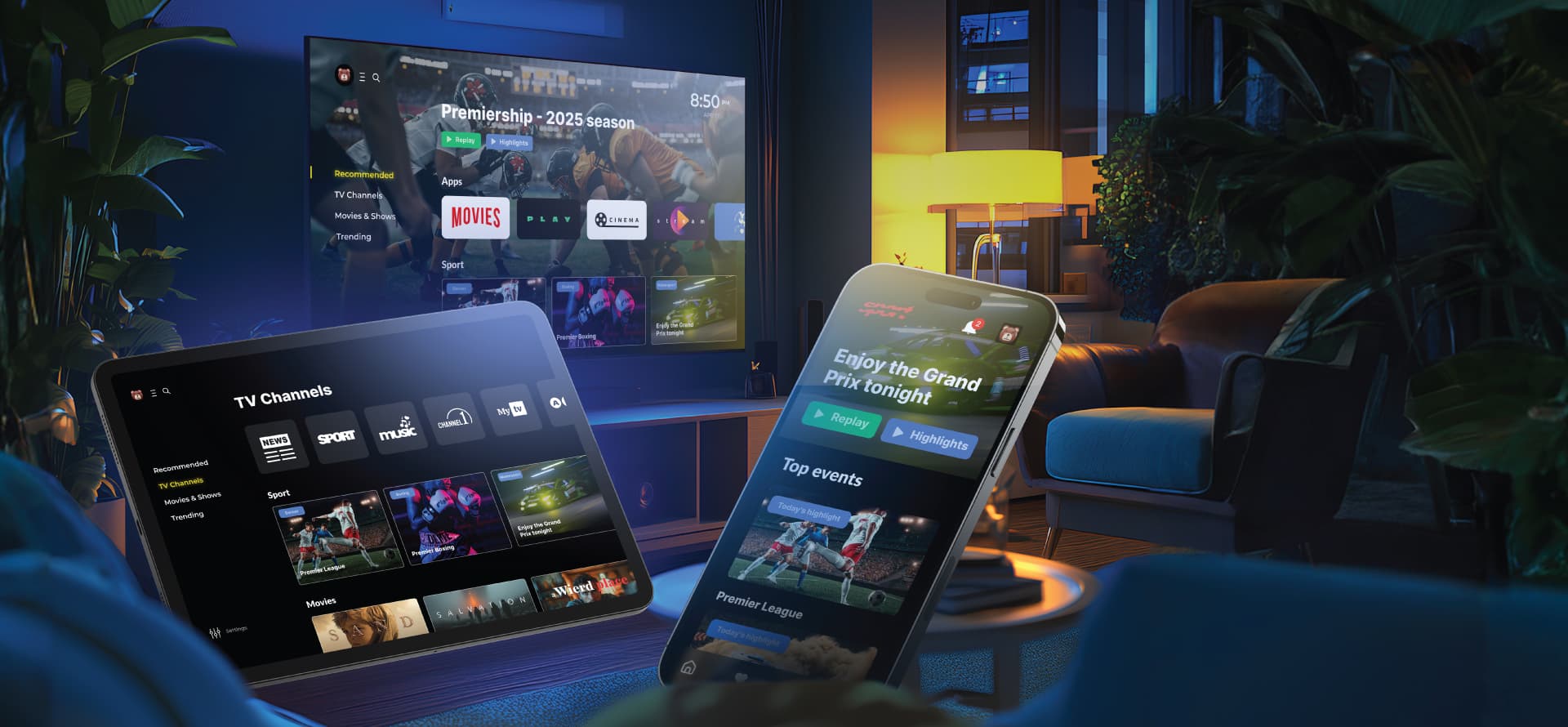
During the development of a modular OTT solution designed for multiple Smart TV environments, performance stability became a critical factor affecting release readiness. The team faced situations where startup behavior and runtime responsiveness varied significantly across device generations, making early performance validation a key part of the delivery process. The project highlighted how architectural choices and testing strategy influence real-world app behavior long before users notice visible slowdowns.
Key takeaways from the project:
- Validating startup performance on real devices instead of relying solely on emulators
- Identifying bottlenecks caused by bundle structure and dependency evaluation
- Balancing feature richness with performance expectations across different TV tiers
- Integrating performance checks into QA workflows early in development
Expert comment:
“Developers often don’t realize how much time library evaluation takes on older TVs. A dependency that feels lightweight on the web can add seconds during startup on Tizen or older webOS versions.”
Large bundles, heavy dependencies, or many small libraries can all increase evaluation time. During this phase, users may see a blank or static screen because the application has not started executing code yet.
Choosing libraries early in the project has a lasting impact. Replacing heavy dependencies later often requires large-scale refactoring.
Practical startup optimization approaches
Projects that achieve stable startup performance usually combine several tactics:
- Keeping the application bundle lightweight from the beginning
- Avoiding animation libraries or utilities that add unnecessary processing time
- Rendering only the portion of the home screen visible at launch
- Delaying non-critical UI work until after interaction becomes possible
- Simplifying visual effects on older devices when needed
The balance depends on measurable KPIs. Performance engineers often run repeated startup measurements on real TVs to understand where timing budgets are spent and where optimization efforts bring the highest impact.
Field perspective
Startup performance is closely tied to user trust. The faster the screen reacts and becomes interactive, the more stable the application feels overall.
Many improvements come from architectural decisions made early in development, which is why startup optimization plays a central role in long-term Samsung Tizen app performance.
How teams optimize startup time in real projects
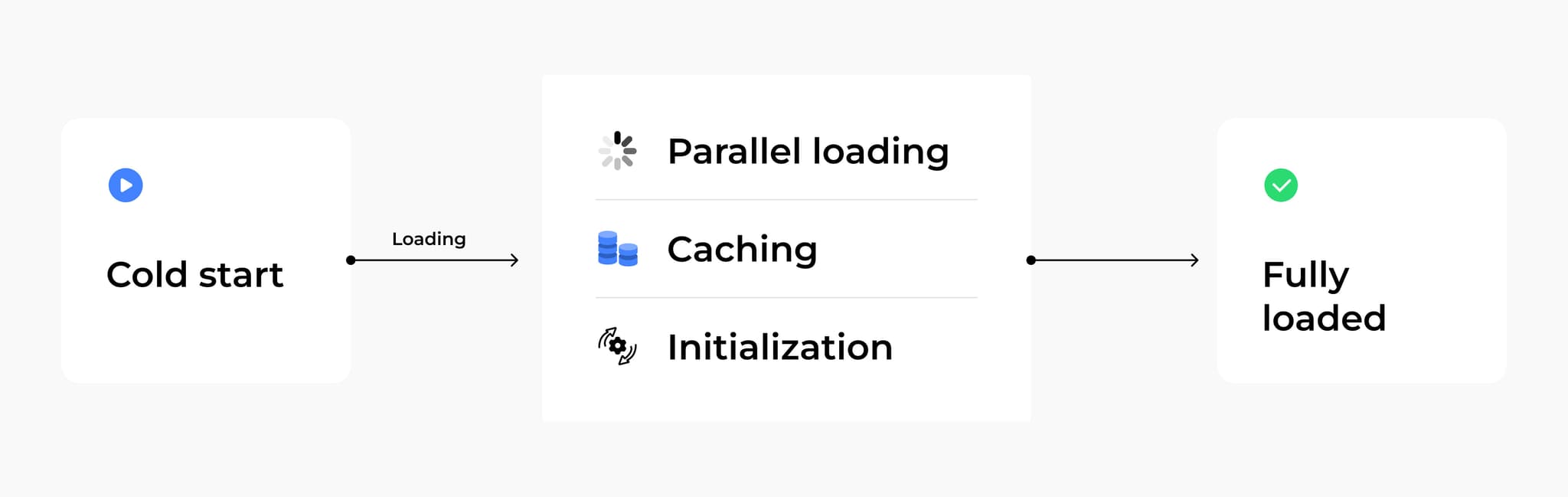
Improving startup speed usually begins long before profiling sessions. Many bottlenecks stem from architectural decisions made early in development, especially around dependencies and the application’s structure.
Choose libraries with TV performance in mind
Dependencies that feel lightweight in browser environments can behave very differently on Smart TVs. Processing power varies significantly between device generations, and small delays add up quickly during startup.
Expert comment:
“On a modern TV, a library might evaluate in a few hundred milliseconds, while on a device just a couple of years older, it can take more than twice as long. Developers don’t usually notice this during web development, but on TVs the difference becomes visible right away.”
Replacing heavy libraries later often requires large-scale refactoring, so teams with Smart TV experience tend to establish internal standards for navigation, animation, and list rendering early on.
Keep the bundle lean
Startup timing strongly depends on how much code the platform must process before rendering begins.
Common approaches include:
- Reducing dependency count
- Leveraging effective and lightweight libraries that fit the use case
- Moving secondary logic outside the initial load
- Trimming unused functionality from production builds
Even multiple small libraries can create noticeable overhead when combined inside a single startup bundle.
Balance UI rendering during startup
Home screens in OTT applications often include many rails and content rows, although only a portion is visible immediately after launch. The rendering strategy becomes a balance between initial speed and smooth navigation later.
Expert comment:
“A home page may have twenty rails, but users see only the first few when the app opens. Rendering everything at startup increases load time without improving the first impression.”
Teams often experiment with trade-offs:
- Rendering only visible elements at launch
- Loading additional rows while users scroll
- Pre-rendering more content when startup timing allows extra margin
The right balance depends on measurable KPIs and device behavior.
Adapt features to different device tiers
Tizen app performance optimization sometimes involves adjusting visual complexity depending on hardware capabilities. Heavy animations or advanced effects may remain enabled on newer TVs while simpler alternatives run on older models.
This approach helps reduce startup workload and supports consistent — performance across the device ecosystem.
Use KPIs to guide decisions
Optimization priorities become clearer when they’re based on repeated measurements rather than assumptions.
Expert comment:
“I often start with a timer in my hand, launching the app multiple times on real devices. Numbers immediately show where effort matters most — startup, scrolling, or playback.”
Timing metrics help teams decide whether to spend budget on faster launch, smoother scrolling, or richer visuals. Startup improvements often interact with other parts of the experience, making measurement essential for meaningful Tizen TV performance tuning.
Field perspective
Startup performance reflects a combination of architectural choices, content strategy, and practical compromises made throughout development. Decisions taken early in the project frequently shape how responsive the application feels long after release.
Need help improving performance on Samsung Tizen TV apps?
Performance challenges on Tizen often emerge from architectural decisions made early in development, and solving them usually requires both platform knowledge and real-world optimization experience. Oxagile’s engineers help teams identify bottlenecks, improve responsiveness, and align applications with real device behavior across different TV generations.
How JavaScript workload shapes responsiveness on Tizen TVs
If memory defines how long an application can stay stable, JavaScript defines how alive it feels from one interaction to the next. On Tizen TVs, almost every user action triggers JavaScript execution: focus changes, scrolling, menu transitions, even subtle UI effects. All of this work flows through the main thread — the same execution path that processes remote-control input.
That architectural detail explains why responsiveness can degrade even when the application appears functionally correct. In real projects focused on improving Samsung Tizen app performance, this main-thread bottleneck is often the first place engineers investigate once memory and startup concerns have been addressed.
When the main thread spends too much time executing JavaScript, input handling is delayed. The UI does not crash; it hesitates. And hesitation, on a TV interface, is immediately perceptible.
The effect becomes especially visible during fast navigation. For example, when users hold down a directional key to scroll across rails. Under such conditions, uneven execution time accumulates, exposing bottlenecks that remain hidden during slower interactions.
Expert comment:
“The biggest freezes I’ve seen weren’t caused by visual effects. They came from JavaScript doing too much at the wrong moment. In one project, a monitoring framework blocked the main thread long enough for the UI to freeze completely. That was an extreme case, but even 200-300 milliseconds of delay during scrolling are enough for users to feel something is wrong.”
Because interaction and execution run on the same thread, workload timing directly affects perceived responsiveness. Predictability becomes just as important as raw speed. For teams looking to optimize Tizen TV apps, managing JavaScript execution on the main thread is a foundational issue.
Stabilizing interaction with throttling
When the main-thread workload becomes uneven, the instinct is often to make it faster. In practice, responsiveness improves as much through consistency as through raw speed.
One of the most effective techniques for optimizing Tizen TV apps under aggressive navigation patterns is throttling. In simple terms, throttling limits how frequently certain operations execute. Instead of processing every rapid input event immediately (especially when a user holds down a remote button), the application spaces execution within a controlled interval. This introduces predictability.
Expert comment:
“Scrolling with a held button is one of the hardest things to optimize. It’s an aggressive interaction pattern. Throttling gives the app a timing buffer and stabilizes the speed instead of letting it jump between fast and slow reactions.”
Throttling, however, works only when execution time fits within the defined interval. If a single interaction already consumes more time than the allowed window, freezes persist. That’s why throttling typically complements deeper code optimization instead of replacing it.
For teams engaged in Tizen TV performance tuning, stabilizing interaction timing becomes a foundational step in maintaining consistent responsiveness across device generations.
Re-rendering as a hidden source of JavaScript load
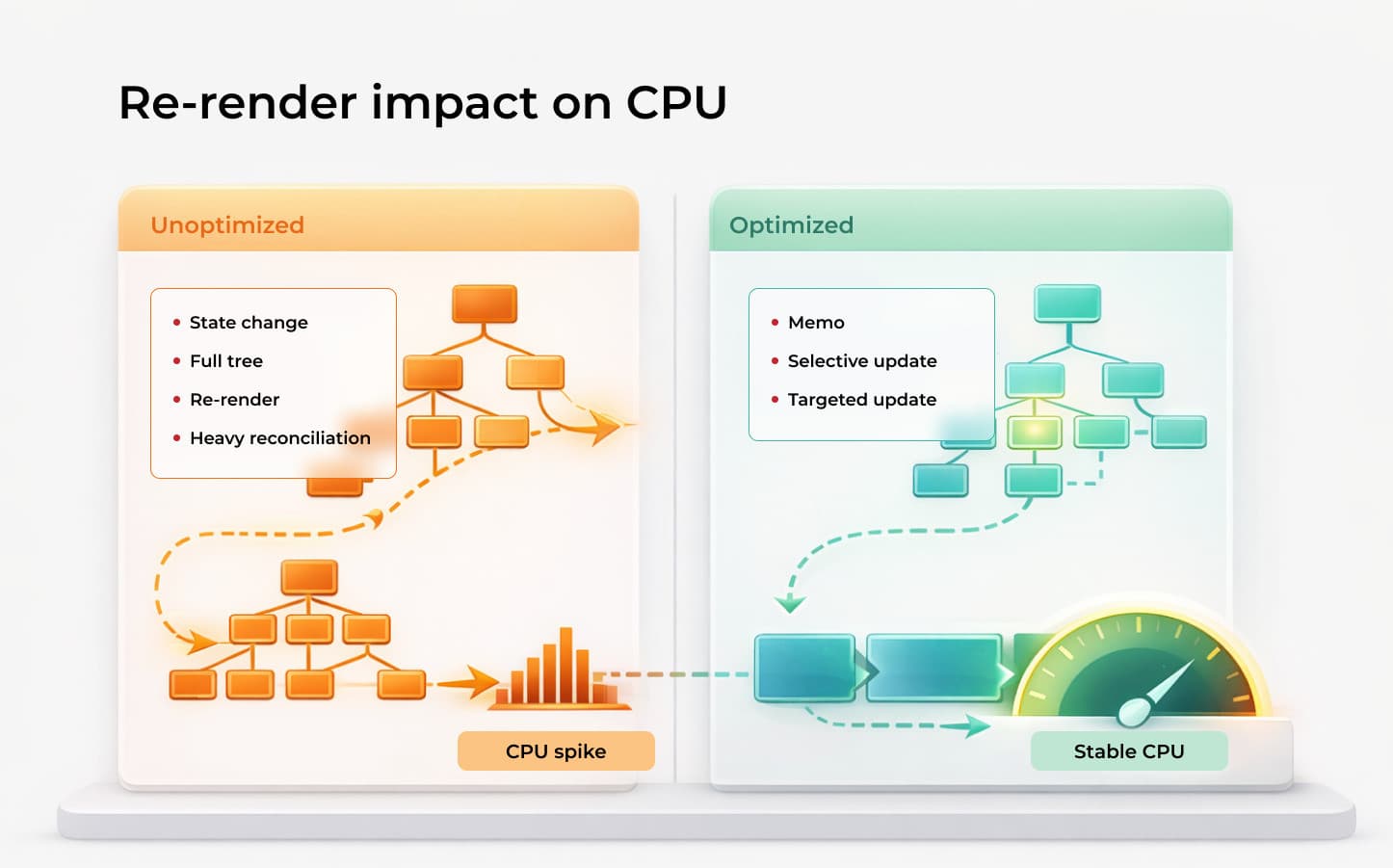
When teams analyze JavaScript performance on Tizen TVs, profiling sessions often reveal an interesting pattern: a large share of execution time is not spent on business logic but on UI updates.
In React-based applications, re-rendering is part of normal behavior. Components update when state or props change. The issue arises when updates affect far more of the interface than intended.
A focus change, for example, should ideally repaint a single visual element. In poorly structured component trees, the same action can trigger a full rail re-render. On resource-constrained devices, that difference becomes measurable and perceptible.
Expert comment:
“Re-rendering itself isn’t bad. It becomes a problem when the scope is too broad. I’ve seen cases where scrolling one element caused the entire rail to re-render instead of just updating focus. That’s where multi-second freezes come from.”
Some re-rendering is justified. Updating a “Continue Watching” rail after exiting the player, or reflecting progress state changes, requires a UI refresh. The key lies in minimizing the surface area of those updates.
Typical Tizen TV optimization techniques include:
- Isolating state to smaller component boundaries
- Preventing unnecessary prop propagation
- Making sure that visual updates affect only the required elements
In addition to increasing main-thread workload, excessive re-rendering also increases rendering costs at the browser level. When JavaScript triggers broader UI recalculations than necessary, execution and rendering begin to compound each other.
Need help with Tizen TV performance tuning?
Performance issues on Tizen require structured analysis across architecture, main-thread behavior, and rendering layers on real devices. Oxagile’s engineers deliver targeted diagnostics and measurable tuning for Samsung Smart TV applications. Explore our Tizen TV app development services.
UI rendering as the visible side of performance
After interaction becomes stable, attention naturally shifts to how the interface behaves visually. An application may respond to input correctly and still feel heavy if rendering is inconsistent.
On Smart TV platforms, the interface does not typically behave as a single flat surface. What looks like a simple homepage is built from multiple visual layers: background images, rails, cards, overlays, focus states, and gradients. Each of these elements contributes to rendering cost, and on constrained hardware, that cost becomes very noticeable.
Expert comment:
“On low-end smart TVs, animations are often the most performance-intensive part of the UI. Without it, the app looks worse than its competitors. But if you don’t control it carefully, performance degrades quickly.”
Animation improves perceived quality. Focus transitions, scaling effects, side menus sliding into view — all of these details shape how modern OTT interfaces feel. At the same time, each animated property introduces additional rendering work.
Rendering-related issues often manifest subtly. Animations lose smoothness, scrolling introduces micro-stutters, and focus transitions feel slightly delayed. The application continues functioning, yet the visual rhythm breaks.
In real projects, performance tuning gradually shifts from pure JavaScript execution to styling decisions, animation patterns, and how UI updates are expressed through CSS.
Animation strategy across device tiers
Smart TV interfaces rely heavily on motion. Focus transitions, scaling effects, and animated menus contribute to the polished and modern feel of an OTT product.
On Tizen, the question is how the animation is architected. If motion effects are tightly embedded into UI logic with no room for adaptation, optimization options become limited later.
Expert comment:
“Animation should be implemented through flags from the beginning. It has to be possible to enable or disable it depending on the device. On one project, the animation was divided into three tiers: low, mid, and high-end. For low-end TVs, it was disabled by default. After testing, we selectively introduced certain effects where devices could handle them.”
That shift in approach changes the role of animation in the system. It turns from a fixed visual decision into a configurable layer. Teams gain flexibility to validate behavior across different Samsung TV generations and adjust effects based on measured performance.
Layers and compositing behavior
Rendering on Tizen is built around compositing multiple visual layers into a final frame. Each major UI element, whether it is background images, rails, cards, overlays, or focus indicators, can exist as an independent layer processed by the browser.
Expert comment:
“Layering is normal. Every Smart TV interface consists of multiple visual layers stacked together. The issue appears when the number of layers grows unnecessarily or heavy elements are isolated into their own layers. For example, placing a full HD image into a separate layer via CSS props can significantly increase compositing cost and put additional pressure on rendering.”
On constrained Samsung devices, compositing operations are expensive. Overlapping large layers, or updating them frequently, forces additional repaints and composite operations. Under sustained interaction, this overhead becomes visible through subtle frame instability.
Dynamic updates introduce another layer of complexity. Data arrives after the initial render, components re-evaluate, and the UI recalculates more than expected. On resource-limited hardware, even moderate redraw expansion affects smoothness.
In the real world, examining layer structure often exposes inefficiencies that remain invisible in design reviews but are measurable on physical devices.
CSS behavior, layout thrashing, and forced reflow
A significant share of UI rendering cost on Tizen stems from how CSS properties influence the rendering pipeline.
Some properties affect layout and geometry, others operate primarily at the compositing level. The distinction is critical. When layout-affecting properties are animated or updated frequently, the browser must recalculate element sizes and positions before producing the next frame.
Expert comment:
“There are CSS properties that are suitable for animation and others that aren’t. If developers use the wrong ones, the browser ends up recalculating layout and repainting more than necessary. On Smart TVs, especially low-end devices, that becomes noticeable very quickly.”
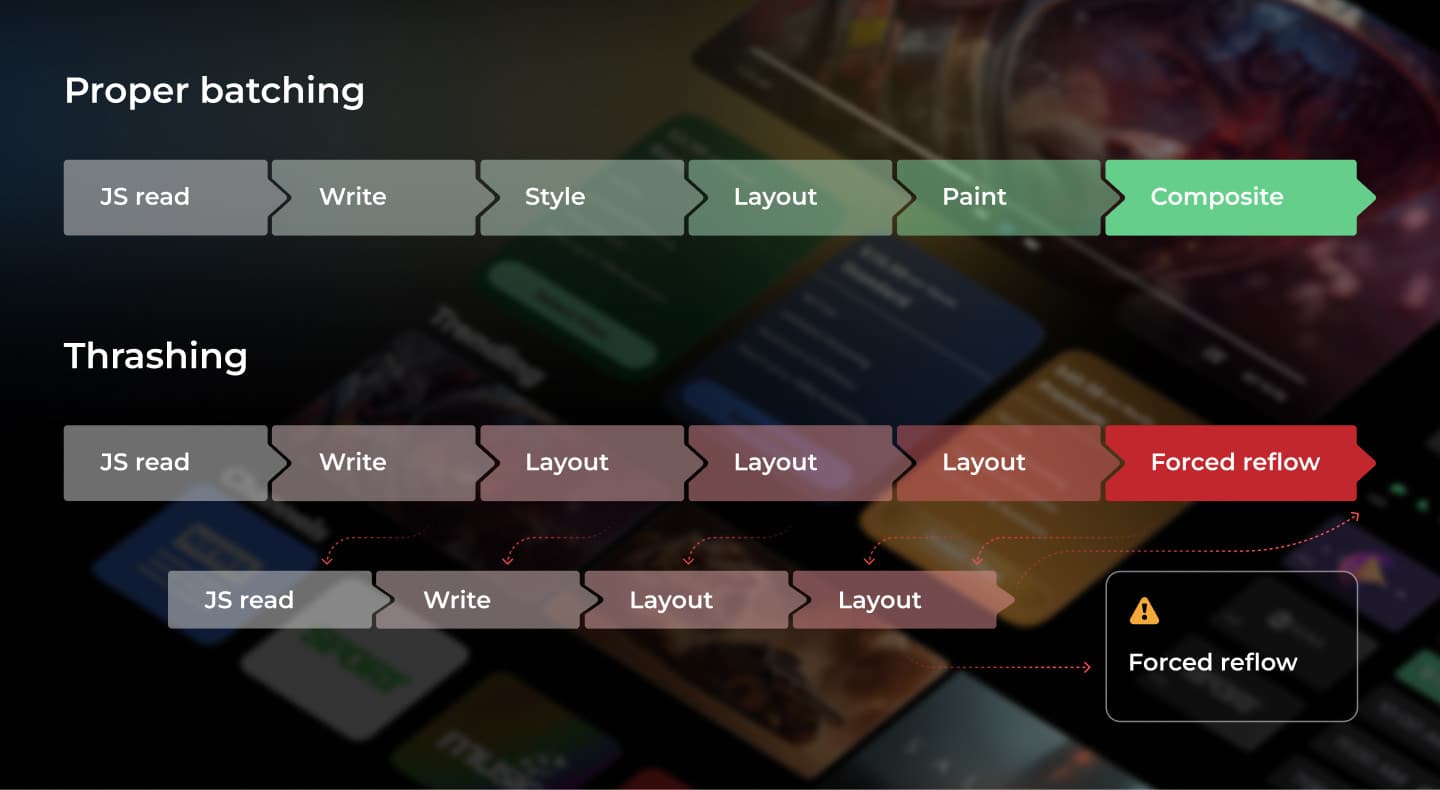
One recurring issue is layout thrashing — a pattern where layout-related values are repeatedly read and modified in close succession. Each change forces the browser to recompute the layout, sometimes across a much larger portion of the page than expected.
A related mechanism, forced reflow, occurs when JavaScript triggers synchronous layout recalculation before the browser has completed its previous rendering cycle. Instead of batching updates efficiently, the engine performs additional blocking work on the main thread.
On modern desktop hardware, these inefficiencies may remain barely perceptible. On constrained Samsung TVs, they show themselves up through uneven scrolling, unstable animations, or frame drops during seemingly simple interactions.
UI rendering performance ultimately depends on the volume of executed JavaScript and, what’s also important, the way visual updates propagate through the layout, paint, and compositing stages. CSS decisions, particularly those affecting size, positioning, and stacking context, often carry more weight than expected, especially in environments with limited processing power.
Concluding thoughts on Tizen app optimization techniques
Once you step back from individual symptoms, a different structure starts to reveal itself: performance problems on Tizen rarely “start” where they are noticed. They arrive there late. A playback hiccup might actually be rooted in how assets were prepared, how the UI is layered, or how the app decided to wake up in the first place. What looks like a momentary slowdown is often just the last visible ripple of decisions made much earlier in the pipeline.
From the user’s perspective, none of this internal machinery exists. There is no awareness of bundle evaluation, memory churn, or compositing work. There is only the felt experience: the app either flows or it resists, breathes lightly or suddenly feels dense. That gap is important. It turns performance from a purely technical checklist into something closer to perception design, where engineering choices quietly shape emotional response.
Seen through that lens, memory behavior, startup flow, JavaScript pressure, rendering strategy, animation design, and asset handling stop being separate concerns and start behaving like parts of one ecosystem. A seemingly harmless layout shift can quietly drag the main thread. An over-ambitious animation can ripple into compositing strain. A careless asset strategy can slowly inflate memory until responsiveness erodes over time. Nothing acts alone, everything amplifies something else.
This is why optimization on Samsung Smart TV platforms is about coordination. Stability appears when structure, interaction, and device constraints are tuned together, not patched separately. When that alignment holds, the application doesn’t just become faster in parts, it starts to feel coherent, from the first frame to the last interaction.
Let’s discuss your Tizen performance challenges
If your Samsung Smart TV application requires deeper analysis or targeted optimization, our performance engineers are ready to review your case and provide a structured assessment.
FAQ
Why does Tizen app performance optimization often start late in a project?
Many teams begin thinking about performance only after features are complete, because early development usually happens on modern devices or emulators where bottlenecks remain hidden. On real Samsung TVs, to a large extent, older models, architectural decisions made early can suddenly become visible through startup delays or interaction lag. Addressing performance earlier helps avoid expensive redesigns later.
Why do Tizen TV performance issues appear only on certain devices?
Samsung TVs differ significantly across generations in processing power, available memory, and browser engine versions. An app that feels smooth on a recent model may experience slower rendering or delayed input handling on older devices, even when the codebase is identical. Device diversity makes real hardware testing a critical part of performance work.
Can Tizen app slow performance happen without memory leaks?
Yes. Applications may release memory correctly while still feeling sluggish if allocation happens too aggressively or if heavy assets load simultaneously. In such cases, system-level processes like garbage collection interrupt interaction and create visible slowdowns without any actual leak.
How early should teams think about Tizen TV performance tuning?
Performance considerations are most effective during architecture planning, particularly when choosing libraries, structuring bundles, and defining startup behavior. Later optimization remains possible, though changes often require deeper refactoring once a product grows.
What role does content play in Samsung Tizen app performance?
Content strategy directly impacts responsiveness. Oversized images, aggressive buffering, or heavy visual assets can increase memory pressure and startup time, even when application logic is well-optimized. Performance improvements sometimes come from adjusting assets rather than rewriting code.
What are the most effective Tizen app optimization techniques for older Samsung TVs?
On older Samsung models, optimization efforts deliver the highest impact when they target structural bottlenecks. Priorities typically include reducing JavaScript execution peaks on the main thread, minimizing layout-triggering CSS properties, controlling animation scope, and validating memory behavior during extended sessions. Performance gains often come from disciplined architectural adjustments rather than isolated micro-optimizations.
How can teams optimize Tizen TV apps without removing key UI features?
Optimizing Samsung Tizen applications does not require sacrificing visual quality. Instead, it involves controlling how and when features execute. Techniques such as device-tier segmentation, selective animation flags, controlled rendering scope, and deferred non-critical operations allow teams to preserve design intent, reducing runtime pressure on constrained hardware. The goal is adaptability, not simplification.
What tools are typically used for Tizen TV performance tuning?
Tooling on Tizen is more limited compared to some other Smart TV platforms. Performance investigations commonly rely on a combination of developer tool profiling, memory snapshots, logging, scenario-based stress testing, and repeated measurements on physical devices. Because emulator behavior often differs from real hardware, device validation remains essential for accurate tuning.