Smart TV App Testing: Behind the Screen with an Automation QA Architect

Table of contents
- Smart TV and mobile TV testing: Polar opposites or points of convergence?
- Why Smart TV app resilience matters
- Emerging markets as a distinct technical landscape
- First impression as a point of no return
- Resilience checklist as a go-to-market strategy
- Smart TV app resilience checklist from Oxagile
- A final note on testing for Smart TV apps
At first glance, Smart TV and mobile TV testing appear to belong to entirely different worlds. Ask any AI assistant, and you’ll likely receive a list of contrasts: distinct navigation patterns, interaction models, user expectations, and so much more.
But is the difference truly that stark? What if a well-designed automation testing approach can bring these ecosystems much closer than they seem? What if automated Smart TV testing can make even complex Smart TV navigation predictable and manageable, without altering the existing automation logic?
As Smart TV applications grow in scale and reach new audiences, another question arises alongside testing: how do you maintain stable playback, responsive navigation, and reliable performance across diverse devices and operating conditions? Testing and resilience are often discussed separately, yet both contribute to the same goal: delivering a Smart TV experience users can trust.

To explore this, we spoke with Oxagile’s test automation expert, Maksim Doroschenko, presenting him with several common assumptions about Smart TV testing and asking for evidence-based confirmation or rebuttal drawn from real project experience. As a bonus, he shared a set of best practices that have consistently proven effective across multiple video streaming projects delivered by Oxagile, a Smart TV app development company.
Key takeaways:
- Smart TV and mobile TV testing share the same core automation architecture, with navigation acting as the primary platform-specific layer.
- Smart TV automation relies on screen models and navigation logic that calculate focus paths automatically rather than scripting every remote control action.
- Manual QA focuses on platform-specific behavior, unstable network conditions, notifications, and other scenarios that are difficult to automate reliably.
- Device diversity, memory constraints, and fluctuating network conditions can reveal stability issues that functional testing alone may miss.
- Long-running sessions, stress tests, and performance monitoring help uncover memory leaks and other resilience issues before they affect users.
Smart TV and mobile TV testing: Polar opposites or points of convergence?
Smart TV testing looks messy on the surface, but the underlying automation structure barely changes compared to mobile. The same core architecture, test logic, and reusable components carry over, with navigation handled as a separate, device-specific layer rather than rewriting everything from scratch. Let’s demystify several misconceptions.
Guess 1: Smart TVs are a lot trickier for testing than mobile TV
What’s the ground for the assumption?
Smart TV navigation is seen as a tangle of buttons (Back/Home, Left, Right), UI focus elements (Hey, remote control!), and tricky font sizes that are hard to read from the distance. At the same time, the only thing that should be carefully checked on mobile is a touch sensor control with its accurate responsiveness of elements.
And in fact?
Yep, navigation scenarios differ, which is reflected in the automation test architecture.
Maxim’s hands-on expert insight:
“When we compare OTT mobile and OTT TV, the automation architecture is almost the same. For navigation, which differs depending on the device, we create a dedicated module that describes all navigation rules. When switching between screens, the tests simply call the corresponding module and its ‘navigate’ method.
This way, we don’t have to write out every navigation step manually, as everything happens automatically “under the hood”.
Each screen is represented by a Page Object or Screen Object class that defines the screen’s elements and possible actions (click, type, scroll, etc.). Our tests are built from these modules, which makes the whole framework modular, reusable, and easy to maintain.”
Oxagile’s best practice #1: Test automation framework
What’s the concept?
In the test automation framework crafted by Oxagile, the application screen is described as a matrix of elements arranged vertically and horizontally, defining which elements can receive focus and how navigation between them works.
Thanks to this, the framework can automatically determine the current focus position on the screen by simply reading which element is active at a given moment.
When a test needs to execute a command like “move to this element”, the navigator calculates the path on its own, for example, “three steps right, one step up”, and performs the transition. All of this happens under the hood, so in tests, the ‘navigate’ method is used. It allows moving to the desired element without explicitly describing each step.
This approach is one of the key features of Smart TV automation. It lets you move beyond traditional step-by-step testing and work with navigation as a logical structure.
Maxim’s hands-on expert insight:
“Actually, we often write tests for both mobile and Smart TV applications of one client. The architecture remains the same: I mean the same rails, the same methods, and the same test logic. The only difference is the navigation module we’ve built into the Smart TV app testing architecture.
Thanks to this, QA engineers don’t have to adjust the tests manually. All navigation logic is handled automatically, while the tool knows how to perform user actions, for instance, pressing a button on the remote.
It’s more than just an Oxagile tool, it’s the result of our deep expertise. We know how to build such a system from scratch in any language: Python, TypeScript, or any other tech stack.
When we design automation, we lay the right architectural foundation from the start, making it easy to adapt the solution to any platform.”
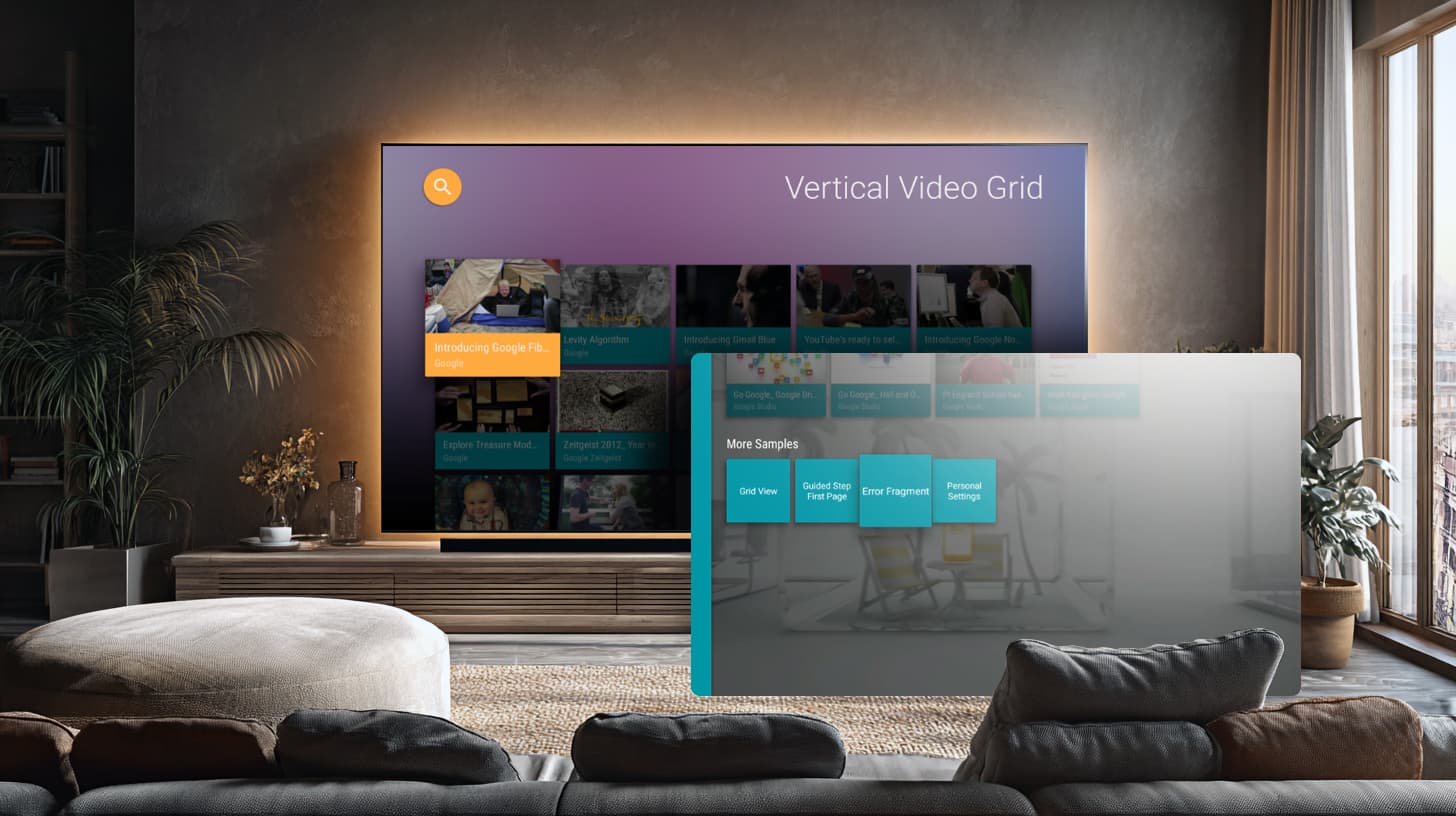
Test automation framework by Oxagile: Example for the grid page with 5 items in a row and Simple row layout
Guess 2: It’s always beneficial to test Smart TV apps on real devices, as emulators don’t reflect real-world conditions
What’s the ground for the assumption?
First, it’s because of different TV models that use their own operating systems, SDKs, remotes, performance levels, and network adapters.
There may also be differences in color rendering, scaling, and video player behavior, especially when playing DRM-protected or streaming content.
And in fact?
Emulators can do more than many people think.
Maxim’s hands-on expert insight:
“Let me comment on digital rights management right away. Specific stuff, like playback or DRM-protected streams, requires manual QA verification.
As for the basic things to control, we always double-check whether an issue found on an emulator also appears on a real TV. Our experience has shown that emulators catch almost all the same errors as real devices.
Another great point about emulators lies in their flexibility and scalability. On a powerful server, we can run multiple emulator instances in parallel and easily specify which OS version we need, like Android 9, 10, and so on.
When we handle testing for Smart TV apps on real devices, things get much more complicated. We never run tests in a single thread; for example, we can execute 500 tests in four parallel threads in just two hours. Running them in one thread would take about eight hours, which is inefficient.
It’s also technically harder to maintain stable automation. If a problem occurs with the emulator, we can simply restart it, create a new session, and rerun the test. Many tools now support running everything in Docker, which makes the process fast and stable.
As a result, our test runs are significantly more reliable. The industry-standard flakiness rate is about 5%, meaning 5 out of 100 tests may fail due to automation issues rather than real bugs. On real devices, this number can easily jump to 20-30%.
The use of emulators also supports automated Smart TV application testing, allowing repeated performance checks, stress tests, and memory leak detection before deploying to real devices.”
Oxagile’s best practice #2: What can be tested brilliantly on emulators
Emulators turn out to be convenient not only for functional testing but also for performance testing. Oxagile’s test automation team collects metrics such as memory usage, CPU load, and other indicators, saves them, and compares results across builds to see whether the application’s performance has improved or worsened.
Maxim’s hands-on expert insight:
“Even if the absolute values differ slightly from those on real devices, the relative changes still accurately reflect performance dynamics. Moreover, emulators are great for detecting memory leaks. If an issue exists, it will accumulate over time, and this can be clearly seen on performance graphs. Memory leaks are directly linked to overall performance, and in this regard, emulators perform just as well as real devices.”
Guess 3. Specific user scenarios like lean-back for Smart TVs and lean-forward for mobile TVs require different testing approaches
What’s the ground for the assumption?
When we test apps on Smart TV, it seems reasonable to validate long viewing sessions, voice search functionality, and lean-back scenarios, where users interact with the interface from a distance using a remote.
For mobile TV, the priorities are likely to be different: you should focus on how the app behaves when switching between other apps, how it handles background notifications, and whether it resumes correctly after returning to the screen.
This assumes autonomous testing scenarios, because the usage context is not the same. Smart TV implies more of a “lean-back”, passive viewing experience, while mobile devices involve frequent switching and short, interactive sessions.
Specific user scenarios like lean-back for Smart TVs and lean-forward for mobile TVs require different testing approaches.
And in fact?
Such test cases are not an everyday routine.
Maxim’s hands-on expert insight:
“In short, test automation covers the common functional base for both Smart TV and mobile TV. The platform-specific nuances are then verified manually by the QA team.
In more detail, our automation consists of many isolated test cases designed to pinpoint issues precisely. Of course, we can run long sessions like “watching live content for two hours” or perform stress tests on request, but that’s not our focus. The key goal of automation is to take routine, repetitive checks off the QA team’s plate, ensuring that all the fundamental scenarios work reliably and stay under control.
Manual testing focuses on platform-specific, exploratory, and context-dependent scenarios where human observation and adaptability matter most.
As for the acceptance criteria, they are consistent across devices. We add a permission, say, an age restriction, and then go to a rail and verify that the content matches the age limit (visible up to age 12, hidden after). The same test case runs on both Smart TV and mobile TV: similar rails, similar categories, search working equally well. This approach ensures consistency and reliability across platforms.
We don’t automate some specific mobile checks, like notifications, low battery, or switching between apps. They tend to be unstable, time-consuming, and costly, so we leave those to manual testing. The same goes for network scenarios like “poor internet connection”. Our automation focuses on maintaining a stable functional baseline instead.
Though, occasionally, we create specific stress tests for unique situations, e.g., catching a rare bug that only appears after long playback sessions. One of such cases involved memory leaks: the app would crash after about three hours of continuous viewing. We developed an overnight test that simulated watching and navigation for 7-8 hours, collected memory and CPU metrics, and then compared results across builds. That’s how we confirmed the fix actually worked.”
Oxagile’s best practice #3: Regression goes to automation, cross-device new feature checks go to manual QA
Oxagile’s test automation team handles regression testing, which frees up manual QA specialists to focus on cross-device checks and more complex scenarios.
As a result, the share of time manual testers can dedicate to new feature testing increases from around 50% to as much as 80%.
Long-running sessions, stress tests, and performance monitoring help uncover issues before they affect users in production. They also highlight a broader requirement for Smart TV application reliability: can the application maintain consistent behavior under real-world operating conditions?
This requirement is commonly referred to as resilience.

How do you make Smart TV apps win viewers’ attention?
By combining thorough testing with proven Smart TV UX/UI practices, we create interfaces that keep users immersed in the content. Consistent performance, smooth playback, intuitive navigation, and personalized recommendations are core to every custom Smart TV solution we build.
Why Smart TV app resilience matters
In Smart TV applications, resilience and stability effectively describe the same thing: consistent performance under real-world operating conditions.
The OTT market leaves little room for the assumption that technical readiness can be treated as secondary. Competition is intense, user acquisition costs are high, and viewers have near-zero tolerance for friction. Success depends on whether the application maintains stable behavior under real usage conditions.
In many cases, large-scale rollouts expose issues that are not visible during development or limited pre-release testing.
First impressions depend on how the application behaves at runtime: startup speed, playback continuity, and stability under changing network conditions, constrained devices, and backend load.
Typical failure patterns include:
- Slow application startup
- Delayed navigation and focus loss
- Playback interruptions and buffering
- Unexpected application crashes
These behaviors are interpreted as system instability, not isolated technical defects. In OTT environments, switching to an alternative application requires minimal effort.
What does Smart TV app resilience imply?
From a system perspective, resilience describes how the application behaves under stress conditions. It is defined by consistency across startup, navigation, playback, and backend interaction layers.
From a business standpoint, launching without a resilience-first approach is a high-risk move. Marketing campaigns amplify visibility, but also technical weaknesses. If performance, stability, and fault tolerance are not prepared for scale, even the strongest go-to-market strategy can backfire, leading to wasted acquisition budgets, poor retention, and reputational risks for partners and operators.
Launching without resilience preparation introduces measurable risks. Performance degradation, instability, and fault tolerance issues surface directly in production environments, affecting retention, acquisition efficiency, and platform credibility.
Heterogeneous device environments and unstable operating conditions demand a different technical mindset. Therefore, app resilience is a foundational element of an OTT expansion strategy.
Emerging markets as a distinct technical landscape
Entering new markets is rarely just a question of promotion, partnerships, and content libraries. For OTT products on Smart TV platforms, expansion is often accompanied by ambitious launch campaigns, high expectations, and significant marketing investments.
But emerging markets are a distinct technical landscape. When OTT products expand into emerging markets such as Africa or LATAM, they enter a space where many assumptions common in EU or US launches no longer hold. So when a Smart TV application is introduced to such a new audience, success depends not only on what the app offers, but also on whether it can withstand real-world conditions.
One of the defining characteristics of these markets is the high share of low-end and mid-end Smart TV devices. Televisions have a much longer replacement cycle than smartphones, meaning older models with limited CPU, memory, and graphics capabilities remain in use for years. From an application perspective, this creates a highly heterogeneous device landscape where resource constraints are not an edge case but a baseline condition.
Network conditions add another layer of complexity. Internet connectivity in emerging markets can be unstable, bandwidth inconsistent, and sensitive to peak-time congestion. For Smart TV applications, this affects everything from app startup and navigation to video playback and backend communication. Designs that implicitly rely on stable, high-throughput connections tend to break down when those conditions are not guaranteed.
Peak load behavior further amplifies these challenges. Popular content releases, live events, or major promotions often trigger sudden spikes in concurrent users. When network quality and device performance are already constrained, such spikes can quickly expose weaknesses in application resilience, backend capacity, and client-side error handling.
These factors explain why approaches that work well in more homogeneous, high-end environments cannot be transferred as-is. In emerging markets, technical resilience focuses on building Smart TV applications that can adapt to constrained devices, fluctuating networks, and uneven load patterns during normal operation. Without this adaptation, even well-designed products risk underperforming at scale.
Why low-end device coverage is a business must in emerging markets
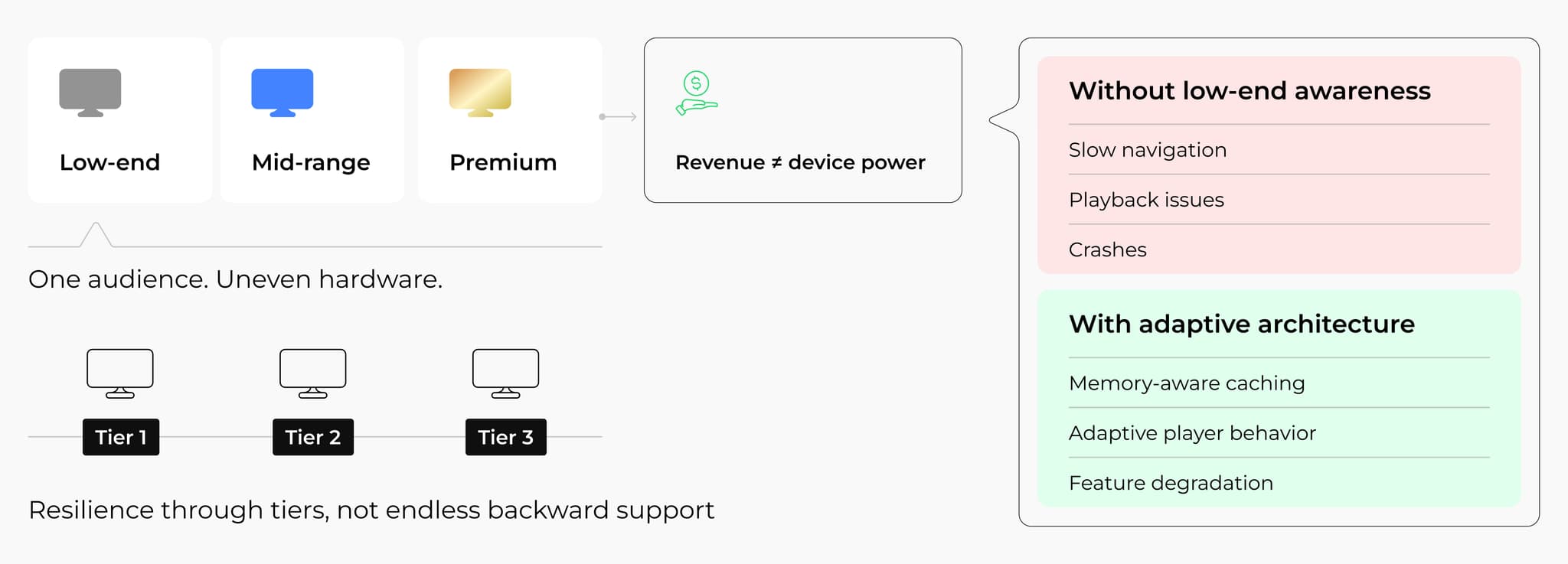
A wide range of device capabilities therefore coexist within the same audience, creating an uneven technical baseline for OTT applications. Such diversity directly influences how Smart TV apps are perceived and adopted after launch.
From a commercial standpoint, device capability does not correlate with revenue potential. Subscription-based OTT models generate the same income per user regardless of whether content is consumed on a premium Smart TV or on a more constrained model. Excluding part of the device spectrum reduces the reachable audience without delivering any financial benefit.
From an operational perspective, constrained devices amplify the impact of architectural and implementation choices. In practice, this translates into a higher sensitivity to common design decisions, including:
- Inefficient client-side caching strategies
- Aggressive asset and metadata preloading
- Default player configurations that ignore memory pressure
- Lack of adaptive behavior across different device classes
When these factors are not explicitly addressed, Smart TV applications are more likely to exhibit unstable behavior, including slow navigation, degraded playback, and higher crash rates.
Addressing these risks does not require lowering overall product quality. Well-designed Smart TV app architectures allow functionality and resource usage to adapt to device capabilities. Memory-aware caching, configurable player behavior, and controlled feature degradation enable a single product strategy to support heterogeneous devices and, at the same time, preserve stability and performance.
At the same time, resilience does not imply unlimited backward compatibility. Practical approaches focus on clearly defined device tiers and realistic usage patterns.
First impression as a point of no return
Unlike web or mobile products, OTT apps don’t benefit from repeated trial attempts. Viewers expect the application to work immediately and reliably, especially when it is launched as part of a large-scale market entry.
From the user’s perspective, common issues are interpreted as product flaws, which include:
- Slow application startup
- Delayed navigation and unresponsive UI
- Playback freezes and buffering
- Unexpected application crashes
Resilient Smart TV apps are defined by how they behave during user interactions. Users do not distinguish between network failures, backend delays, or device limitations. They observe only application behavior: responsiveness, playback stability, and error frequency.
For this reason, Smart TV app stability is treated as a system-level requirement that directly affects production stability and long-term usability. Consistent behavior under real-world conditions defines whether an application remains usable after deployment.
The business impact of a weak first impression extends far beyond user frustration. Launching to a large audience without sufficient attention to Smart TV app stability can lead to several cascading effects, like:
- Marketing campaigns driving traffic to an unstable product
- Poor retention metrics during the most critical acquisition phase
- Negative word-of-mouth and store ratings
- Reputational risks for partners, distributors, and local operators
Several recurring mistakes tend to amplify these risks. Teams often prioritize feature completeness and visual polish, postponing resilience validation. Common patterns include releasing with a strong focus on flagship devices, skipping large-scale performance and resilience testing, and relying on optimistic assumptions about network quality. Without fallback scenarios and degraded modes, Smart TV applications remain fragile at the exact moment when they are most exposed.
In this context, resilience becomes a prerequisite for protecting both marketing investment and long-term growth. A stable first impression builds user confidence, reinforces brand credibility, and creates the conditions for sustainable audience growth.
Case in point: What happens when a Smart TV launch meets real-world conditions?

How does a Smart TV app behave when it is released across multiple platforms and device tiers at once, under real user load, and non-ideal operating conditions?
A large-scale Smart TV app rollout demonstrated how strongly first impressions depend on both resilience and performance decisions made before launch. Device heterogeneity, memory-related performance constraints, and uneven network behavior quickly surfaced issues that would have directly impacted retention if left unaddressed.
Key challenges addressed during the rollout included:
- Maintaining a stable startup and navigation across different
- Smart TV platforms
- Establishing predictable playback behavior under fluctuating network conditions
- Adapting application logic to constrained devices without fragmenting the product
Resilience checklist as a go-to-market strategy
At scale, resilience cannot be treated as an isolated technical concern. In Smart TV applications, stability, performance, and fault tolerance are intertwined, with weaknesses in one area inevitably surfacing in another. Playback issues may originate from network behavior, memory pressure, backend overload, or player configuration, yet the user experience suffers regardless of the root cause.
Production experience consistently shows that separating performance optimization from resilience work leads to blind spots.
- Memory leaks can manifest as playback freezes
- Aggressive buffering strategies can trigger crashes on constrained devices
- Backend instability can cascade into client-side failures through retries and authentication flows
In real-world conditions, these boundaries blur, and Smart TV applications are evaluated by users not as standalone subsystems, but as a whole.
For this reason, resilience needs to be addressed as part of the go-to-market strategy instead of something that can be postponed until after launch. Especially during market expansion and high-visibility releases, applications face sudden increases in traffic, heterogeneous device usage, and unpredictable network conditions. Without explicit preparation for such scenarios, growth efforts tend to expose structural weaknesses.
Need practical support with Smart TV app resilience?
If you are preparing a Smart TV launch or planning to scale an existing OTT product, resilience work often requires external validation and hands-on expertise from a Smart TV app development company. Architecture review, resilience testing, and tuning for real operating conditions help reduce technical and commercial risks before market entry.
Smart TV app resilience checklist from Oxagile
The checklist below is based on Oxagile’s real production experience. It outlines the key areas to address before a large-scale launch. These include network adaptation, backend offloading, memory management, and player tuning, all of which contribute to resilient Smart TV apps that can withstand real-world usage. The checklist also reflects recurring problem patterns observed during large-scale Smart TV rollouts and focuses on practical measures that improve reliability and stability under load.
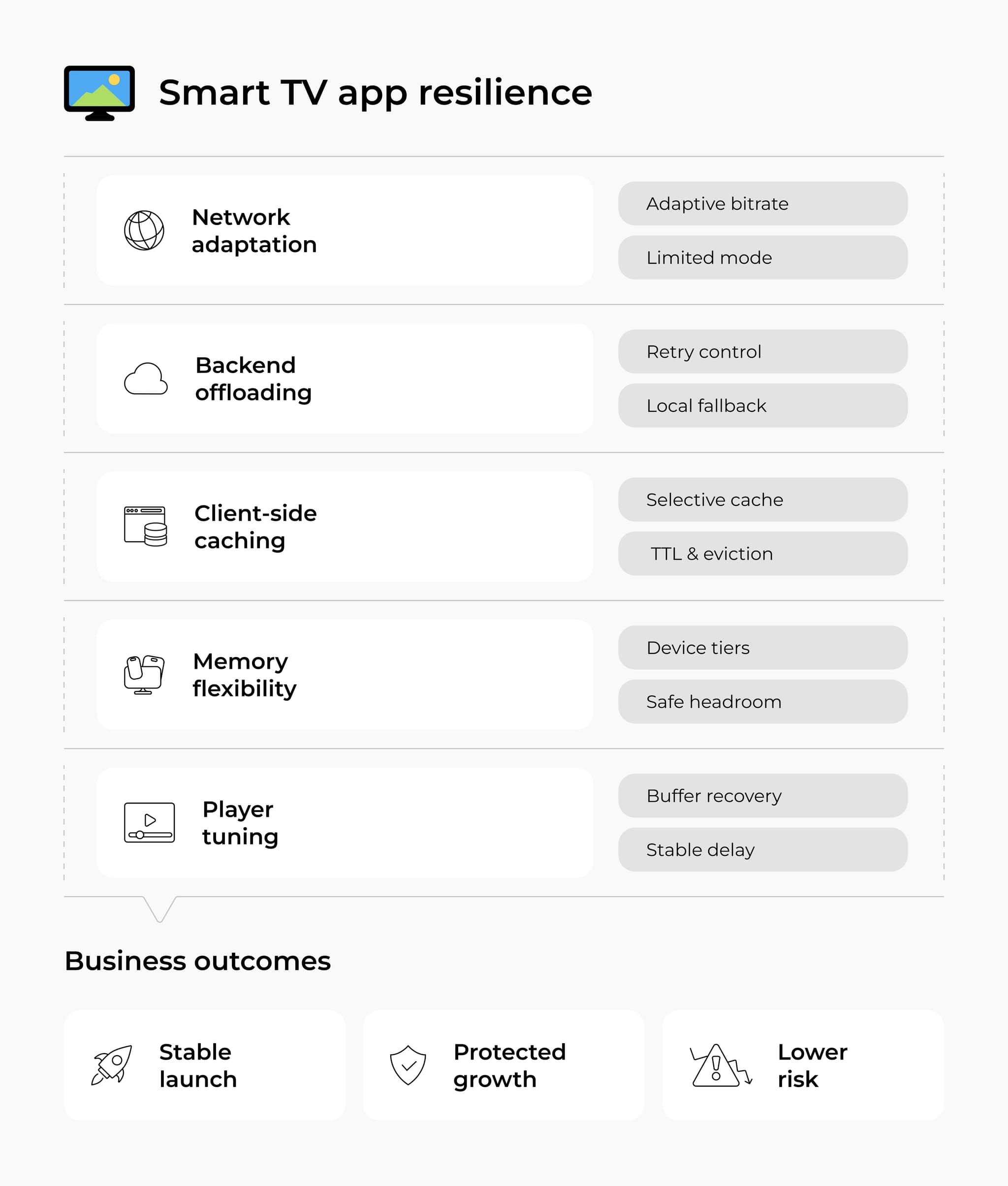
1) Poor network conditions adaptation
Unstable network conditions remain one of the most underestimated risks for Smart TV applications at scale. Assumptions about consistent bandwidth and predictable latency rarely hold once an app reaches a broad audience. Resilient applications treat network degradation as a normal operating state, adjusting asset delivery, caching behavior, and playback logic accordingly.
In practice, playback stability often depends on how quickly the player reacts to bandwidth drops. Production experience shows that slower quality downgrade increases the likelihood of freezes, while conservative upgrade paths reduce visual quality fluctuations. In several rollouts, starting playback at a lower acceptable quality and enabling adaptive bitrate logic only after playback stabilization resulted in fewer interruptions and a more predictable viewing experience under poor network conditions.
Real-world client story:
In one project, playback issues surfaced immediately under unstable network conditions. Adaptive bitrate logic caused slow quality upgrades at startup, leading to a noticeable delay before acceptable playback quality was reached. To mitigate this, playback was started at the lowest acceptable quality, with adaptive bitrate enabled only after the player entered the playing state. This slightly increased startup time, but internal benchmarking showed the trade-off to be acceptable.
Additional tuning revealed that buffer exhaustion during bandwidth drops caused short freezes, which were resolved by allowing the player to fetch more segments in parallel, improving recovery speed after quality downgrades.
2) Backend offloading and degraded modes
Backend systems tend to experience the highest stress precisely during moments of peak user interest. Authentication flows, session renewals, and metadata requests can surge within minutes, turning minor slowdowns into user-facing failures. Resilient Smart TV applications are designed to reduce backend dependency when instability occurs, instead of amplifying it through aggressive retries.
Production incidents repeatedly demonstrate how short timeouts combined with immediate retries can escalate backend degradation. Adjusting retry strategies, introducing randomized intervals, and using last-known-good client-side data allow applications to preserve navigation and playback while backend services recover, significantly reducing visible disruption during high-traffic periods.
Real-world client story:
A production incident occurred during a live release of a high-demand series scheduled at peak hours. A surge of API calls within a short time window overloaded authentication and metadata services, while short client timeouts combined with immediate retries amplified the failure. Users were unable to retrieve session tokens and access the live stream.
Client-side changes focused on revising retry behavior, introducing randomized retry intervals, optimizing token refresh logic, and serving personal content from last-known-good local data while backend load was high.
3) Client-side caching without killing memory
Client-side caching improves responsiveness and reduces backend load, but only when applied selectively. Smart TV devices operate under tight memory constraints, making indiscriminate caching a frequent source of instability. Effective caching strategies balance asset lifetime, invalidation rules, and memory availability across device tiers.
In production environments, memory leaks caused by improperly managed cache references often surface gradually, first as sluggish navigation and later as out-of-memory crashes. Adaptive cache sizing and disciplined eviction policies consistently prove more effective than static configurations, especially when applications need to remain usable during temporary backend degradation.
Real-world client story:
In several deployments, aggressive local caching improved responsiveness but gradually led to stability issues on memory-constrained devices. Investigation showed that excessive asset retention and improper cache reference handling caused memory growth over time, first manifesting as sluggish navigation and later as crashes.
Refining cache scope, adjusting cache lifetimes, and aligning cache size with device memory capacity reduced memory pressure, preserving the benefits of local data reuse during backend degradation.
4) Memory flexibility and low-end reality
Memory pressure remains one of the most common causes of Smart TV app crashes. Beyond caching, aggressive preloading, oversized player buffers, and large in-memory asset collections frequently exhaust available resources on constrained devices. These issues usually do not appear in isolation; instead accumulate over time until stability degrades.
Resilient applications adapt memory usage to device capabilities. Production tuning shows that avoiding unnecessary preloading and allocating memory headroom for core functionality significantly reduces crash rates, even when supporting heterogeneous device landscapes.
Real-world client story:
Stability analysis across heterogeneous Smart TV devices showed that crashes clustered on lower-memory platforms. The main contributors were oversized in-memory collections, aggressive preloading, and player buffer configurations that left insufficient headroom for the rest of the application.
By introducing memory-aware caching, reducing unnecessary preloading on constrained devices, and tuning player memory usage, crash frequency decreased without affecting functionality on more capable hardware.
5) Player tuning for unstable conditions
Playback behavior dominates user perception of Smart TV applications. Live streaming scenarios introduce additional sensitivity, as content delivery depends on tightly coordinated pipelines. Player configuration plays a decisive role in determining whether temporary disruptions lead to visible failures or recover gracefully.
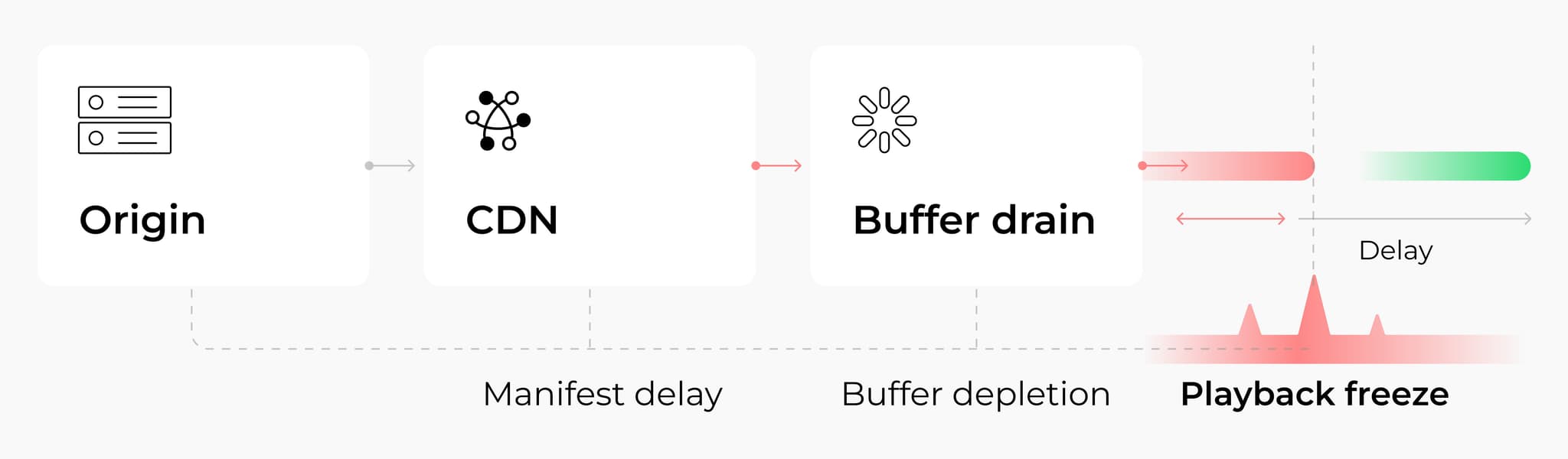
In live environments, insufficiently adaptive manifest fetching and buffering logic often cause growing playback delays and eventual freezes. Real-world tuning experience shows that faster recovery after missed manifest updates and flexible buffer refill strategies stabilize live playback and prevent delay accumulation, even when upstream components momentarily fall behind.
Real-world client story:
In a live streaming project with strict latency requirements, testing revealed a steadily growing gap between playback and real time. The issue originated from delayed chunk availability on the server side combined with rigid manifest polling on the client.
When manifest updates were missed, the player continued polling at a fixed interval, allowing buffer reserves to drain. After adjusting the manifest fetching logic to react faster to missed updates, playback stabilized and recovered without accumulating additional delay.
A final note on testing for Smart TV apps
How do you test Smart TV apps? The variety of operating systems, remote-based navigation, and large-screen experiences introduce specifics you won’t encounter in mobile TV environments.
But there’s no need for guesswork or fear. With a well-designed test automation architecture that accounts for key nuances, particularly focus-based navigation, Smart TV testing becomes a structured, predictable, and highly scalable process.
At the same time, functional validation is only one part of building a successful Smart TV product. As applications scale, stable startup behavior, predictable playback, efficient memory usage, and resilience under changing network conditions become equally important. Users evaluate the overall experience, not the underlying cause of failures, whether they originate from device limitations, backend pressure, or connectivity issues.
When the approach is right, even complex Smart TV ecosystems are fully testable with clarity and confidence. Combined with a resilience-first mindset, this foundation helps Smart TV applications remain stable under real-world conditions and better prepared for long-term growth.
Looking for measurable results, not general claims?
Opt for Smart TV app testing services handled by pros who can help validate your application across devices, operating systems, and usage scenarios that reflect real world conditions.
FAQ
What is Smart TV app testing?
Smart TV app testing is the process of verifying that an application works correctly across different TV platforms, screen sizes, and input methods. It includes checking navigation with a remote control, focus management, playback quality, performance, compatibility with various operating systems (Tizen, webOS, Android TV, Fire TV, etc.), and overall user experience on large screens.
How do you test Smart TV apps effectively?
A few practical recommendations on how to test Smart TV apps include:
- Test navigation early and often, as remote-based focus logic is central to Smart TV UX
- Validate video playback under different network conditions and on various content types
- Implement automated smoke and regression tests to ensure stability across builds
- Pay close attention to performance metrics such as memory usage, CPU load, and rendering time
What is the most challenging aspect of Smart TV app testing?
The biggest challenge is handling focus-based navigation reliably. Unlike mobile apps, which rely on touch input, Smart TV apps use directional focus logic, which should work flawlessly across screens, layouts, and device types.
Can Smart TV app testing be automated?
Yes. Smart TV app testing can be automated through screen models and dedicated navigation logic. By modeling each screen as a grid of focusable elements and using a dedicated navigation module, tests can interact with remote-based interfaces without manually scripting every step.
Core functionality, regression checks, and even long-session playback scenarios can be reliably validated through automation, while platform-specific quirks or edge-case behaviors are handled manually. This combination lets QA teams maintain consistency across devices, scale test coverage, and focus human effort where it matters most.
What is Smart TV app resilience?
Smart TV app resilience describes the ability of an application to maintain predictable behavior under stress conditions that typically accompany market entry and scale. From a business perspective, it protects acquisition investments, reduces early churn, and stabilizes growth metrics by reducing the risk that technical issues undermine first impressions during high-visibility launches.
How does Smart TV application reliability differ from performance optimization?
Smart TV application reliability focuses on consistent, fault-tolerant behavior across real operating conditions, including unstable networks, backend degradation, and device constraints. Performance optimization improves speed and responsiveness under expected conditions. At scale, both aspects intersect, but reliability determines whether an application remains usable when assumptions about infrastructure no longer hold.
Why is Smart TV app stability critical during market expansion?
Market expansion typically amplifies usage patterns rather than revealing new ones. Increased traffic, broader device diversity, and higher concurrency expose weaknesses that may remain hidden in limited deployments. Smart TV app stability supports growth initiatives by preventing visibility from turning into negative user experiences, protecting retention and partner relationships during critical launch phases.
How do resilient Smart TV apps reduce commercial risk?
Resilient Smart TV apps limit the impact of technical failures on business outcomes. Graceful degradation, adaptive client behavior, and controlled backend dependency prevent outages from escalating into user-facing disruptions. As a result, marketing campaigns deliver sustained value, support costs decrease, and reputation risks associated with failed launches are minimized.
What should a Smart TV app resilience checklist include?
A practical resilience checklist focuses on readiness. It should cover:
- Adaptation to poor or unstable network conditions
- Backend offloading strategies and degraded modes
- Client-side caching discipline
- Memory flexibility across device tiers
- Player tuning for live and on-demand content
Addressing these areas before launch helps reduce stability issues, operational risk, and early user churn.