Designing Magic Remote UX on webOS

Table of contents
When designing for smart TV, teams usually start with layout structure, content hierarchy, or video playback behavior. On webOS, another layer quickly becomes central to the discussion — Magic Remote UX. The reason is practical: if pointer-based navigation is not implemented correctly, the application will not pass review in the LG Content Store.
Magic Remote introduces cursor-based interaction into the lean-back environment. Move the remote, and a pointer appears on screen. Point, select, scroll.
From the user’s perspective, the mechanic feels intuitive. From a development standpoint, it alters how navigation is structured. Interactive elements must respond reliably to pointer input across screens, overlays, and dynamic sections. If interaction exposes gaps, they surface immediately during moderation.
Input models often reveal structural weaknesses early in smart TV ecosystems where store approval is manually validated. That is why interaction logic is treated as a foundational layer within Oxagile’s webOS TV app development services. In practice, this means that the navigation architecture is defined alongside the playback logic and UI structure from the earliest stages of the project. Certification is not approached as a final checkpoint, but is anticipated in the way interaction is designed from the start.
With that context in mind, this article explores how Magic Remote user experience influences webOS TV UX design from a practical development perspective.

To unpack the topic beyond theory, we turn to Sergey Glyzdov, JavaScript Engineer at Oxagile. Sergey has led webOS and Tizen deployments and has been directly involved in certification cycles for LG and Samsung stores. The insights shared here reflect real submission experience, including cases where moderation feedback highlighted differences between formal documentation and real review practice. Over time, those lessons shaped an internal checklist that now structures webOS submissions in a far more predictable and controlled way.
Key takeaways:
- Magic Remote UX directly impacts LG Content Store certification outcomes.
- Pointer-based navigation changes how focus, overlays, and dynamic UI elements must behave.
- Pointer and D-pad logic must coexist without breaking interaction consistency.
- Focus management and keyboard behavior are common moderation risk areas.
- Performance differences across device tiers influence UX stability, especially on low-end models.
- Designing interaction architecture early reduces certification friction and resubmission cycles.
Certification first: Why Magic Remote UX defines store approval
Magic Remote user experience in webOS directly affects store approval. Before an application appears in the LG Content Store, it goes through manual moderation. During review, the application is opened and explored as a user would explore it.
LG provides detailed submission requirements covering navigation, typography, startup performance, and interface behavior. The documentation is extensive. In practice, reviewers navigate through the interface, open sections, trigger overlays, scroll through content, and attempt to complete common user flows using Magic Remote.
In webOS, particular attention is paid to how smart TV remote interaction behaves in real scenarios. Reviewers expect consistent behavior across screens, overlays, dynamic blocks, and playback controls.
Expert comment:
“Moderation is hands-on. The app is navigated from the first screen to playback and back using Magic Remote. Reviewers check how interaction behaves across different states — menus, modals, scrollable areas. Gaps usually appear when interaction logic wasn’t tested end-to-end.”
Magic remote as a mandatory interaction layer
Support for pointer-based TV navigation changes the structure of the interface logic. Directional focus and cursor interaction are not identical models. A layout designed primarily around D-pad transitions can expose inconsistencies when used with a pointer. For example:
- Elements that receive focus but are visually small and difficult to target with a cursor
- Scrollable containers without visible, clickable controls
- Dynamic components that react to focus changes but do not register pointer clicks reliably
Expert comment:
“In webOS, pointer interaction has to feel native. It’s not enough for an element to technically react to a click. It needs to be reachable, clearly visible, and predictable when operated with a cursor.”
Under certification review, these structural details become visible quickly. That’s why consistency across input modes is evaluated in practical navigation scenarios, not in isolated component tests.
Readability, startup time, and performance sensitivity
Certification also evaluates readability from a specified viewing distance and observes video startup time. Interface responsiveness is monitored during navigation.
On older webOS devices, rendering performance directly influences pointer behavior. If frame rendering becomes unstable, cursor movement can appear delayed or imprecise.
Sergey notes:
“On low-end models, performance and cursor stability are linked. If rendering drops frames, the pointer feels less accurate. That’s why interaction testing includes performance profiling, especially on older devices.”
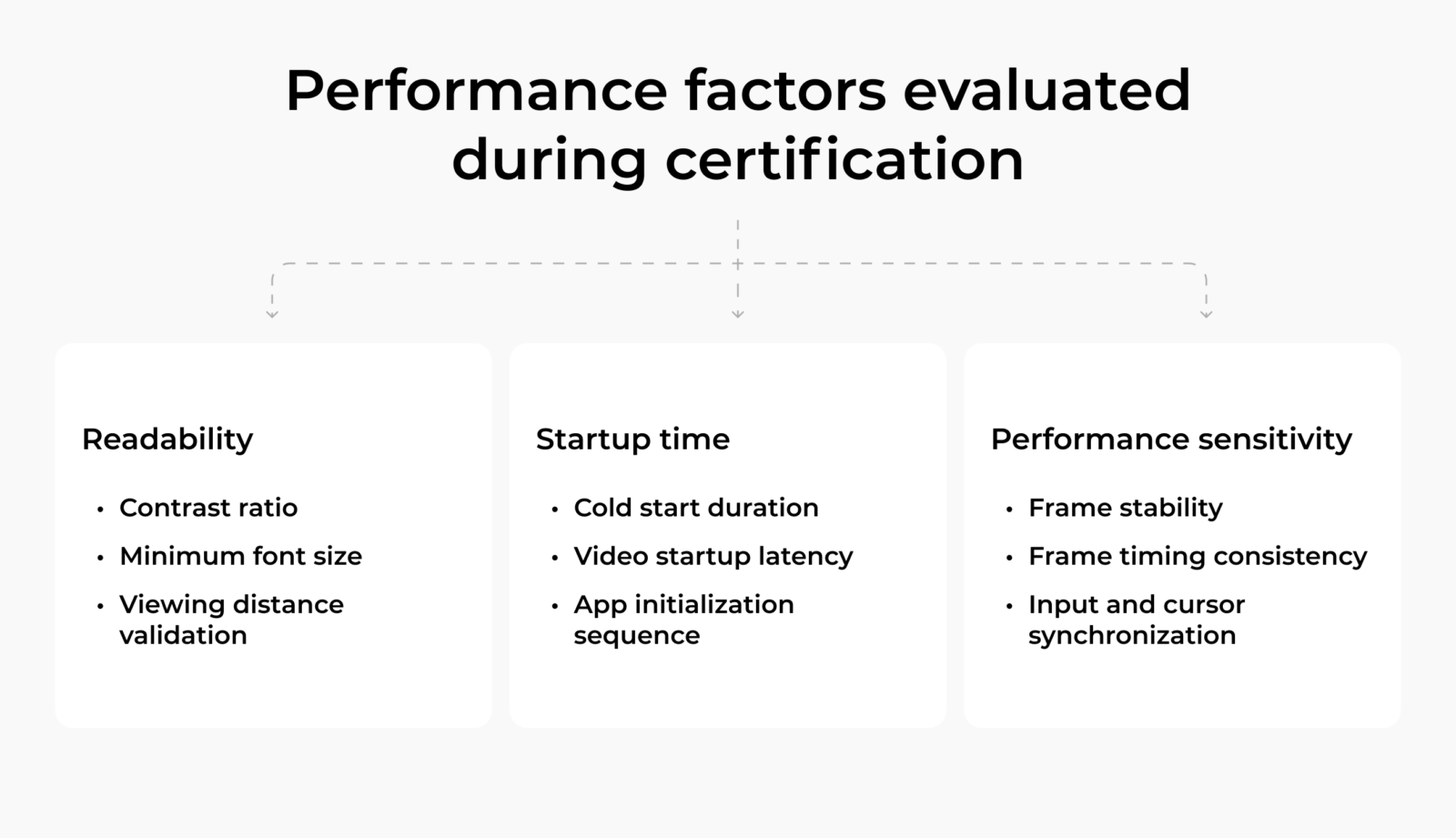
Magic Remote UX in webOS, therefore, extends beyond basic click handling. Interaction logic, visual clarity, and performance stability all contribute to certification readiness.
Pointer-based TV navigation and D-pad logic in webOS
In webOS applications, two navigation models operate in parallel. Both pointer and D-pad input are fully supported, allowing users to rely on the interaction model they prefer. The interface must remain predictable regardless of the active input mode.
Directional navigation (D-pad)
D-pad interaction follows a defined structure:
- Focus moves step by step
- Each press shifts the selection in a specified direction
- Navigation paths are predetermined by layout relationships
- The system maintains a clear active element at all times
Interaction depends on how elements are connected within the focus map.
Pointer-based TV navigation
Cursor interaction behaves differently:
- The pointer can target any visible element directly
- Selection does not follow a predefined path
- Users can skip intermediate elements entirely
- Element size and spacing influence usability more than focus order
In webOS magic remote navigation, the cursor activates instantly when the remote moves. The interface must respond without disrupting the existing focus structure.
As Sergey puts it:
“With D-pad, navigation is based on focus transitions. With the Magic Remote, users select elements freely. If those two mechanisms are not aligned, interaction inconsistencies appear immediately.”
Where inconsistencies surface
Conflicts typically emerge in situations like:
- The cursor selects one element while logical focus remains on another
- Scroll containers respond to D-pad but not to pointer clicks
- Overlays open correctly yet break focus tracking underneath
- Interactive components highlight under focus but fail to register cursor input
Expert comment:
“The system must maintain a stable focus state internally. Cursor activity cannot override or erase that state. Otherwise, switching back to buttons produces unpredictable results.”
These interaction details connect directly to TV UX focus management, which becomes critical when both control models coexist.

Planning a webOS TV app that must pass certification on the first submission?
At Oxagile, we design interaction architecture with both pointer and D-pad logic aligned from the start, reducing moderation friction and eliminating avoidable resubmissions. Our webOS TV app development team brings hands-on certification experience across device generations, including low-end models.
TV UX focus management and keyboard behavior in webOS
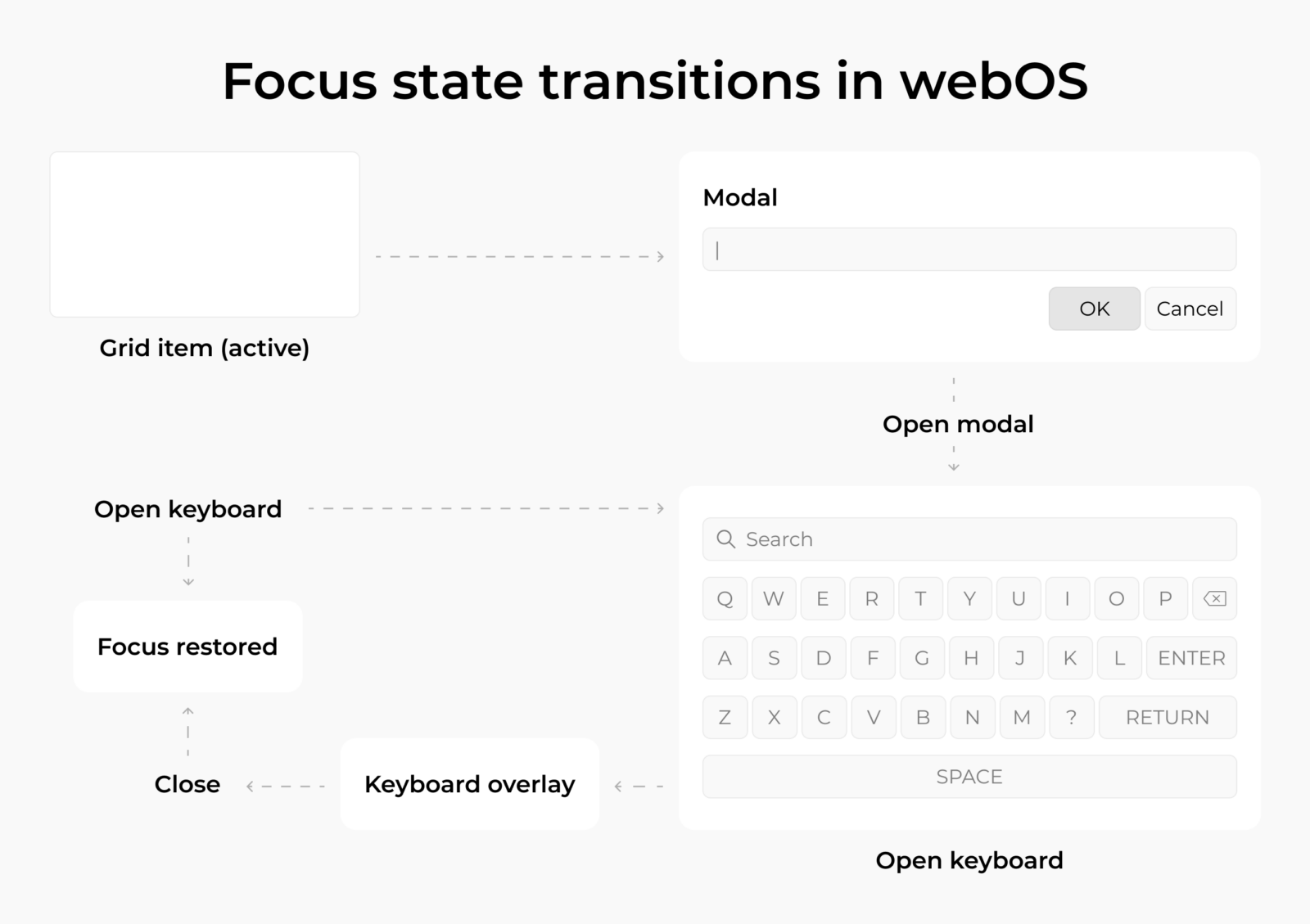
In TV UX focus management, transitions introduce the most visible issues. Opening modals, updating grids, or closing overlays requires explicit control over which element remains active.
Two recurring problems appear in real projects:
- Focus returns to a default element instead of the previously selected one
- Pointer selection updates visually, but the internal focus state remains elsewhere
Sergey notes:
“After closing overlays or re-rendering content, the application must restore the exact previously active element. Resetting focus to the first item in a list immediately disrupts the navigation flow.”
Keyboard behavior as a structural stress test
On-screen keyboards quickly expose weaknesses in focus logic. Keyboards introduce:
- Dense grid layouts with tight spacing
- Horizontal and vertical navigation paths
- Mixed pointer and directional interaction
- Multiple state changes within a small UI area
Custom keyboards add another level of complexity. Language-specific layouts alter navigation mapping. Right-to-left input changes spatial relationships. Extended character sets require alternate states and additional rows.
Sergey explains:
“In custom keyboard layouts, directional transitions must be defined explicitly for every key. If that mapping is incomplete, D-pad navigation and pointer selection stop behaving consistently.”
Closing the keyboard is another critical transition. Focus must return to the original input field or the control that triggered it. If it resets unpredictably, users experience navigation drift.
Rendering and focus synchronization
On older webOS models, asynchronous updates can cause the visual and logical states to become desynchronized. A highlighted element may no longer be logically active. Cursor input can be applied to an outdated state after dynamic content loads.
Expert comment:
“When rendering and focus updates are processed separately, visual selection and logical state can diverge. Users immediately perceive such a mismatch during interaction.”
Case in point: Immersive streaming solution for Tizen and webOS
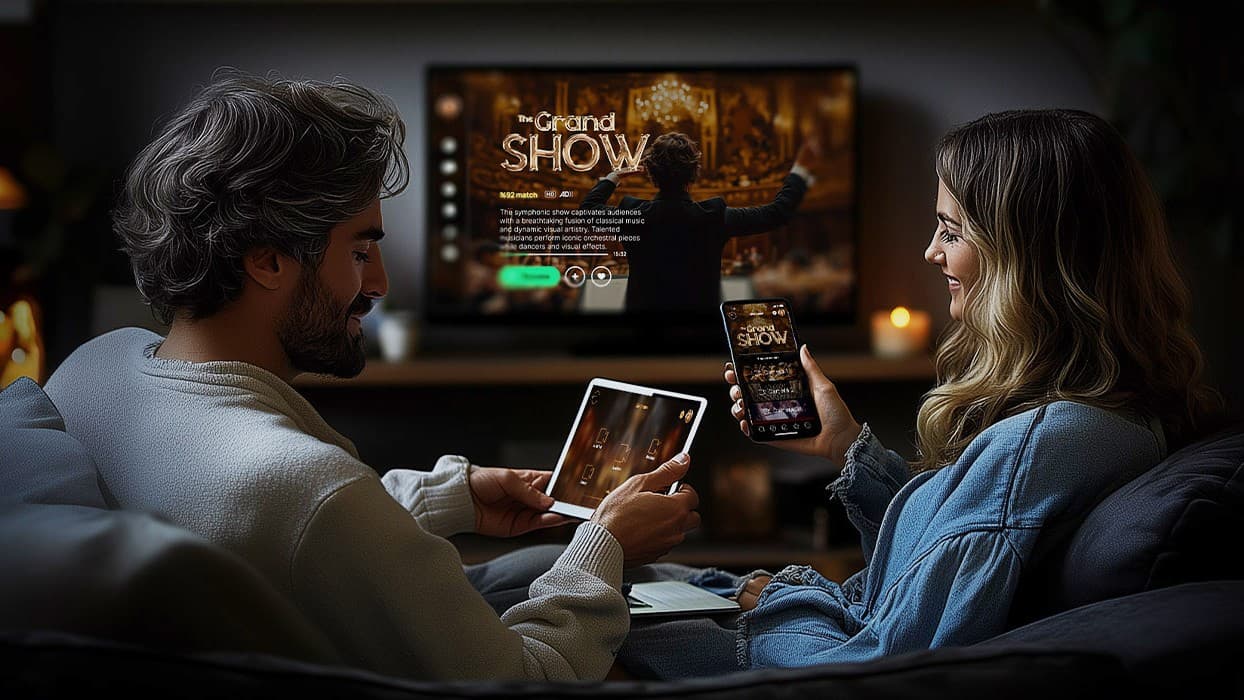
A cross-platform streaming application built for Samsung and LG environments required synchronized D-pad and Magic Remote behavior, along with store-compliant interaction logic for webOS certification.
The project involved:
- Unified navigation architecture across Tizen and webOS
- Full Magic Remote support aligned with certification requirements
- Explicit focus mapping for dynamic content and overlays
- Validation of pointer and directional interaction under real device constraints
Store submission model and update flexibility in webOS
Navigation and focus handling are only part of the picture. The release model also influences how Magic Remote UX evolves after launch.
On LG, applications can be hosted remotely. Instead of submitting a fully packaged update for every change, teams may deploy a lightweight store build that points to a hosted web application. The core logic resides in a controlled domain, which allows UI and interaction improvements to be rolled out without repeated full moderation cycles.
For teams working on webOS TV UX design, this flexibility matters. Interaction refinements, including adjustments to pointer behavior, focus restoration, or scroll handling, can be deployed faster when they do not require a complete store resubmission.
Practical implications include:
- Faster iteration on navigation behavior
- Immediate rollout of UI adjustments
- Reduced friction during post-release improvements
- More predictable maintenance workflows
As Sergey notes:
“LG’s hosting model gives teams more control over post-release changes. Interaction fixes and UX refinements can be delivered without waiting for a full store approval cycle.”
Samsung supports similar mechanisms under stricter conditions. On webOS, the model is more broadly available, which affects the long-term maintenance strategy.
For cross-platform projects, release mechanics influence how smart TV interaction refinements are delivered after launch.
Smart TV UI best practices for Magic Remote UX
Over time, our recurring project experience has shaped a practical checklist to follow during webOS development that helps teams validate interaction stability before submission and release.
1. Keep one interaction state for all inputs
Pointer selection and D-pad navigation must reference the same internal state.
Practical checks:
- Guarantee that a cursor click updates the logical focus state
- Enable D-pad navigation resumes from the element last selected with the cursor
- Avoid focus “sticking” to an old element after pointer interaction
2. Make focus restoration deterministic
Transitions create the most visible navigation breaks: overlays, keyboards, playback panels, and dynamic updates.
Practical checks:
- Restore focus to the exact previously active element after closing an overlay
- Keep focus inside the modal/keyboard while it is open
- Return focus to the triggering control after keyboard dismissal
3. Align visual boundaries and hit areas
Pointer-based TV navigation exposes geometry issues faster than D-pad.
Practical checks:
- Match clickable regions to visible tiles and controls
- Avoid invisible clickable padding that overlaps adjacent elements
- Ensure small UI elements remain targetable from a viewing distance
4. Treat scroll as an interaction system
Scroll behavior must remain consistent across content types and input modes.
Practical checks:
- Provide predictable scroll affordances for pointer control (not only directional movement)
- Keep scroll position stable when overlays appear and disappear
- Prevent scroll containers from “stealing” focus unexpectedly
5. Validate on real devices as part of UX work
Device behavior affects interaction stability: input latency, rendering timing, and focus updates.
Practical checks:
- Validate pointer responsiveness and focus timing on physical hardware
- Verify navigation behavior on multiple device generations
- Re-test critical flows after performance-related changes
These practices help surface interaction gaps before release and simplify iteration afterward.
Launching on both LG and Samsung?
Certification requirements and navigation rules differ across platforms. We maintain internal checklists for both ecosystems, helping teams prepare interaction architecture for smooth submission and cross-platform stability.
Final thoughts
Magic Remote does not introduce a decorative interaction layer. It reshapes how navigation is validated in real-world conditions. Pointer input exposes inconsistencies in layout structure, state handling, and rendering timing more quickly than directional navigation alone.
Smart TV interaction architecture becomes most visible when input models shift. Stability under those shifts depends on deliberate navigation mapping, controlled state transitions, and device-level validation.
Teams building across multiple smart TV ecosystems encounter these constraints in different forms. Certification rules, release mechanics, and device generations vary, yet interaction integrity must hold across them.
If you are evaluating smart TV interaction architecture or preparing for store submission, we are ready to discuss structural decisions, certification workflow, and platform-specific constraints in detail.
FAQ
What makes Magic Remote UX different from traditional TV interaction models?
Unlike classic button-based control, Magic Remote UX introduces spatial targeting behavior. Users rely on visual scanning instead of a stepwise focus movement. This changes how attention is distributed across the screen. Interface density, visual grouping, and hit-area clarity become more influential than directional mapping alone. As a result, layout balance and element spacing directly affect perceived responsiveness.
How does webOS TV UX design influence interaction architecture decisions?
In webOS TV UX design, interface structure is closely tied to input responsiveness. Layout hierarchy must support both immediate targeting and logical fallback behavior. Designers often need to account for varying screen sizes, scaling behavior, and typography contrast, especially on different panel generations. These constraints shape component sizing and interaction timing before visual refinement begins.
What challenges typically affect smart TV remote interaction consistency?
Smart TV remote interaction often suffers from edge-case instability. Issues tend to surface during rapid input switching, animation-heavy transitions, or content refresh events. Latency tolerance on television screens is lower than in desktop environments, which makes minor timing mismatches more noticeable. Stability requires synchronization between rendering cycles and input processing.
How should teams approach accessibility in pointer-based TV navigation?
Accessibility in pointer-based TV navigation depends heavily on visual affordances. Clear hover states, sufficient target sizes, and predictable pointer acceleration are essential. Teams should also validate interaction for users who rely on slower motor input or limited precision. Designing with a minimum target size and consistent motion feedback improves inclusivity without complicating layout structure.
What are common implementation pitfalls in webOS Magic Remote navigation?
In webOS Magic Remote navigation, one overlooked risk is over-reliance on hover-dependent UI states. If essential information appears only on hover, users navigating via directional input may miss context. Another pitfall involves inconsistent pointer acceleration settings, which can create uneven targeting speed across different screen areas.
Why is TV UX focus management critical in large-scale applications?
In large content libraries or grid-heavy interfaces, TV UX focus management directly affects perceived control. When content blocks are dynamically loaded or filtered, maintaining logical continuity helps users retain spatial awareness. Without deliberate focus anchoring, navigation can feel disorienting, especially after deep browsing sessions.
What distinguishes strong smart TV UI best practices from generic UI guidelines?
Effective smart TV UI best practices account for viewing distance, motion sensitivity, and input variability. Unlike mobile or desktop interfaces, television environments require higher contrast thresholds, larger interactive zones, and predictable animation pacing. Design decisions must accommodate multiple hardware tiers and rendering capabilities and maintain consistent interaction behavior.