













This website uses cookies to help improve your user experience


Apple says a closed iPhone Duo is about the size of a passport. Whoever wrote the developer rules seems to have taken the comparison to heart, because every iOS app arriving on the device is processed according to the SDK it was last built with. And that decides how much of the 7.6-inch inner display the app gets and how it behaves in Split View, the first iPhone split screen.
An iPhone Duo app nobody has rebuilt is still let in. It opens and plays, then sits at its old size in a band of black space, like a traveler with the wrong paperwork parked in a transit lounge with only a vending machine for company.
Streaming apps have more to lose here than a calculator does. The inner display is the biggest Apple has put on an iPhone, and people who paid for a phone that opens into a small movie screen presumably want to watch movies on it. A video app that greets them with black borders and controls in odd places goes down about as well as a hotel that has lost the reservation. Custom players built around fixed dimensions are the most exposed, and they usually give themselves away halfway through an episode, at the moment the viewer unfolds the phone.
Oxagile’s iOS engineers are in the middle of this for a client. The request was to adapt an existing video streaming app for iPhone Duo, and very quickly the work turned into practical questions about black areas and aspect ratios, and about what the player does when the display changes shape under it.
This article covers what breaks in an existing streaming app and how to fix it, then what the inner display makes possible beside the video, and when a separate device still does the job better.
Key takeaways:
Yes, they will open and play, and Apple sorts them into three groups that could hang above the lanes at passport control.
| Last built with | What happens on iPhone Duo |
| An SDK earlier than iOS 27 | Open, the app keeps a familiar iPhone size and aspect ratio with black space around it. Closed, it uses the area beside the status bar and camera. |
| iOS 27 SDK | On the inner display the app extends into the area beside the status bar but stops short of the screen edge. |
| iOS 27.1 SDK (Xcode 27.1) | The app reaches the edge of the screen, standard navigation and toolbar buttons switch to a vertical layout, and the Duo-specific APIs become available. |
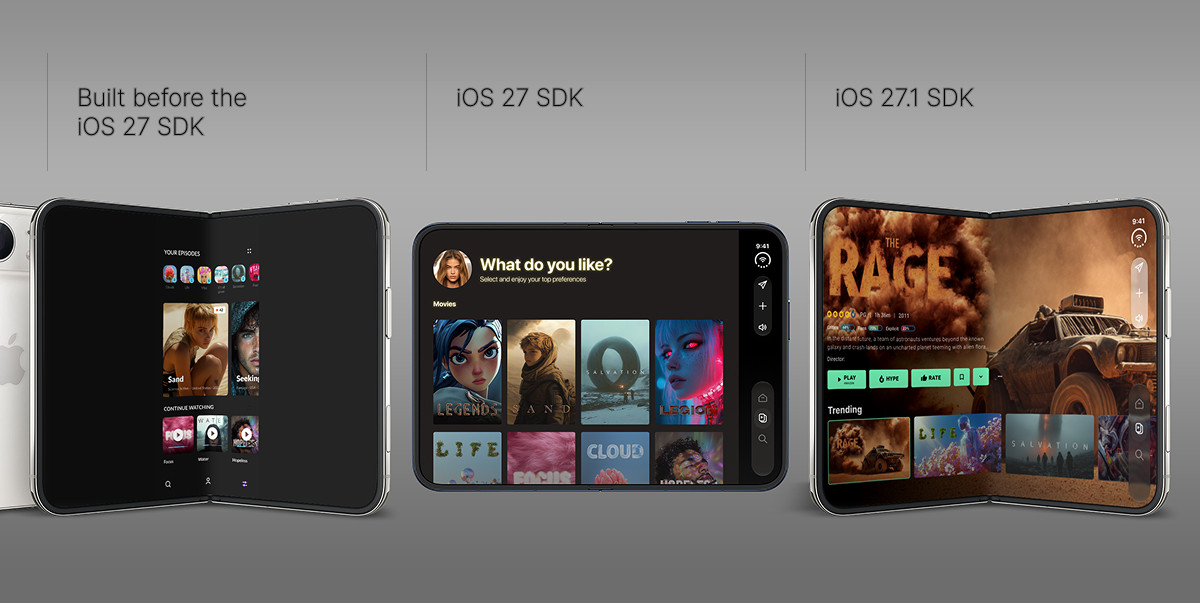
How an existing app looks on the iPhone Duo inner display depending on the SDK it was built with, from a black-framed iPhone-sized window to an edge-to-edge layout.
The first row is the transit lounge. It is an expensive place to wait for a streaming app because the black space around the whole app is drawn by the system, and no setting inside the player can remove it.
iOS 27 foldable iPhone support comes in two steps. The iOS 27 SDK makes iPhone apps resizable across the board, and the iOS 27.1 SDK (the iPhone Duo SDK in practice) adds the full display and the foldable APIs.
A rebuild sorts out the paperwork without opening the luggage, where most video apps pack the same few assumptions. According to Apple’s iPhone Duo developer talks, the inner display ignores the orientations an app declares, so a player that has insisted on landscape in full screen since roughly the invention of the smartphone loses that privilege there. The talks also warn against referencing the main screen on a device with two displays.
Then there is UIRequiresFullScreen. Apple still honors the key, which sounds reassuring until the fine print: the app resizes anyway every time the viewer opens or closes the phone.
Older codebases have two more problems on top of that. Apps built with the latest SDK must adopt the scene-based life cycle or they fail to launch, unwelcome news for any UIKit app that still runs everything through the app delegate. Since every app takes part in Split View on iPhone Duo, a player can be squeezed into half the screen mid-session without anyone asking its opinion.
Waiting it out comes with a deadline. Apple already accepts iPhone Duo-optimized builds, and from April 2027, every submission and update has to include iPhone Duo screenshots, a sort of new passport photo rule for the App Store. The first routine bug fix after that date brings the device into scope, adapted app or not.
The iPhone Duo screen size is 7.6 inches inside and 5.4 inches outside. Apple gave the two panels nearly identical proportions, so content scales between them as the phone opens and closes.
| Display | Screen size | iPhone Duo resolution | Pixel density | Aspect ratio | 16:9 video in landscape |
| Inner (open) | 7.6 in | 1878 × 2670 | 430 ppi | ≈1.42 | Fills the width, about 20% of the height goes to letterbox bars |
| Outer (closed) | 5.4 in | 1398 × 2034 | 460 ppi | ≈1.45 | Fills the width, about 18% of the height goes to letterbox bars |
| iPhone 18 Pro (for reference) | 6.3 in | 1206 × 2622 | 460 ppi | ≈2.17 | Fills the height, about 18% of the width goes to pillarbox bars |
Several early reports called the inner display 4:3, and Apple’s own pixel counts disagree. The iPhone Duo aspect ratio works out at about 1.42, close to the square root of two behind A4 paper. In other words, Apple has built a phone shaped like an office printer’s favorite sheet and asked everyone to watch movies on it. A 16:9 picture on the inner display is still about 77% larger in area than on iPhone 18 Pro in landscape mode. The black bars have moved from the sides of the screen to the top and bottom.
Player code shouldn’t take its numbers from this table, tempting as it is to type them in and go home. In portrait, the outer display reports a compact horizontal size class like any other iPhone, and the inner one reports regular in both directions (the way an iPad does). Split View can then hand the app widths that no spec sheet mentions. What the player can trust is the size its window scene gives it at that moment, read again after every fold, unfold, and rotation.
Video apps come unstuck on the details that a rebuild leaves untouched. Players are packed with assumptions that made perfect sense on a phone with one screen and one shape.
Black on an iPhone Duo screen can mean three different things, and only one of them was ever a design decision.
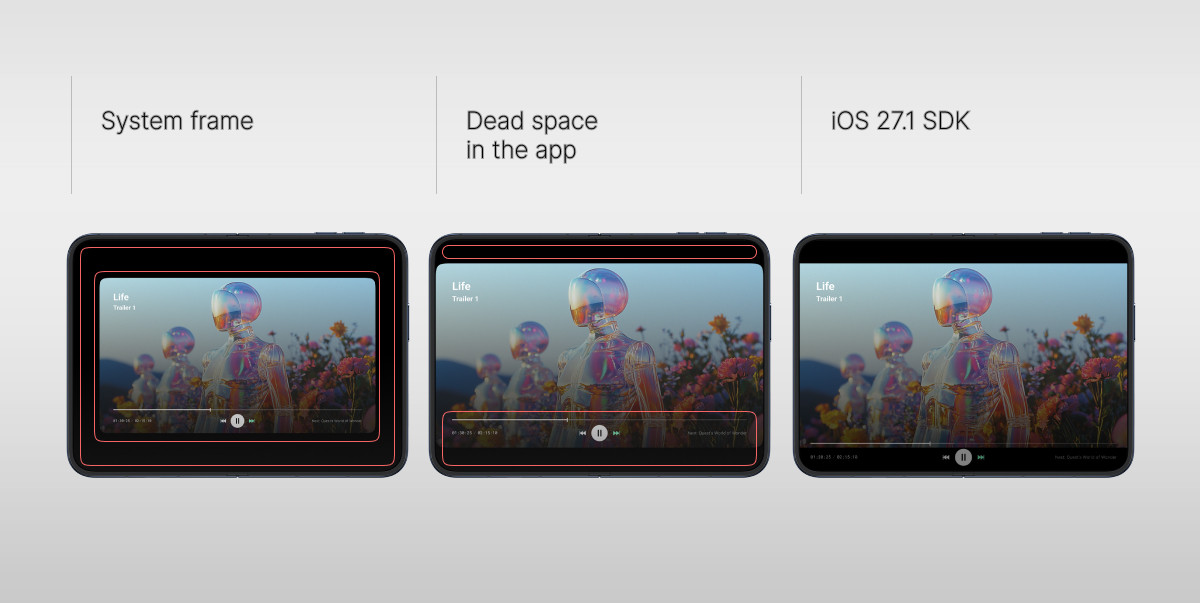
Three kinds of black on the inner display: the system compatibility frame, dead space inside a fixed player container, and intentional letterboxing.
Scaling will probably start the first argument about the device between product managers and engineers. Aspect fit keeps the whole frame and lives with the bars. The alternative, aspect fill, crops about a fifth of the picture’s width to get rid of them, and during a live soccer match, that fifth can contain the ball.
Apple’s design guidance for iPhone Duo tells game developers to change the aspect ratio where they can and, when bars are unavoidable, to fill the padding with artwork so the experience feels full screen.
Movies can’t change shape on request. The second half of the advice still applies, though, and Netflix’s folded player, as the Video.js team describes it, puts a faint reflection of the video on the lower half, under the controls.
Apple describes iPhone Duo content as something that reacts to the fold, turns with the phone, and hops to the other display when the phone is flipped over. From the app’s side of the glass, it is less poetic. The app gets resized every time the viewer fiddles with the hinge, sometimes onto a different display altogether, and the viewer expects the episode to carry on at the same second with the same subtitles.
A clumsy transition in a video-on-demand app costs a few seconds of rebuffering and some muttering at the screen. Live is less forgiving, because a player that tears itself down and rebuilds on every layout change has to rejoin the stream, and if it rejoins at the live edge, whatever the viewer had paused or rewound to is gone. In a soccer match, by some law of nature, that is the minute with the goal in it.
None of the code responsible looks dangerous on an iPhone with one screen. In SwiftUI, it is usually a .frame(width:height:) with a pair of constants wrapped around the player, and in UIKit, an AVPlayerLayer frame that was set once in viewDidLoad and never looked at again. Anything that does its sums with UIScreen.main.bounds is a relative of the same problem, and Apple’s talks now tell developers to stop asking for the main screen at all on a device that has two.
Orientation checks are next in the queue. A player that jumps to full screen on UIDevice.current.orientation, or a view controller held to landscape by supportedInterfaceOrientations, meets a display that pays attention to neither.
Two quieter habits do their damage to playback itself. If the AVPlayer belongs to a view that gets rebuilt on a size change, it is thrown out with the view, and the stream starts again from scratch. The second habit is gentler: a rendition ceiling chosen from the view size at launch, which leaves someone who unfolds the phone watching a picture meant for 5.4 inches on a 7.6-inch screen.
Split View adds a problem that will probably land in QA’s bug tracker, even though nothing is broken. Pin a video above another app, let that app start a video of its own, and the first one pauses, because iOS still plays one video at a time. The player has to treat it as an ordinary interruption and get the state, the analytics events, and the resume right.
For nearly twenty years iPhone navigation and toolbar buttons have lived along the bottom of the screen, and iPhone Duo has moved them out. An app built with the iOS 27.1 SDK finds them stacked vertically down the side, next to a Dynamic Island that now runs down the side of both displays as well. Split View gives each app its own outer edge, so the app on the left keeps its controls on the left.
Standard components pack up and move on their own. Custom player overlays need someone to carry their bags, and the likely casualties are a scrubber pinned to the bottom with constants, a title bar that assumes both side insets are equal, and subtitles positioned for a tall, narrow frame.
The hinge is new to iPhone, and if you hold the phone half-open like a book, the fold runs straight down the middle of a landscape picture, right where a centered subtitle line and a centered play button live.
Apple’s answer in the design guidelines is to get content off the fold altogether. The video goes to the top half, and the playback controls drop to the bottom, clear of the picture and within reach of a thumb. This is also how Netflix built its iPhone Duo player, with controls that adapt to full screen, folded, and propped-up positions.
For apps doing their own layouts, the new arrangement APIs are ArrangementView in SwiftUI and UIArrangementViewController in UIKit. A player wants the overlay style. With the phone closed or fully open, an overlay arrangement stacks its primary view on top of the secondary one, the way controls sit over a picture, and once the phone is partly open, Apple’s documentation says the primary view moves to the bottom or trailing part of the display and the secondary view to the top or leading part.
Make the controls the primary view and the video the secondary one, and the API produces the Netflix layout without any custom geometry code.
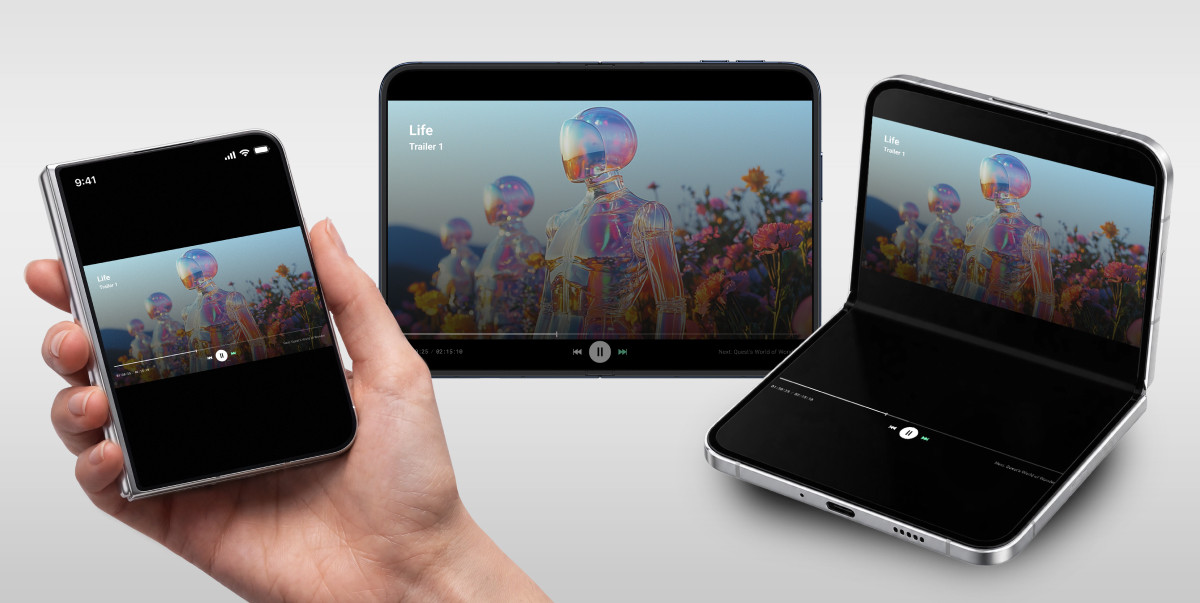
One player in three poses: closed, fully open, and half-folded, with the video on the top half and the controls on the bottom half.
Touch changes with the shape. Open, the phone is too wide for one thumb to reach across. A swipe to seek or adjust the volume through the middle of the screen will run over the fold as soon as the phone is partly closed.
Here the inspection gets to “did you pack this bag yourself?”, and most streaming apps have to admit they didn’t. Third-party player SDKs, ad SDKs, analytics, and DRM all come along for the trip.
iPhone Duo brings no new DRM or advertising standards, so FairPlay stays FairPlay. What changes is how often these components have to resize, hop between displays, or survive an interruption, and each of them has its own idea of how a full-screen transition should look.
The regression pass needs five checks at the very least.
Before anyone writes custom code, check what the vendors have shipped. A player SDK that already handles iOS 27.1 resizing saves a lot of work, and if yours doesn’t, finance will want to hear about it well before the estimate lands on their desk.

Our video engineers can review the player, layouts, and third-party SDKs of your existing iOS app, or help you design an interactive experience built for the foldable screen.
For years video products had a fairly simple choice. Interaction could stay in the player and fight the picture for the same few inches, or it could move to a second screen, usually the phone in the viewer’s hand while the match played on the TV.
iPhone Duo smudges that line, because its viewing surface changes shape several times in one session. Open it, and there is room beside the video for features that used to require another device, live stats and chat among them.
A bigger screen doesn’t automatically make a better video experience, any more than a bigger suitcase makes a better vacation. The expanded display reopens a question that streaming products have been asking for years: how much can happen around the video before it gets in the video’s way? Someone has to decide which interactions are allowed in the cabin next to the picture and which go in the hold on a separate device. It’s the same sorting job that sits behind any multi-screen app.
Even before Apple introduced the foldable iPhone, streaming UX had started adjusting to phones that change shape. In June 2026, Twitch rolled out Dual Format streaming, which sends horizontal and vertical versions of the same live stream simultaneously1. The company reports that 70% of its new viewers arrive on mobile. Netflix’s iPhone Duo app flips its Clips feed from vertical to horizontal video as the phone unfolds. On iPhone Duo, the hinge becomes one more thing the format follows.
The sorting is easiest done one scenario at a time.

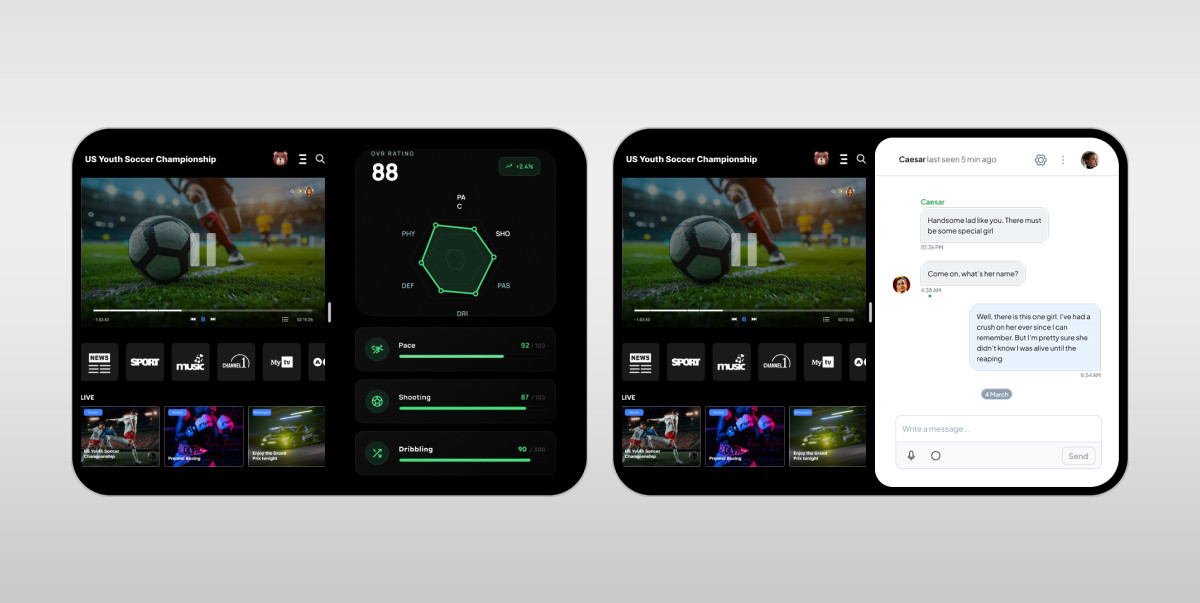
Live sports is the obvious place to start, since the numbers change every minute of a long match.
System Split View is a different thing. There, the viewer places your video app next to someone else’s. If your app lacks chat or stats, the space beside your player is filled with a messenger or betting site that you have no control over.
A streaming app with multiple content areas keeps both halves within one product, where the layouts can interact with each other. Stats can follow the match clock, and chat can collapse when an ad starts. Apple’s arrangement views take care of the geometry, so most of the engineering goes into keeping the two areas in sync.
Some things travel better in the hold, and a dedicated second-screen app remains the better choice in a few situations. Plenty of live sports plays on a TV, and there the phone is the second screen whatever shape it folds into. iPhone Duo changes what happens when the phone is the only screen in the room.
Privacy is another reason, since betting slips, payments, and personal messages don’t belong next to a video everyone on the couch can see. Some interactions need full attention, too. Picking a fantasy team or filling out a long form beside a live match does neither of them any favors. And with long-form viewing, every panel beside the picture takes space from the thing the viewer opened the app to watch.
We looked at the same question for TVs and phones in Second Screen or Same Screen?, and iPhone Duo adds one more screen to the comparison.
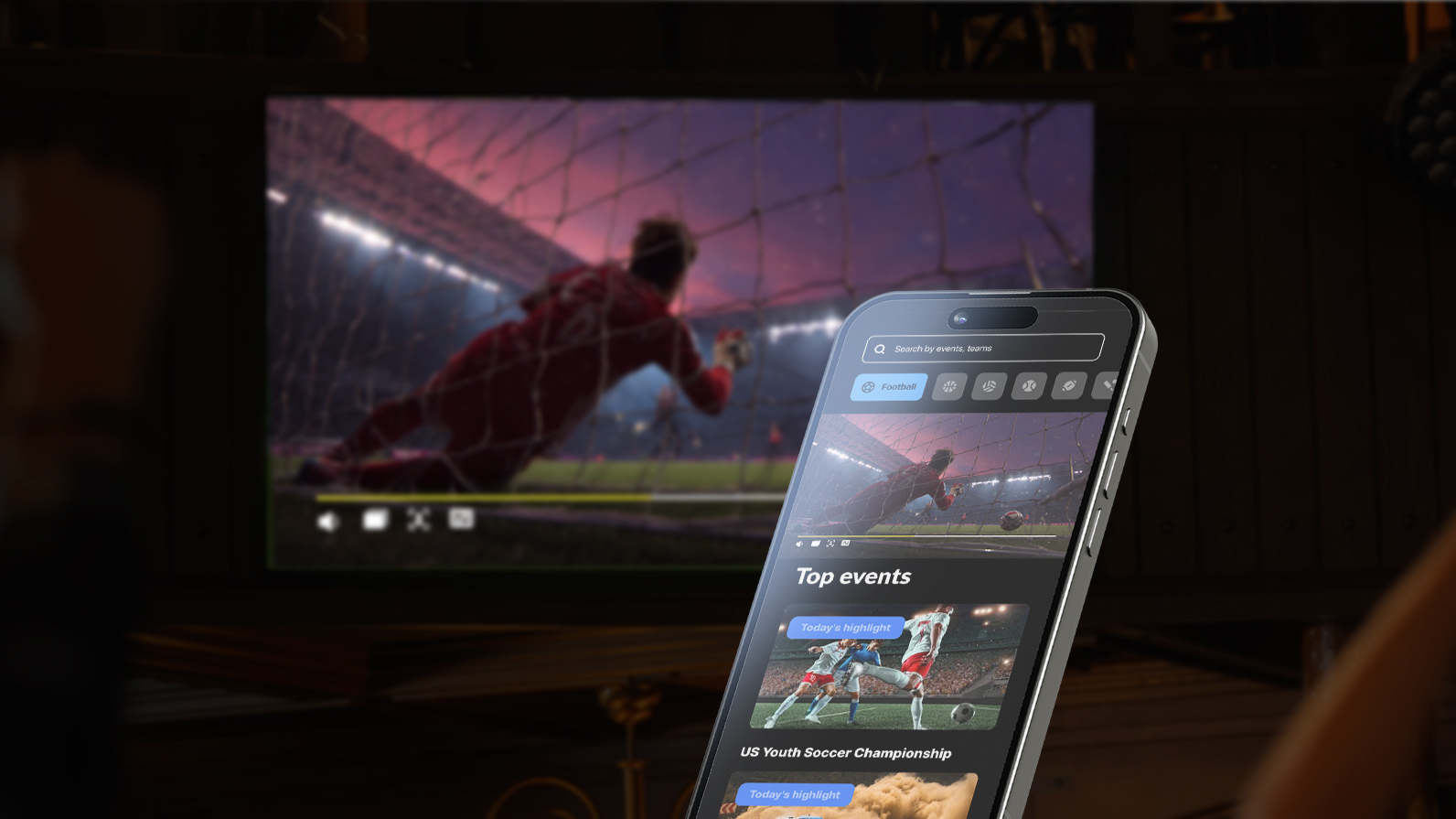
A national satellite TV provider wanted more out of its soccer audience during live matches. Oxagile built a companion app for iOS and Android where fans predicted events such as the outcome of a shot while the game played on TV, and accurate calls won sponsored prizes.
Audio watermarking kept the app in sync with the broadcast, and the infrastructure was built for up to 500,000 simultaneous bets. Predictions opened only during breaks in play, so the match itself kept the viewer’s attention. On iPhone Duo, the same prediction panel could sit under the match when there is no TV around, and it would stay on the phone in the viewer’s hand when there is.
And then someone closes the phone.
Whatever lived beside the video on the inner display now has to fit onto the 5.4-inch outer one or give up its place. Companion content can disappear, collapse into an overlay, or move to a separate view a tap away. Which of those is right depends on how often people look at it. A live score could shrink to a badge on the video, whereas a busy chat might be better off folding into an unread counter.
Coming back matters as much. When a viewer opens the phone again, they expect to land where they left off, with the chat at the message they had reached and the stats on the same tab. Since iPhone Duo cannot open new windows on the outer display, designs that depend on a second window must fold back into one when the phone closes.
Outside the app, a Live Activity gives the closed phone a job. StandBy runs on either display even when the phone isn’t charging, and Live Activities are among the things it shows. A Duo standing tent-style on a desk can keep the live score in view all evening, which is the boarding pass on the Lock Screen applied to soccer.
Starting early is the cheaper option. Apple has accepted iPhone Duo-optimized builds since October 5, 2026, so there is still time to find the expensive problems before viewers find them and write about them in App Store reviews.
It also helps to agree what “done” means before anyone produces an estimate. For a video app, five acceptance criteria cover most of it.
How long will it take? That depends on the codebase, and anyone quoting a figure before opening it is guessing. An app built on standard UIKit or SwiftUI containers, with the player wrapped in AVPlayerViewController, may get away with targeted fixes. Older apps with a hand-built player and layout math scattered through them are a different job, closer to a renovation. The audit looks at four areas.
One question deserves an answer before any estimate: how much does AVKit do on its own? Apple’s documentation says framework-provided views and containers adjust automatically around the fold and inner camera, and custom views have to handle reserved regions themselves. It doesn’t say how far that goes for the playback controls of AVPlayerViewController.
An app built on AVKit needs its player run through every pose in the simulator before anyone designs replacement controls. At least one open-source player has added its own control deck for the half-folded pose. Apple also warns against placing an arrangement view inside a list, scroll view, or navigation split view. This rules out a quick fix for players embedded in a feed.
A few small details are cheap to fix and make an app look careless when missed. iPhone Duo uses Touch ID, so a login or parental control screen that says “Use Face ID” will be wrong on it. Poster art and hero images cropped for tall screens need versions for the squarer display. An app with no widget or Live Activity has nothing to show on the outer display in StandBy. Our mobile application development practice covers both the audit and the implementation.
Oxagile’s tip
Settle who owns the AVPlayer before anyone touches the layout. If the player lives inside a view that gets rebuilt on a size change, move it to something that outlives a fold, such as a playback coordinator held by the scene. Layout fixes made before that change would have to be checked again once the player stops restarting.
The iPhone Duo simulator comes with Xcode 27.1 and the iOS 27.1 SDK, which were released on October 15, 2026. It only appears in the device list when the iOS 27.1 runtime is selected. Device Hub provides buttons to open, close, rotate, and fold the device, so an iPhone Duo developer can try every pose without the phone in hand.
The simulator has limits worth planning around. Apple’s release notes list StandBy as unavailable in the iPhone Duo simulator runtime, along with running and debugging most app extensions, and warn that the first launch can take several minutes. Developers have also found that simctl has no commands for fold posture, hinge angle, or split screen. For now, poses change only by hand in the simulator’s own interface, and a CI pipeline can’t script them.
Oxagile’s tip
Run the simulator checks as a grid. Four poses (closed, open, half-folded, rotated) against four kinds of playback (on demand, live at the live edge, live inside the DVR window, an ad break) make 16 short sessions, and the same four kinds of playback in Split View add 4 more. Since simctl can’t change poses, budget time for a person to run all 20 by hand on every build that touches the player.
The simulator is an online check-in, which confirms the paperwork and says nothing about the line at the real border. Long sessions with a lot of folding, live and on demand, are the real test of playback stability, and dropped frames during transitions only appear on the actual panel. Gestures and reach on a real hinge are beyond a mouse in Device Hub.
Battery drain needs hardware too: Apple rates iPhone Duo at up to 26 hours of streaming video on the inner display and 37 on the outer, and a player that wastes power will stand out against those numbers. Adaptive bitrate switching has to be checked on real networks, where it meets a screen that changes size mid-stream.
Simulator testing is the right place to start. The plan still needs physical-device QA from day one, with time set aside for whatever it turns up.
Rebuilding with the iOS 27.1 SDK gets a streaming app through the border, and that is all it does. The viewer judges the app by what comes after, by whether playback survives a fold and whether the controls have found their way to the side of the screen. Framing deserves its own line in the plan because hardly anything in a streaming catalog was shot for a 1.42 display. From April 2027, every App Store update also has to include iPhone Duo screenshots, which makes the device hard to ignore.
The space is the part worth getting excited about. With the inner display, a streaming product can put the live stats and the chat next to the video on one device, something that used to take a second screen or an overlay fighting the picture for attention. Foldables won’t retire dedicated second-screen apps, least of all where the main screen is a TV running an Apple TV app. They give product people one more option to weigh.
A good iPhone Duo video app hands the extra space to the interactions that help people follow what they’re watching and leaves the rest to the picture.
Our engineers build and adapt streaming apps for iOS and the other screens your viewers use, including player architecture, DRM, and even companion experiences for live events. Tell us about your app, and we’ll come back with an assessment of the work iPhone Duo calls for.
1. Introducing Dual Format and 2k Streaming on Twitch — Twitch

Yes. They open and play, but how much of the screen they get depends on the SDK. Apps built with an SDK older than iOS 27 keep a familiar iPhone size and sit in black space on the inner display. The iOS 27 SDK takes an app part of the way, and only the iOS 27.1 SDK reaches the screen edges. Players with fixed dimensions or orientation locks usually need more work after the rebuild.
Split View, a first for iPhone, runs two apps or two windows of the same app side by side on the 7.6-inch inner display. Saved app pairs reopen later. In portrait a video can sit above another app, and every app takes part in multitasking, though new windows open only on the inner display.
iPhone Duo ships with iOS 27.1, and that release carries the foldable features: fold-aware layouts, Split View, controls along the side of the screen, two Home Screen pages at once, and StandBy on either display. Third-party apps get the full screen and the new APIs once they’re built with the iOS 27.1 SDK.
Xcode 27.1 with the iOS 27.1 SDK, released on October 15, 2026. It includes the iPhone Duo simulator in Device Hub (it appears once the iOS 27.1 runtime is selected) and APIs such as ArrangementView, UIArrangementViewController, and reserved regions for the fold and cameras.
The outer display behaves like any other iPhone, compact in width and regular in height in portrait and compact both ways in landscape. The inner one is regular in both directions. That is iPad territory, so sidebars and multi-column layouts can appear there, and because the inner display ignores the orientations an app declares, layout decisions should come from size classes.

