










This website uses cookies to help improve your user experience


Seeing the pace at which the OTT market grows, the development of custom TV apps becomes a great way of video content monetization. The Global video streaming OTT platform market, including major players like Amazon, Apple, and Google, is projected to rocket to $616.42 billion by 20321 opening up immense opportunities for turning your business into a success story. Fire TV is one of the most popular platforms to go for when creating big screen applications. Let’s see what the OS looks like from the inside.
From its launch in 2014, Fire TV has become a promising app development ecosystem that has conquered the hearts of viewers from all over the world. In fact, Amazon Fire TV recently holds a decent part of the CTV device market share, having 14% in share of voice (SOV) in North America, 17% SOV in the EMEA region, and a leading 24% SOV in the United Kingdom2. The rapid annual growth and constant platform improvement help Fire TV hold leading positions in the industry.
Moreover, Amazon launched it’s Fire TV Stick 4K Select in October 2025 along with a brand new oprating system called Vega OS. It promises faster performance and more efficient resource use, particularly on lower-memory devices.
Aiming to create cohesive user experience, Amazon decided to develop Android open-source code into its own operating system to power TV and tablet devices and boost digital sales across various channels. Since the OS is basically an Android sibling, apps developed for Android can be run on Fire after minor alterations and vice versa. Here’s what you need to know before looking for an expert Fire TV app development vendor.
It would be wrong to say that there is no distinction between the two operating systems but in fact, an average user can only spot a difference when finding Amazon Appstore instead of Google Play Store. Amazon TV apps look extremely familiar since they are built on the basis of Android using the same frameworks and tools. For developers, such “kinship” means easy code adjustment for seamless access to the Fire OS ecosystem.
Still, the percentage of code reuse varies in each particular case, being determined by the app’s functionality that should be implemented for Amazon Fire TV.
Whereas there are some basic patterns and to a great extent similar UIs, which allows quick porting from Android to Amazon, please pay earnest heed to distinctive features like purchases, analytics, push notifications, or advertising. From the development perspective, many of the Google services are to be replaced with the ones that are specific for Amazon Fire TV.
Also, the difference in approaches might concern both client-focused and backend-focused customizations. Advanced remote controls are important to consider as well — in case their adaptation for Fire TV is needed, this causes a couple of alterations to create a seamless navigation experience.
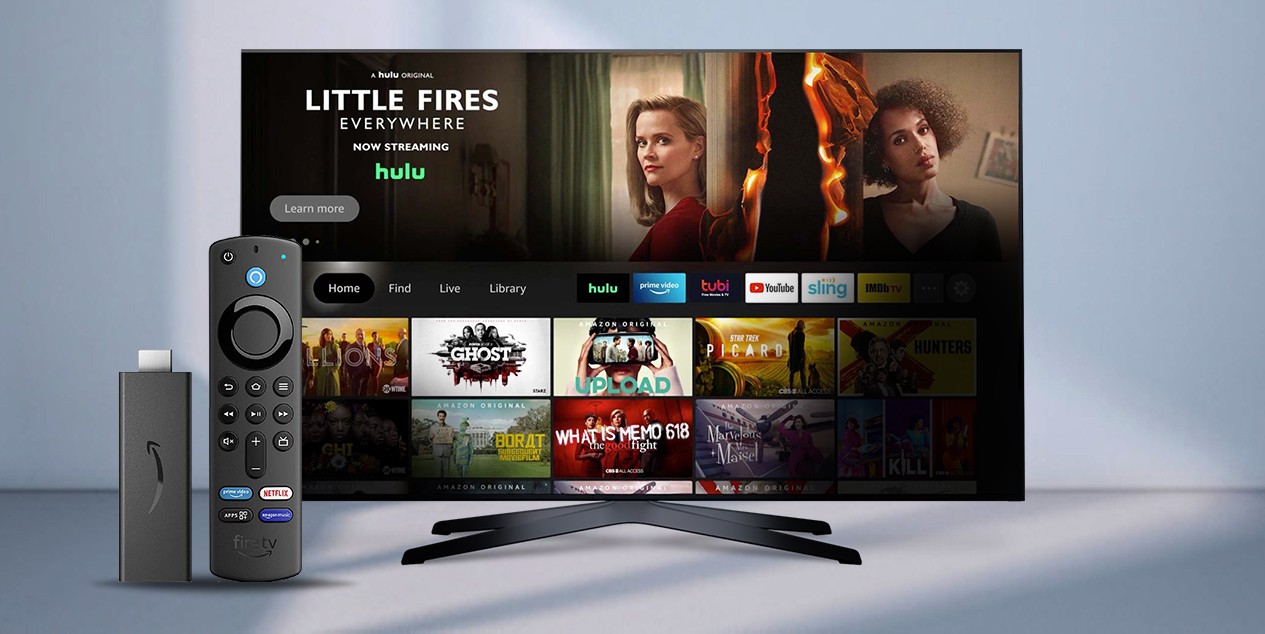
Amazon Fire TV stick
Fire TV app development is primarily based on Kotlin, while Java may also be instrumental. С and C++ can be used for some particular tasks, still far less commonly.
As for Amazon-specific APIs and SDKs, you can use Amazon In-AppStore SDK for in-app purchasing and Amazon Fling SDK to allow users to enjoy video content from multiple screens and share watching experiences.
Amazon Pinpoint will assist with analytics, while Amazon Publisher Services (APS) can optimize ad monetization.
Video Skills Kit (VSK) and Media Session API are among the tools for voice-enabling Amazon Fire TV apps.
Fire OS has introduced the Fire App Builder framework to provide developers with a comprehensive solution for building high-quality, functional, and beautiful TV applications. The platform uses well-known Android tools and features to customize, configure and extend app capacity.
There are not many changes in the UI of Fire TV applications since the core is based on the Android UI framework and developers can make use of all the OS’s widgets except for Menu and ActionBar. To see those items, users have to tap the Menu button on a Fire TV remote or Game Controller. This modification has been put in place to avoid screen cluttering.
To improve user experience, Amazon TV developers have introduced the “far-field control” feature that allows people to manage their big-screen sessions by voice. With the help of Alexa virtual assistant, Fire TV Cube, and Amazon Echo, Fire TV followers can enjoy your apps hands-free.
Creating Fire TV apps, you can ensure your audience will get unmatched lean-back experience. Fire TV Cube, Streaming Media Player, and Soundbar devices are targeted at providing top-notch immersion into movies and games by boosting audio, image, and navigation quality.
Building TV apps, it’s always good to know that the operating system is flexible and powerful enough to run any application or game. Fire OS allows making use of a quad-core CPU, 2GB RAM, 8GB internal storage, 4K video, HDR, and Dolby Atmos audio. You can find format and resolution specifications for all the compatible devices on the Fire TV Device Specifications Overview.

We know how to optimize Fire TV app performance and create apps that conquer the hearts of millions.
To make sure your TV app is successfully integrated into Amazon Appstore, look into the Amazon Appstore Presubmission Checklist and review all the necessary requirements. Continue by pre-testing your app and finally submitting it to Amazon. Putting it more precisely:
The Fire operating system powers Smart TVs, automotive screens, and Amazon tablets. The range of supported TV models is extended by Fire TV Stick USB streaming media player that can turn almost any modern TV into a smart one. Motorists can also enjoy their rides by watching and listening to their favorite video content. Amazon tablets run by its own OS provide cost-effective yet high-quality watching, gaming, and reading experiences for everyone.
Fire TV application development is a strategic move toward uncovering new audiences, expanding your business outreach, and increasing the lifetime value of your streaming offering. As Fire TV continues strengthening its position in key markets, the platform offers a clear path for scaling OTT presence with lower fragmentation and faster time-to-market compared to many competing ecosystems.
Looking ahead of 2026 and beyond, one of the biggest shifts on the horizon is Amazon’s Vega OS — a Linux-based operating system that’s starting to ship on newer devices like the Fire TV Stick 4K Select.
For developers, Amazon has released Vega Developer Tools, supporting React Native and web technologies that help build lightweight, scalable apps for both existing Fire OS devices and future Vega-powered ones. At the moment, Amazon has confirmed a multi-OS strategy: Fire OS isn’t going away, so developers may need to support both environments for some time.
As Fire OS and Vega OS continue to coexist and evolve, you can count on Oxagile to make sure your product is optimized for today’s Fire TV environment and fully ready for upcoming Vega-powered devices.
Reach every screen your audience values, refine discovery with intuitive design, craft deeply personalized experiences, and unlock precise audience insights.
1. Global Video Streaming OTT Platform Market Forecast — Data Bridge Market Research
2. Q3 2025 Global Connected TV Device Market Share Reports — Pixalate

Existing Android apps can often be reused for Fire TV because Fire OS is built on the Android Open Source Project (AOSP). Developers typically re-use a significant portion of the Android codebase (especially business logic) when porting to Fire OS, but must adapt certain platform-specific parts such as in-app purchases, analytics, push notifications, and ads to Amazon’s equivalents.
For forward planning, mind that Amazon is rolling out Vega OS, and existing Android-based (Fire OS) apps won’t run natively on Vega. Therefore, developers will need to rebuild or refactor apps using the Vega SDK (React Native / web-based) to support this new Linux-based OS.
Fire OS devices support a range of hardware: many Fire TV devices offer quad-core CPUs, around 2 GB RAM, 8 GB of storage, 4K video, HDR, and Dolby Atmos audio. Plus, Fire TV includes not just set-top devices (sticks, cubes) but also Fire-powered Smart TVs, tablets, and other media players.
Importantly, with Vega OS starting to roll out (e.g., the Fire TV Stick 4K Select device), developers should prepare for differences because Vega uses a Linux-based architecture.
Fire TV app development best practices involve using Amazon’s ecosystem tools to improve the app without slowing it down. Fire OS’s native features, like the In-AppStore SDK for in-app purchases and Amazon Fling SDK for sharing content across devices, can be a good start. Mind the unique remote control features and remove elements like the Menu and ActionBar to avoid cluttering the screen. Plus, optimize your app for devices like Fire TV Stick 4K and Fire TV Cube, which support 4K video and Dolby Atmos audio.
To optimize Fire TV app performance, focus on reducing lag and keeping playback smooth. Use adaptive streaming to adjust video quality based on the user’s connection speed, so buffering doesn’t become a problem. Take advantage of Fire OS’s built-in hardware support for 4K content to keep video running smoothly. For better navigation, minimize delays when users interact with the app, especially with remotes or voice commands. Also, cut down on unnecessary background tasks and optimize memory usage to keep the app responsive, even on lower-spec devices like the Fire TV Stick.

